The following article highlights top component (YPbPr) to HDMI converters to help you connect older devices—like DVD players, game consoles, and VCRs—to modern HDTVs and displays. Each option converts analog video and audio signals to HDMI, aiming for clear visuals and minimal latency. Read on to compare features, compatibility, and setup considerations so you can choose the right adapter for your home theater.
| Product | Brand | Type | Key Benefit |
|---|---|---|---|
| Portta Component to HDMI Converter | Portta | YPbPr to HDMI | 1080p 60Hz support with LPCM audio |
| Portta Component to HDMI Converter with HDMI Cable | Portta | YPbPr to HDMI | Wide resolution range, stable signal |
| Anber-Tech YPbPr to HDMI Converter | Anber-Tech | YPbPr to HDMI | Preserves original resolution, broad compatibility |
| TIXILINBI 1080P Component to HDMI | TIXILINBI | YPbPr to HDMI | Male YPbPr to HDMI adapter, simple setup |
| Tengchi RCA to HDMI Converter | Tengchi | RCA to HDMI | Analog to HDMI, easy plug-and-play |
Note: Each option converts analog component or composite signals to HDMI. Always verify that your source device provides the correct output type (YPbPr/component vs. RCA/composite) and that you connect the required power if the product specifies USB power.
Portta Component to HDMI Converter, 1080P 60Hz

Brand: Portta
Type: Component (YPbPr) to HDMI
Features: Converts analog YPbPr video and R/L audio input into HDMI output. Supports 1080P 60Hz, HDMI 1.3 compatibility, HDCP 1.2/1.3, and wide support for resolutions including 480i/p, 576i/p, 720p, 1080i, and 1080p. Notes: No upscaling or downscaling; uses uncompressed 2-channel LPCM audio; 165MHz bandwidth ensures minimal signal distortion and no delay.
Portta Component to HDMI Converter with HDMI Cable

Brand: Portta
Type: Component to HDMI
Features: Converts analog YPbPr video and R/L audio input into HDMI output. Supports 1080p at 60Hz for PS2/PS3/Xbox 360 and other devices. The adapter emphasizes compatibility with 480i/p to 1080p ranges, with no scaling function, ensuring faithful color and detail transfer. Comes with HDMI cable for convenient setup.
Anber-Tech YPbPr to HDMI Converter
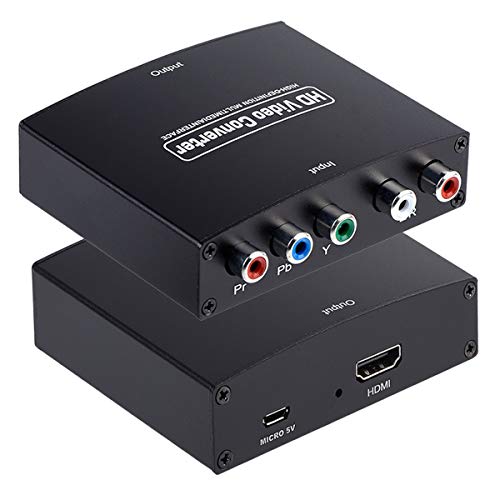
Brand: Anber-Tech
Type: Component (YPbPr) to HDMI
Features: Converts analog YPbPr video and R/L audio to HDMI output. Maintains original source resolution (no upscaling), supports a wide range of input resolutions (including 480i/p, 576i/p, 720p, 1080i/p) and HDMI output up to 1080P/60Hz. Notes: Not reversible; ensure device has YPbPr output rather than RCA.
1080P Component to HDMI Adapter, YPbPr to HDMI
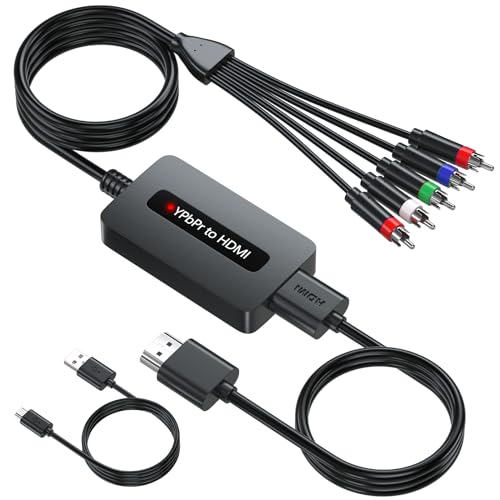
Brand: TIXILINBI
Type: Component to HDMI
Features: Engineered to work with devices with female component ports, including DVDs and set-top boxes. Delivers high-definition visuals with preserved original resolution. It supports a broad set of input resolutions (YPbPr) and HDMI output at 480P/576P/720P/1080P. Notes: For use with devices that have component outputs; not for consoles requiring specific adapters.
Tengchi RCA to HDMI Converter
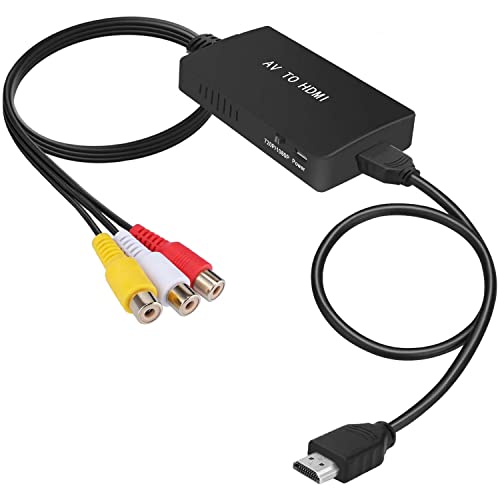
Brand: Tengchi
Type: RCA (Composite) to HDMI
Features: Converts analog composite video (RCA) to HDMI 1080p output. Not for HDMI to AV conversion. Plug-and-play with USB power required during use. Useful for legacy VHS, DVD players, and older consoles that use RCA outputs. Not compatible with 3D or 4K; 1080p output is common. Keeps setup simple for classic home theater configurations.
Buying Guide: Key Considerations For Component To HDMI Converters
- Source format: Confirm whether your device uses component (YPbPr) or composite (RCA) outputs. Pick a converter that matches your device’s output.
- Resolution and aspect: Look for adapters supporting common HD resolutions (480i/p, 720p, 1080i/p). Some do not upscale, preserving original detail and avoiding misalignment.
- Audio handling: Ensure the converter transmits stereo LPCM or appropriate audio formats. Some models require separate power for stable audio/video performance.
- Power requirements: USB-powered units need a power source. Check included cables and compatibility with your TV’s USB port or a wall charger.
- Reversibility: Most component-to-HDMI adapters are not reversible. Do not attempt to use an HDMI-to-component adapter in reverse unless explicitly stated.
- HDCP and compatibility: If you plan to connect to newer displays, HDCP support (1.2/1.3) improves compatibility with modern TVs and players.
- Setup simplicity: Consider whether a unit includes an HDMI cable and whether it offers plug-and-play operation for quick wiring with minimal configuration.
- Build and heat: Aluminum housings and robust connectors can help with heat dissipation and durability for long-term use in home theaters.
- Price vs. performance: Compare the essential features (supported resolutions, audio formats, power needs) to determine the best value for your setup.
This article focuses on converting legacy component or composite signals to HDMI for display on modern HDTVs. When selecting a converter, match the device’s output type to the converter’s input type, review supported resolutions, and verify power requirements to ensure reliable performance.