Many older devices output analog RCA signals, but modern TVs and monitors often prefer digital HDMI. The following RCA to HDMI converters translate classic AV input (Yellow, White, Red) into HDMI video and audio, enabling easier viewing on today’s displays. All options below are plug-and-play, with USB power typically required for operation. This guide highlights five reliable adapters that support common standards like PAL and NTSC and offer 720p or 1080p outputs. Use the features to match your setup, whether gaming, home video, or legacy equipment.
| Product | Brand | Output | Notes |
|---|---|---|---|
| Tengchi RCA to HDMI Converter | Tengchi | 1080p | One-way AV to HDMI; USB-powered |
| DigitConvert AV to HDMI Converter | DigitConvert | 720p/1080p | PAL/NTSC compatible; USB-powered |
| ABLEWE RCA to HDMI | ABLEWE | 720p/1080p | One-way; USB-powered |
| WENTER RCA to HDMI Converter | WENTER | 720p/1080p | One-way; RCA to HDMI |
| GBOLE RCA to HDMI | GBOLE | 720p/1080p | One-way; USB-powered |
Tengchi RCA to HDMI Converter
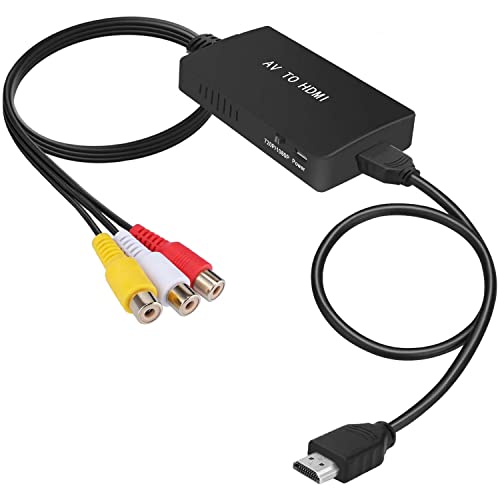
The Tengchi RCA to HDMI Converter is designed to convert an analog composite input to a 1080p HDMI output. It accepts RCA inputs (Yellow video, White and Red audio) and provides an HDMI 1.3 output. This is a straightforward, plug-and-play solution intended for classic devices such as PS2/PS3, STB, VHS players, and older DVD players. It requires an external USB power source to operate, with included USB power cable to be connected to a 5V supply during use. Note that it does not support 3D or 4K and is not bidirectional.
DigitConvert AV to HDMI Converter

The DigitConvert adapter converts RCA composite input to HDMI, delivering 720p or 1080p output. It supports standard PAL and NTSC formats and works with PCs, laptops, Xbox, PS4, VHS/VCR, Blu-ray players, and other AV sources. It’s a plug-and-play device with no driver installation required, and a USB power cable (included) should be connected to a 5V power source during operation. This model emphasizes wide compatibility and effective signal processing to produce clearer video on modern displays.
ABLEWE RCA to HDMI

The ABLEWE RCA to HDMI converter is a compact, plug-and-play unit that transforms RCA composite inputs to HDMI at 720p or 1080p (60 Hz). It’s designed to celebrate nostalgia while delivering modern display capability. The device supports PAL, NTSC variations and similar standards, with a USB power cable required for operation. Its emphasis on precision colors and detail aims to produce a more faithful reproduction of legacy video on contemporary screens. Like others, it is one-way and not a bidirectional converter.
HDMI to RCA Cable (Non-Converter)

This HDMI to RCA cable transmits digital HDMI signals to a TV’s RCA inputs but does not perform any signal conversion. It is suitable for devices already supporting HDMI-to-analog functionality where the display accepts an RCA input. It is important to note that this cable does not convert signals; it only transports them. It’s best paired with a source that can output compatible HDMI while using an HDMI to RCA adapter if needed for the final display.
WENTER RCA to HDMI Converter

The WENTER RCA to HDMI Converter is a compact solution for converting AV CVBS signals to HDMI at 720p or 1080p (60 Hz). It notes one-way conversion (RCA to HDMI) and emphasizes easy setup with USB power. It targets users with older VCRs, game consoles, and other RCA-output devices who want a straightforward HDMI display option. The device promises improved color and detail through its processing capabilities, making legacy media more viewable on modern televisions.
GBOLE RCA to HDMI

The GBOLE RCA to HDMI adapter converts analog RCA input to HDMI at 720p or 1080p with USB power support. It supports PAL and NTSC formats and is designed for compatibility with a wide range of devices, including PCs, Xbox, PS4/PS3, VHS, VCR, and DVD players. Like other single-direction models, it does not convert HDMI to RCA. The USB-powered setup helps stabilize operation, delivering a smoother legacy-to-HDMI viewing experience on compatible displays.
Buying Guide
- One-way vs. bidirectional: All listed adapters are one-way (AV to HDMI). If you need HDMI to AV, choose a model explicitly marketed as HDMI to RCA or use a dedicated HDMI-to-AV scaler.
- Resolution options: Most consoles and players will look best at 720p or 1080p. Check whether your TV supports 1080p input for the best result, and verify whether the adapter offers 720p as well.
- Standard compatibility: Look for PAL/NTSC support to ensure compatibility with regional broadcast formats. Some adapters note specific NTSC variations (NTSC3.58, NTSC4.43) and SECAM support.
- Power requirements: USB power is common. Use the included USB cable and a 5V power source to ensure stable operation, especially with non-powered devices.
- Signal quality and color accuracy: Choose adapters that mention “advanced signal processing” or “color accuracy” to improve picture fidelity from older sources.
- Source compatibility: Verify the adapter’s support for your device type (VHS/VCR, PS2/PS3, Xbox, Blu-ray, DVD players, PCs, laptops, STBs) to ensure proper integration with your setup.
- Cable quality and build: Some models use good-quality HDMI outputs and robust AV inputs; consider devices with durable connectors if you frequently plug and unplug.
- Ease of use: Plug-and-play with minimal setup is ideal for beginners. Avoid drivers, if possible, to reduce compatibility issues.
- Limitations: Remember that RCA to HDMI adapters do not magically upscale to true HD if the source is low resolution; expect improvements in clarity and color rather than sharp digital perfection.
When choosing, consider your legacy hardware, the display you plan to use, and whether you need a simple plug-and-play solution or a model with broader format support. Each of the listed options provides a viable path to viewing older video and gaming content on modern HDMI displays.