Converting old analog footage into digital files helps preserve memories and makes sharing easier. The following selections focus on reliable USB capture devices, standalone recorders, and simple adapters that work with common VHS, Hi8, MiniDV, and other analog sources. Each option emphasizes easy setup, compatibility, and straightforward recording, so you can digitize memories without a steep learning curve.
Summary of chosen products
| Product | Brand | Format | Capture Method |
|---|---|---|---|
| Oassuose VHS To Digital Converter | Oassuose | VHS/Hi8/Mini DV to 1080P | USB-A/USB-C capture card |
| DigitPro VHS To Digital Converter 2.0 | DigitPro | VHS/VCR/Hi8 to 1080P | Standalone device with HDMI output |
| Portta VHS To Digital Converter | Portta | VHS/AV/S-Video to digital | External conversion/recorder with USB/SD |
| DigitPro VHS To Digital Converter 3.0 | DigitPro | VHS/Hi8/DVR to up to 1080P | Standalone with built-in screen |
| THE CIMPLE CO RCA To HDMI Converter | THE CIMPLE CO | RCA/Composite to HDMI | HDMI output for digital display |
Oassuose VHS To Digital Converter
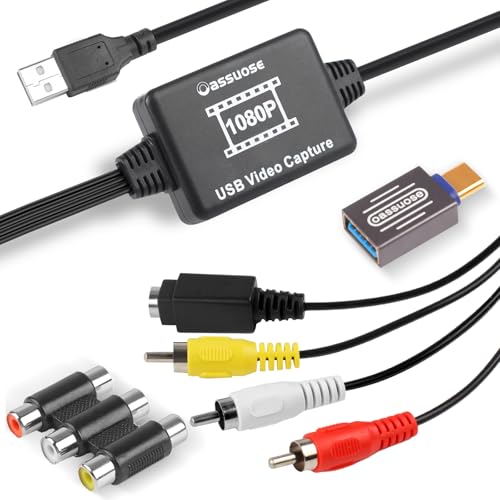
The Oassuose device transfers video and audio from legacy sources such as VHS, VCR, DVD, Hi8, and Mini DV tapes using RCA or S-Video to a computer via USB-A or USB-C. It outputs up to 1080P at 30fps and emphasizes a plug-and-play setup, requiring no driver installation. It is designed to digitize memories with optional acquisition software for recording on PC or Mac. It supports direct capture to a connected computer or notebook using standard interfaces.
DigitPro VHS To Digital Converter 2.0

DigitPro’s 2.0 model provides one-touch digital conversion for analog sources including VHS, VCR, DVR, DVD, Hi8, and camcorders. It supports AV/RCA and S-Video inputs and records up to 1080P at 30Hz. The device can store files directly to USB drives or TF cards (up to 512GB) without a computer, with a built-in preview screen and built-in speaker for real-time review. It offers auto pause/resume and time watermark features, along with NTSC/PAL compatibility for versatile use.
Portta VHS To Digital Converter

Portta’s converter/recorder emphasizes a true plug-and-play workflow with no PC or software needed. It supports AV/RCA and S-Video inputs and records to MP4 or MP3 via USB storage or TF cards (up to 512GB). A 3.0-inch LCD preview screen and built-in speaker enable direct playback, while user guidance includes ensuring correct input connections and unmuted volume settings for the chosen source.
DigitPro VHS To Digital Converter 3.0

DigitPro’s 3.0 edition combines a 5-inch HD preview screen and built-in battery for portable digitization. It supports AV/S-Video inputs and various analog formats, pursuing a true all-in-one approach. The device enables recording in MP4/MP3/WAV formats with NTSC/PAL compatibility. It also provides smart tools such as signal loss detection, pause/resume, automatic stop, and scheduling for easier archival workflows, though it requires tapes to be played through the converter.
THE CIMPLE CO RCA To HDMI Converter

This RCA-to-HDMI converter from The Cimple Co enables upgrading analog devices to digital displays using HDMI output. It’s designed for straightforward plug-and-play use, facilitating compatibility with a range of HDMI-capable TVs and monitors. It’s useful for viewing or recording from legacy composite devices, though it does not perform reverse up-conversion and is best suited for simple display or capture setups that rely on HDMI output rather than direct digital capture to a computer.
Buying Guide: Key Considerations For Digitizing Analog Video
- Source compatibility: Verify the device supports your analog source (VHS, Hi8, Mini DV, camcorders) and the input types (RCA, S-Video, AV, AUX). Some standalone recorders also handle DVD/VCR playback, while others require a computer.
- Output format and storage: Look for devices that save in widely used formats such as MP4, MP3, or WAV. Consider storage options (USB drives, SD cards, or internal memory) and limits (e.g., up to 512GB).
- Resolution and frame rate: For best results, choose devices that capture up to 1080P at 30fps or higher. Compatibility with NTSC/PAL ensures broader material support.
- Ease of use: Plug-and-play functionality and built-in screens aid in quick digitization. Standalone recorders can operate without a computer, while USB capture cards require software on a PC or Mac.
- Software and drivers: If using a USB capture device, confirm compatibility with your operating system and the availability of acquisition software or recommended apps.
- Portability vs. reliability: Battery-powered portable units excel for on-the-go digitization, while connected devices often offer robust long-term use with higher storage capacity.
- Future-proofing: Consider devices that support high-capacity storage and are compatible with evolving video formats to extend the lifespan of your digitized archive.
- Price and support: Compare warranties, customer support, and included accessories (cables, remotes, adapters) to ensure practical value for your setup.
When choosing, assess whether you primarily want a quick, standalone digitization workflow or a flexible setup with computer-based editing. Standalone models simplify capture and immediate playback, while USB capture solutions offer extensive editing options in post-production. The right choice depends on your archival goals, available equipment, and preferred workflow.