Preserving decades of memories starts with reliable VHS to DVD or digital conversion. The following options cover stand-alone converters, capture devices, and all-in-one bundles designed to digitize tapes from VHS, Hi8, MiniDV, and more. Each product supports various input formats, simple one-cable workflows, and options for direct USB or SD card storage. Review these choices to find a model that fits your tape collection and desired output format.
| Product | Brand | Main Benefit |
|---|---|---|
| Portta VHS to Digital Converter | Portta | Plug-and-play with 1080p capture; direct USB/TF storage |
| Roxio Easy VHS to DVD 3 Plus | Corel | Direct DVD burning and digital formats with editing features |
| VCR VHS Transfer Bundle | Tech Collector | All-in-one transfer setup with USB capture and HDMI upconversion |
| Oassuose VHS to Digital Converter | Oassuose | 1080P capture via USB-A/USB-C, no driver required |
| ClearClick Video to Digital Converter 2.0 | ClearClick | Direct recording to USB/SD with no computer required |
Portta VHS to Digital Converter

The Portta converter records VHS, VCR, and other analog sources directly to digital MP4 or MP3 formats. It provides up to 1080P/30Hz recording and supports CVBS+R/L, S-Video, and AUX inputs. This model is a standalone capture box—no PC software, drivers, or playback independent of tapes. A built-in 3.0″ LCD preview screen and speaker enable immediate viewing of captured footage, while USB/TF storage permits direct playback of saved videos and snapshots. Note that it cannot play tapes by itself and requires an external power source for high-capacity USB storage.
Roxio Easy VHS to DVD 3 Plus

This software-and-hardware bundle enables direct capture from VHS, Hi8, or V8 sources to DVD, with the option to convert recordings to digital formats suitable for sharing on devices. It offers trimming, color enhancement, noise reduction, transitions, and stabilization to improve older footage. The solution supports direct burning to DVD or exporting in common digital formats for broad compatibility across modern devices.
VCR VHS Transfer Bundle

This bundle focuses on transferring VHS tapes with HDMI upconversion for modern HD displays. It includes a USB capture device to digitize tapes into digital video files, enabling playback on contemporary TVs and devices. The setup is designed to simplify moving families’ video memories onto current storage formats, even for users with minimal technical experience.
Oassuose VHS to Digital Converter
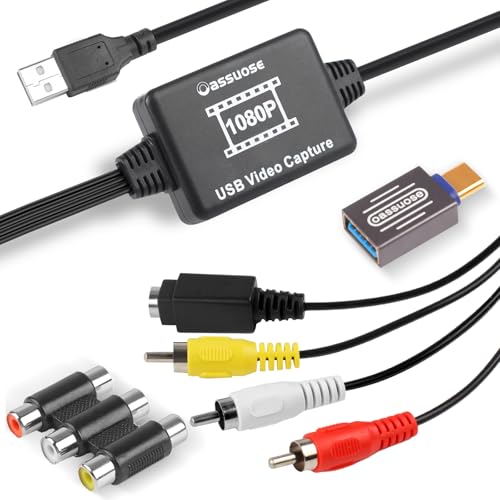
The Oassuose capture device transfers video and audio from multiple analog sources to USB-A/USB-C outputs. It supports recording in 1080P/30fps and works with RCA or S-Video interfaces. The plug-and-play design eliminates driver installation, making it suitable for PC or Mac users who want to digitize tapes without software complexity. A note highlights the need for acquisition software to complete the workflow.
ClearClick Video to Digital Converter 2.0
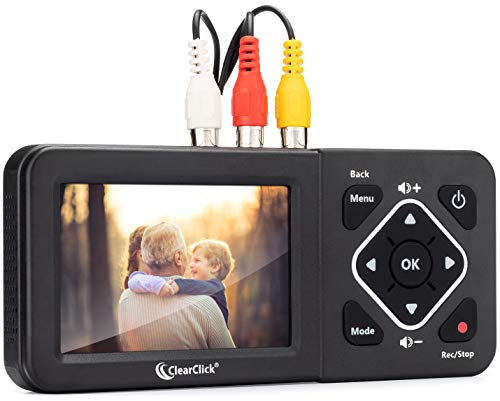
ClearClick’s second-generation converter records directly to USB flash drive or SD card, requiring a working VCR/camcorder and tapes. Supported inputs include VHS, VCRs, DVD players, DVRs, Hi8, and retro gaming systems. It emphasizes a straightforward, computer-free workflow with SD capture at SD resolutions, suitable for users who want a simple, no-software solution for digitizing a variety of tape formats.
Buying Guide
Key considerations when choosing a VHS to DVD or digital conversion solution include format compatibility, ease of use, and destination formats. Think about your tape variety, whether you need built-in editing features, and how you plan to store or share the final files.
- Input and output formats: Look for units that support CVBS/RCA, S-Video, and AUX inputs while offering MP4 or MP3 outputs, or the option to burn to DVD.
- Stand-alone vs. PC-based: Stand-alone capture boxes simplify workflows but may limit advanced editing. PC-based options can unlock more editing features but require software and a computer.
- Storage options: Consider devices with USB/SD card storage or built-in previews. Ensure your drive capacity matches your video length expectations and power requirements for large files.
- Playback and preview: A built-in screen or reliable live preview helps verify footage as you capture, reducing post-processing time.
- Video quality: Many devices support up to 1080p capture; some offer SD capture only. Decide whether HD output is essential for your collection.
- Compatibility with modern devices: If you want DVDs, ensure the device can burn directly to DVD or export widely supported digital formats for streaming and sharing.
- Software dependencies: Some solutions require optional software for capture or editing. Assess whether you’re comfortable with installing and using software.
- Multiformat support: If you have Hi8, MiniDV, or gaming system footage, confirm the device can handle these formats or requires adapters.
For best results, identify the primary use case: preserving memories for archival quality, creating shareable digital copies, or producing DVDs for family events. Balance simplicity with features such as color correction, noise reduction, and easy file transfer to modern devices. Consider a mixed approach if your tapes span several formats, combining a stand-alone converter for quick captures with a software-based option for advanced editing and organization.