If you want to display the same content from a single HDMI source on multiple screens, a multi-output HDMI splitter is the right tool. This guide highlights practical options that duplicate a single input to several displays, ideal for presentations, retail signage, or home theater setups where all screens show the same content. Below you’ll find five reliable splitters with varying port counts and compatibility considerations to help you choose the best fit for your needs.
| Product | Ports | Resolution | Notes |
|---|---|---|---|
| NEWCARE 1×4 HDMI Splitter | 1 In / 4 Out | 4K@30Hz | Mirror only, power required |
| BolAAzuL 1×4 HDMI Splitter | 1 In / 4 Out | 4K@30Hz | Mirror only, powered |
| avedio links 1×4 HDMI Splitter | 1 In / 4 Out | 4K@30Hz | Mirror only, power adapter included |
| JCHICI 1×4 HDMI Splitter | 1 In / 4 Out | 4K@60Hz | EDID management included |
| OREI 1×8 HDMI Extender/Splitter | 1 In / 8 Out (plus local) | 4K@30Hz | Over CAT6 with EDID, extended reach |
NEWCARE 1 In 4 Out Mirror HDMI Splitter

Designed to duplicate one HDMI source to four displays, this splitter provides synchronized video and audio across all connected screens. It is suitable for scenarios where consistency across several displays matters, such as showroom demos or classroom setups. A compatible 5V/1A power adapter is recommended to ensure stable performance. The device does not extend content or bypass HDCP, and it does not pass audio to external devices like speakers. It supports up to 4K with 10.2 Gbps bandwidth and is compatible with 3D and 1080p signals. Typical use requires using high-quality HDMI cables within the specified length to maintain signal integrity.
BolAAzuL 1×4 HDMI Splitter Mirror Only

This 1×4 splitter mirrors a single HDMI source to four displays simultaneously. It supports 4K at 30Hz, 1080p at 60Hz, and 3D, and is designed for a stable multi-monitor setup without extending content. It includes a powered adapter and adheres to HDCP 1.4. The output resolution is constrained by the lowest resolution among the connected displays, and audio passthrough is not available for external speakers. It is ideal for presentations or retail environments where identical content across multiple screens is required.
avedio links 1×4 HDMI Splitter with Power

This 1×4 splitter duplicates one HDMI source to four displays, with an included power adapter to support stable performance. It emphasizes mirror functionality and does not support extended displays or audio extraction. It supports 4K at 30Hz and 1080p at 60Hz and works best with AWG26 HDMI 2.0 cables. The kit is suitable for homes and small offices needing synchronized output across multiple screens and can serve retail or classroom environments where uniform presentation is key.
JCHICI 4-Port HDMI Splitter with EDID Management
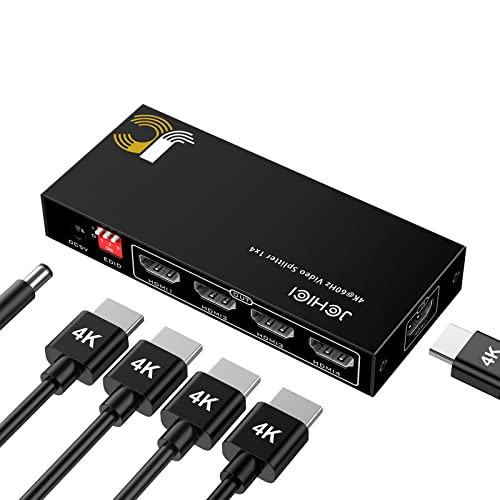
This splitter provides one HDMI input to four displays with an emphasis on maintaining consistent video output. It supports 4K at 60Hz and includes EDID management to help ensure compatibility and stable display quality across connected screens. It is ideal for gaming setups or home theater rigs where mirroring across multiple displays enhances the viewing experience. Keep in mind, this device duplicates output rather than extends content, and HDCP compliance remains in place.
Note: If your setup requires longer cable runs or multiple destinations with larger distances, consider OREI’s 1×8 extender/splitter that uses CAT6/7 cables to reach distant displays while maintaining synchronized output. Always verify that your displays are compatible with the splitter’s maximum resolution and that your HDMI cables match the suggested standards to preserve signal quality.
OREI 4K 1×8 HDMI Extender/Splitter Over CAT6

This extended splitter distributes one HDMI source to eight displays over CAT6 cables, using Power Over LAN to avoid additional adapters on the receiver side. It includes an 8-port CAT6 output plus a local HDMI output for a monitor. The system supports IR pass-through and remote control for connected sources. It is suitable for large-scale signage or multi-room installations where a single source must drive many displays across a network. When planning, ensure your network cables meet the required standards and that the extended range aligns with your room layout.
Buying Guide: Key Considerations For Selecting an HDMI Splitter
Understanding the difference between mirror (duplication) and extend (separate content) is essential. For most “connect multiple HDMI sources to one TV” uses, mirror splitters are the correct choice, duplicating the same signal across multiple displays without creating independent outputs.
- Output count and scaling: Choose a splitter with the right number of outputs for your displays. Higher port counts may require better power management and cable planning.
- Power requirements: Many 1×4 and 1×2 splitters require an external power adapter to maintain signal integrity, especially at 4K resolutions or longer cable runs.
- Resolution and HDCP: Ensure the splitter supports your target resolution (4K@30Hz or 4K@60Hz) and that it complies with HDCP. Bypassing HDCP is rarely supported and may disrupt playback of some content.
- EDID management: Splitters with EDID management can improve compatibility with different displays by negotiating the best common resolution.
- Cable quality and length: Use high-quality HDMI cables and adhere to recommended length limits for your chosen resolution to minimize signal degradation.
- Distance and extensions: If displays are far apart, CAT6/7 extender solutions can be preferable, especially for signage or classrooms where runs exceed standard HDMI cable lengths.
- Audio considerations: Some splitters do not pass audio to external speakers or do not serve as audio extractors. Plan your audio path accordingly if you need external sound.
- Use case alignment: Mirror-only devices are ideal for synchronized displays, while blends of adapters or switchers may suit more complex scenarios, such as switching between sources.