For home and office networks, extending an Ethernet connection often means linking two RJ45 cables. Whether you’re lengthening a run, patching between devices, or building a temporary setup, the right RJ45 connectors and splitters can maintain performance and signal integrity. This guide explores practical, compatible options and compares common types to help you choose the best solution for your setup.
Summary Table of Selected Products
| Product | Type | Key Benefit | Brand |
|---|---|---|---|
| RJ45 Coupler, PLUSPOE | Coupler (Female to Female) | Extends two short cables with secure, corrosion-resistant connections | PLUSPOE |
| LIEZHUA Gigabit Ethernet Splitter 1 to 2 | Splitter (1 in, 2 out) with USB power | Simultaneous high-speed connections up to 1 Gbps, LED indicators | LIEZHUA |
| MVBOONE Ethernet Splitter 1 to 2 | Splitter (1 in, 2 out) | Extends one network port to two; one works at a time | MVBOONE |
| Cable Matters Crossover Adapter (2-Pack) | Crossover adapter | Direct device-to-device communication without a router | Cable Matters |
| ZUYOOK Ethernet Cable RJ45 Splitter Adapter 1 to 2 | Splitter (1 in, 2 out) | Two devices sharing one port with stable signal and shielding | ZUYOOK |
PLUSPOE RJ45 Coupler: Female to Female

The PLUSPOE RJ45 Coupler is designed to extend an Ethernet connection by joining two short network cables. This female-to-female inline connector supports Cat5, Cat5e, Cat6e, and Cat7 cables, enabling quick distance extension without complex wiring. The nickel-plated contacts provide corrosion resistance and a secure snap-in retaining clip helps maintain a stable connection. It’s suitable for temporary or semi-permanent network expansions and is compatible with high-speed Ethernet expectations up to 10 gigabits when used with appropriate cable categories.
LIEZHUA Gigabit Splitter 1 to 2

The LIEZHUA Ethernet Splitter expands a single network port into two, enabling dual-device connections at up to 1,000 Mbps with a USB power option. It includes six LED indicators to identify active connections and is engineered for compatibility with Cat 5 through Cat 8 cables. Note that while two devices can connect, only one can actively use the network at a time in this configuration. This makes it a practical choice for shared networks, entertainment centers, or small offices seeking simple port expansion without additional routers.
MVBOONE Ethernet Splitter 1 to 2
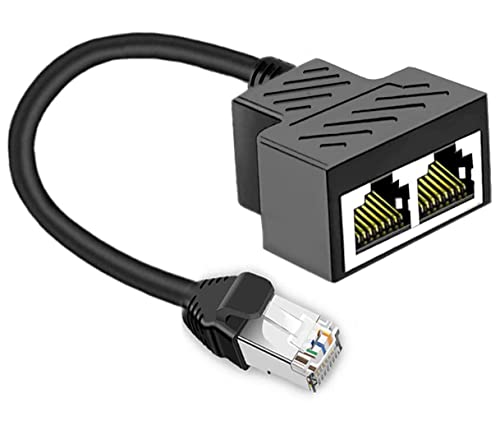
The MVBOONE 1-to-2 RJ45 splitter allows two computers to share a single Ethernet line. It is designed for straightforward sharing of high-speed DSL, cable modem, and Ethernet ports without requiring a router. It emphasizes robust construction for longer service life and is compatible with a broad range of network environments. Remember that, like many splitters, it typically supports one active connection at a time, so workloads must be managed accordingly to avoid simultaneous online activity on both ports.
Cable Matters Crossover Adapter (2-Pack)

The Cable Matters 2-pack crossover adapters convert a standard patch cable into a crossover cable, enabling direct device-to-device communication without a router. This is a cost-effective solution for file transfers or printer sharing between two PCs or networked devices. The adapters are compact and straightforward to use, making them a practical option for quick, temporary networking tasks in small offices or home setups.
ZUYOOK 1 to 2 Ethernet Splitter

ZUYOOK’s 1-to-2 RJ45 splitter is designed for dual-device sharing from a single port. It uses eight-core gold-plated needle contacts and features a solid metal shield to reduce electromagnetic interference. This helps preserve signal quality as two devices access the network, though, as with other splitters, simultaneous full-speed use may be limited depending on your network design. It’s a practical, shielded option for compact setups where cable management and signal integrity are priorities.
Buying Guide: How to Choose the Right RJ45 Linking Solution
When selecting a method to connect two RJ45 cables, consider your network needs, device types, and environment. The following factors help you compare options and pick the best fit.
- Purpose and topology: Use couplers for simple, single-connection extensions; use splitters for sharing a single port among two devices (not two active streams). Crossover adapters are useful for direct device-to-device communication without networking hardware.
- Speed and cable type: Match the connector or splitter to the maximum speed your cables support (Cat5e, Cat6, Cat7, etc.). Higher-category cables enable higher theoretical speeds, but performance depends on the entire network path.
- Signal integrity: Look for shielded connectors or nickel-plated contacts to reduce corrosion and interference. For longer runs, maintain proper cable shielding and avoid excessive bending.
- Power considerations: Some splitters can require external power for full performance, especially when supporting multiple devices at high speeds. Verify whether USB power or other power sources are included or needed.
- Device compatibility: Ensure the device ports match (RJ45 standard). Some devices may be sensitive to polling or negotiation behavior on splitters or adapters.
- Installation simplicity: Inline couplers and simple adapters offer quick fixes. For more complex expansions, consider network devices like switches to manage traffic more effectively and avoid single-port bottlenecks.
- Reliability and environment: For desktop setups, compact pass-through adapters are convenient. In rugged or high-traffic environments, choose components with robust housings and corrosion resistance.
- Future-proofing: If you anticipate upgrading to higher-speed networks, choose connectors and splitters that support higher-category cables and voltages, ensuring compatibility with future gear.
- Cost and availability: Basic couplers and splitters are inexpensive and readily available. For mission-critical or enterprise deployments, prioritize certified components with clear specifications and warranties.
Note that, in many cases, a network switch or router is recommended when two devices need simultaneous full-speed access. RJ45 splitters and simple couplers are best for straightforward extension tasks or temporary setups, whereas switches handle traffic management, security, and persistent multi-device connections more effectively.