Discover reliable computer-to-TV converters that translate HDMI or VGA signals into clear, big-screen displays. This guide highlights five standout options, detailing compatibility, signal direction, and key features to help you choose the right adapter for presentations, entertainment, or extended desktop setups.
| Product | Brand | Direction | Key Benefit |
|---|---|---|---|
| BENFEI HDMI to VGA, Gold-Plated Adapter (Male to Female) | BENFEI | HDMI to VGA | Compact, 1080p support |
| NewBEP HDMI to VGA Adapter Cable | NewBEP | HDMI to VGA | Plug-and-play, full HD |
| Moread HDMI to VGA, Uni-Directional | Moread | HDMI to VGA | Durable, full HD |
| ONTEN VGA to HDMI, 1080P Adapter | ONTEN | VGA to HDMI | Audio capable, easy setup |
| FOINNEX VGA to HDMI Adapter with Audio | FOINNEX | VGA to HDMI | Includes audio support |
Buying guidance: When selecting a computer-to-TV converter, consider direction (HDMI to VGA vs. VGA to HDMI), supported resolutions, whether audio is required, and whether a driver is needed. The best options provide straightforward, plug-and-play operation with reliable signal conversion and durable connectors.
BENFEI HDMI To VGA Adapter – Compact And Portable

BENFEI’s HDMI to VGA adapter is designed for quick connections from devices with HDMI outputs to displays with VGA inputs. It adopts a compact form factor, allowing easy transport for business meetings or on-the-go presentations. The device includes a built-in IC chip that converts digital HDMI signals to analog VGA signals. It is not bidirectional, so it cannot convert VGA back to HDMI. The adapter supports resolutions up to 1920×1080 at 60Hz and is built with a gold-plated HDMI connector to resist corrosion and improve signal quality. A VGA cable is required for the final connection to a display. Ideal for laptops, desktops, Raspberry Pi setups, and projectors that accept VGA input.
NewBEP HDMI To VGA Adapter Cable
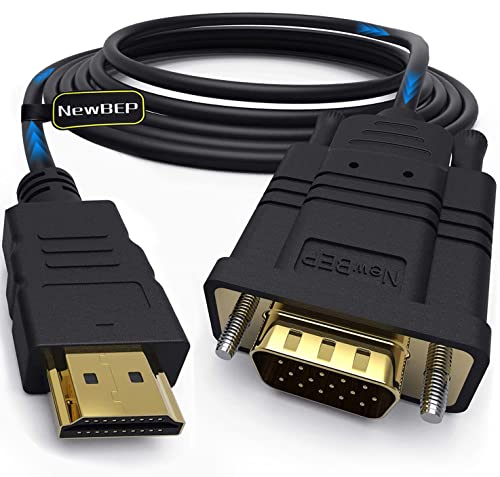
The NewBEP HDMI to VGA adapter cable provides a straightforward solution for transmitting digital HDMI signals to VGA displays. With an active converter chip built inside, it outputs to VGA displays without needing additional drivers. It supports resolutions up to 1080p and works with various HDMI sources like notebooks, PCs, DVD players, and some gaming consoles. The package typically includes the adapter and a standard 6-foot cable, making it a convenient plug-and-play option for classrooms, conference rooms, or home theaters that rely on VGA-equipped projectors or monitors.
Moread HDMI To VGA Adapter — High Compatibility

Moread’s HDMI to VGA adapter emphasizes portability and broad compatibility. It converts HDMI digital signals from a source device to VGA for monitors or projectors, with a compact, easy-to-carry form factor. The design includes a gold-plated HDMI connector for durability and improved signal transmission and a built-in IC to ensure stable conversion to VGA. It requires a separate VGA cable and works well for extending a laptop or desktop display to a larger screen. Note that it is a one-way converter, from HDMI to VGA, and does not support VGA-to-HDMI transmission.
ONTEN VGA To HDMI Adapter With Audio Cable

ONTEN focuses on VGA-to-HDMI conversion, turning analog VGA signals into digital HDMI outputs. This one-way converter is designed for setups where an older computer or display with a VGA output needs to connect to an HDMI input device like a TV or modern monitor. A USB power source is often required, and the device supports VGA input resolutions up to 1920×1080 with HDMI output up to 1080p. The kit usually includes a USB power cable to ensure stable operation. It’s a practical choice when upgrading an older display to a newer HDMI-equipped TV or monitor.
FOINNEX VGA To HDMI Adapter With Audio

FOINNEX offers a VGA-to-HDMI adapter with audio support. This active converter allows you to send content from a VGA source to an HDMI display while carrying audio via a 3.5mm jack. The device is designed for easy plug-and-play use and includes a USB power option for stable operation. It is specifically useful when presenting from a vintage computer with VGA output to a modern HDTV or monitor with an HDMI input. The product notes emphasize that it only converts VGA to HDMI and requires a separate audio connection for synchronized sound.
Buying Guide: Key Considerations For Computer To TV Converters
- Directionality: HDMI to VGA converters enable digital-to-analog conversion, while VGA to HDMI devices convert analog to digital. Ensure the direction matches your source and display.
- Resolution Support: Look for adapters that support common display resolutions (720p, 1080p, and higher where needed). This helps preserve image clarity on larger screens.
- Audio Support: If you need sound on the TV or monitor, choose adapters that carry audio via a 3.5mm jack or internal USB audio.
- Power Requirements: Some VGA-to-HDMI devices require external power; others are USB-powered. Check whether your setup has a spare USB port or power adapter.
- Plug-and-Play vs. Drivers: Most options listed are plug-and-play, but some may require driver installation for certain systems. Consider your operating system compatibility.
- Durability and Build Quality: Gold-plated connectors and robust cables improve signal reliability and longevity, especially for frequent travel or classroom use.
- Cable Length: If you need extra reach, consider the length of any included cables to avoid clutter or signal loss.
- Use Case: For presentations, prioritize compact, portable units with quick setup. For home theaters, prioritize higher resolution support and reliable audio handling.
Summary: The five selected products offer a balanced mix of HDMI-to-VGA and VGA-to-HDMI options, covering common needs for connecting computers to TVs, monitors, projectors, or large displays. Each option emphasizes straightforward operation, reliable signal conversion, and practical design features suitable for American homes, classrooms, and offices.