Turn any USB port into a flexible power source for PC cooling fans with these USB-to-fan adapters and simple speed controllers. This guide highlights five reliable options that let you power 3-pin or 4-pin fans directly from USB, plus a few step-up solutions to reach 12V when needed. Explore basics, usage tips, and buying considerations to choose the right one for gaming rigs, home servers, and media centers.
| Product | Brand | Key Use | Approximate Output |
|---|---|---|---|
| Delinx 8W DC 12V PC Cooling Fan Speed Control | Delinx | USB 5V to 5–12V adjustable for 3-pin/4-pin fans | Up to 8W |
| Gebildet USB to 3Pin/4Pin PWM Power Adapter Cable (6-pack) | Gebildet | USB power for 3-pin/4-pin fans | 5V input, 300W rated |
| CRJ 12V Step-Up USB to Dual PC Fans Power Adapter Cable | CRJ Electronics | USB to 12V for 3-pin/4-pin fans | 12V @ 0.4A |
| Gebildet 12V Step-Up USB to 3-Pin/4-Pin Sleeved Adapter | Gebildet | USB to 12V with switch and speed regulator | 12V output with control |
| Easy Cloud USB Computer Fan 120mm | Easy Cloud | USB-powered 3-speed 120mm cooling fan | Up to 2000 rpm |
Choosing the right USB-to-fan option depends on your setup. If you only need basic light cooling from a standard USB port, a simple adapter with a switch can suffice. For more demanding hardware or a quiet operation with adjustable airflow, stepping up to a 12V capable adapter or a dedicated fan with a speed controller provides more control. The following sections profile five practical choices for American readers upgrading computer or electronics cooling with USB power.
Delinx USB to 12V Adjustable Fan Controller

The Delinx solution provides an easy entry point for USB-powered cooling with a focus on low-power 12V fan control. Input is USB 5V, while the output is adjustable between 5V and 12V up to 8W. It supports both 3-pin and 4-pin PWM fans, allowing flexible deployment in receivers, consoles, or PC cases where extra cooling is beneficial. The device includes a dual-splitter cable for additional fan connections and a multi-speed controller to balance noise and airflow. Ideal for compact builds or noisy components that need selective cooling without a noisy system-wide solution.
Gebildet USB To 3Pin/4Pin Adapter Cable Pack

This set delivers USB-powered power adapters for multiple fans, supporting both 3-pin and 4-pin connectors. It targets efficiency with a 5V starting voltage suitable for standard fans and a 30 cm/12 inch length for flexible placement. The design emphasizes quiet operation by controlling the voltage at the source and maintaining compatibility with common 22 AWG wiring. The pack is well-suited for users needing several adapters for a larger build or a shared cooling setup in home theater PCs, servers, or gaming consoles.
CRJ Electronics 12V Step-Up USB Dual Fan Adapter

The CRJ Electronics adapter offers a built-in 12V step-up circuit to boost USB’s 5V output to 12V, enabling full 12V operation for PWM-compatible fans. This versatility makes it a strong choice for devices like gaming consoles, AV receivers, or network gear that require reliable airflow without a dedicated power supply. The package supports 3-pin or 4-pin fans through a compact, full-length USB-to-fan setup and provides steady performance for central cooling tasks in compact desktops or micro servers.
Gebildet 12V Step-Up USB to 3-Pin/4-Pin Sleeved Cable

This Gebildet option combines a 5–12V step-up with a USB power port and a speed regulator. The inline control makes it easy to adjust fan speed without software. It’s compatible with most 3-pin and 4-pin fans that run from USB power, allowing it to support a broad range of electronics from consoles to professional equipment. The sleeved design adds a tidy look and enhanced durability for cable management in a tight PC case or workstation setup.
Easy Cloud 120mm USB Computer Fan

The Easy Cloud 120mm USB fan presents a ready-to-use cooling option with a three-speed controller and anti-vibration feet. It’s designed for ease of installation in cases, cabinets, or servers where a USB-powered fan can rapidly supplement airflow. The 120mm size provides substantial air movement at moderate RPMs, and the three-speed control enables quiet operation during normal use or higher cooling during intensive tasks like gaming or streaming. This is particularly suitable for larger enclosures or setups with limited space for dedicated power connectors.
OPSFALCON 2 Pack USB To 3-Pin/4-Pin Adapters
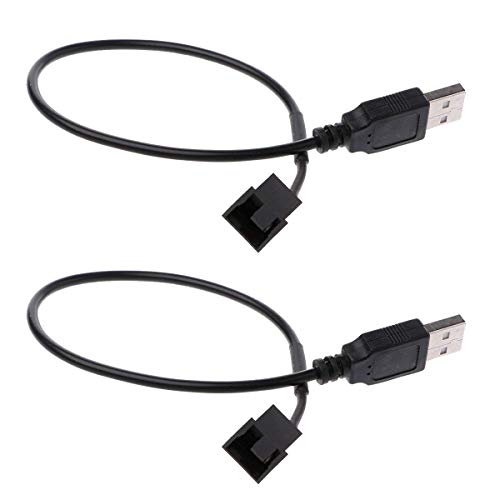
The OPSFALCON adapters provide a compact USB-based power path to small 3-pin or 4-pin fans. The dual-pack format is ideal for building a multi-fan cooling layout using a single USB power source. It supports 5V USB input and is suitable for basic cooling tasks in desktops, home theater PCs, or lab equipment. The cables are sized for flexible routing in tight spaces and can be paired with other adapters for a broader cooling strategy.
OwlTree 2 Pack USB 5V To 12V Speed Controllers
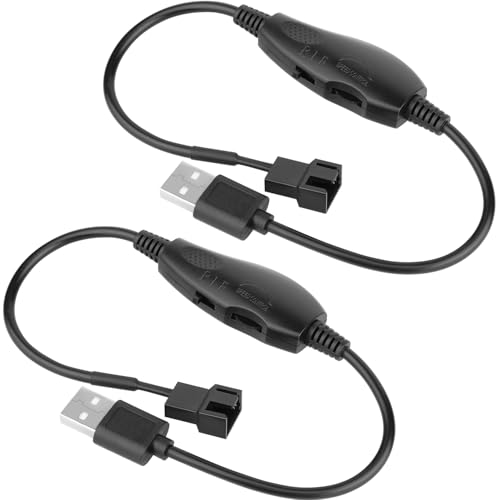
The OwlTree adapters deliver two USB-powered speed controllers capable of driving 4-pin fans at 12V. They support a maximum 8W output and emphasize compatibility with USB-powered environments while maintaining quiet operation for home offices or media centers. The two-pack configuration makes it convenient to power multiple fans or create an expanded cooling scheme across several devices that share a common USB power source.
Wathai 60mm USB Fans With Speed Control

While primarily 60mm form-factor fans, the Wathai units offer USB power and speed control for compact cooling roles. These small fans are suitable for low-profile devices, routers, and compact enclosures where space is at a premium. The emphasis on quiet operation and straightforward USB power makes them a practical choice for hobby projects or lightweight cooling tasks that don’t demand high airflow. They pair well with higher-output USB adapters in broader cooling plans.
Buying Guide: Key Purchase Considerations
- Power needs: Assess whether your fan requires 5V input only, or if a step-up to 12V is necessary for full speed performance. If your device has limited USB current capability, consider adapters with higher current capacity or a dedicated high-output USB power source.
- Fan compatibility: Verify 3-pin vs 4-pin compatibility. PWM-capable fans (4-pin) benefit from controllers that support speed regulation, while 3-pin fans respond to voltage adjustments.
- Voltage stability: Step-up designs rely on internal circuitry to raise USB voltage to 12V. Look for models with robust protection features and documented current limits to avoid damage to fans or devices.
- Noise vs. airflow: Higher speed generally increases airflow but also noise. Choose a controller or adapter with adjustable speeds to balance cooling and quiet operation in your environment.
- Cable management: Shorter cables reduce clutter; sleeved cables improve durability and aesthetics in exposed builds. Consider kits that provide multiple connectors or splitters for multiple fans.
- Durability and safety: Select adapters with proper insulation, overcurrent protection, and heat tolerance suitable for electronics and cabinets. Ensure they are certified for safe use with consumer electronics.
- Use case variety: If powering devices like consoles, servers, DVRs, or routers, ensure the adapter supports the required operating conditions and mounting options for those environments.
In summary, USB-to-fan adapters and speed controllers offer flexible options for cooling upgrades across PCs, consoles, and network equipment. Whether you need simple on/off capability or precise PWM-controlled airflow, these products provide practical paths to improved thermal management without needing dedicated power supplies or complex wiring.