When choosing a large format printer, businesses and professionals weigh print quality, media handling, and total cost of ownership. This guide compares five strong options across brands, including Canon, HP, and Epson, to help you select the right fit for technical drawings, posters, photos, and high-precision color work. Each product section highlights key features, media support, and suitability for different workflows.
Summary of chosen products
| Product | Brand | Format | Key Use |
|---|---|---|---|
| Canon imagePROGRAF TC-21 24″ | Canon | 24″ Wide | Posters, plots, wide media |
| HP DesignJet T650 36″ | HP | 36″ Wide | Architectural/engineering renders |
| HP DesignJet T630 24″ | HP | 24″ Wide | Technical line-drawings, maps |
| Epson EcoTank Photo ET-8550 | Epson | Wide-format up to 13″ x 19″ | Borderless photos and creative projects |
| Epson Workforce Pro WF-7820 | Epson | 13″ x 19″ Copy/Scan/Wax | Office-wide wide-format tasks |
Canon ImagePROGRAF TC-21 24″ Large Format Printer

The Canon imagePROGRAF TC-21 is a 24″ wide-format printer designed for crisp text and vivid images on a range of cut sheet and roll media. It ships with a substantial ink allotment (280 ml total across colors) and includes an automatic sheet feeder for efficient job handling. This model is well-suited for posters, technical prints, and promotional graphics where color fidelity and detail matter. It supports both sheet and continuous media, enabling flexible workflows without frequent reloading.
HP DesignJet T650 Large Format 36″ Plotter

The HP DesignJet T650 is a 36-inch plotter with a two-year onsite warranty, designed for technical drawings, renders, posters, and maps. It targets professional workflows requiring precise line quality and color accuracy. With wide media support and an included auto sheet feeder option, it handles large formats efficiently while maintaining reliable uptime for busy offices and studios.
HP DesignJet T630 36″ Color Plotter

HP DesignJet T630 36″ provides wide-format capability with robust media handling, including sheet and roll options. It targets professionals needing precise line rendering and crisp text in larger formats. The model supports automatic sheet feeding and a media bin, making it suitable for architectural and engineering printing workflows that demand reliability and consistent output at scale.
Epson EcoTank Photo ET-8550 Wide-Format All-in-One
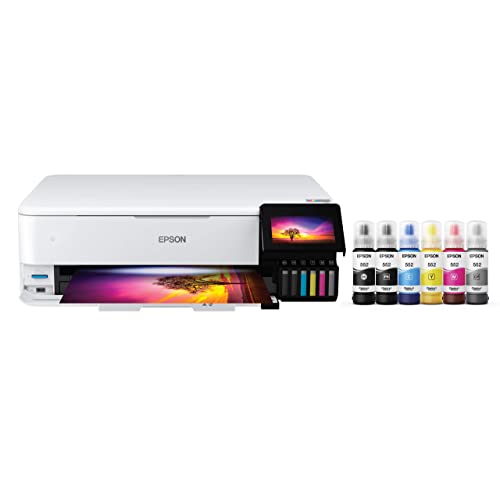
The Epson EcoTank ET-8550 is a cartridge-free color all-in-one that emphasizes affordable in-house photo and creative printing. It supports borderless photos up to 13″ x 19″ and excels with high-accuracy color graphics, thanks to its Claria ET Premium inks. Aimed at photographers and hobbyists who want vivid results without frequent cartridge replacements, it also offers auto two-sided printing for efficiency.
Epson Workforce Pro WF-7820 Wide-Format Printer

The Epson WorkForce Pro WF-7820 delivers reliable wide-format printing with PrecisionCore technology and DURABrite Ultra inks that dry quickly. It supports 13″ x 19″ output and offers built-in wireless connectivity for mobile printing. Ideal for busy offices needing versatile document handling, it balances speed, print quality, and convenience with productive scanning and copying features.
HP DesignJet T630 24″ with Auto Sheet Feeder

HP DesignJet T630 24″ offers solid performance for technical drawings, maps, and posters. It features auto sheet feeding, media bin, and an automatic cutter option, supporting efficient handling of mixed media tasks. This model is well-suited for studios and offices that require dependable wide-format output with clear line accuracy and legible text.
Buying Guide: Key Purchase Considerations
When selecting a large format printer, consider these factors to align output with your needs:
- Print size and media support: Confirm maximum width (24″, 36″, or more) and media types supported (rolls, sheets, automatic sheet feeders).
- Image quality and color accuracy: Look for color gamuts, color management capabilities, and ICC profile support to ensure prints match on-screen proofs.
- Ink system and cost of ownership: Compare cartridge-based versus high-capacity ink tanks, print head technology, and the overall cost per page for photos and technical prints.
- Speed and workflow efficiency: Consider pages per minute for color and monochrome, plus features like duplex printing, automatic sheet feeding, and network connectivity.
- Media handling features: Automatic sheet feeders, roll-to-sheet capability, and cutting/trim options can impact throughput for posters and plots.
- Connectivity and mobile printing: Wi-Fi, Ethernet, and mobile apps affect how easily teams submit jobs from desktops and devices.
- Warranty and service options: Onsite or remote support, service windows, and spare parts availability influence long-term reliability.
- Software compatibility: Ensure driver support for your design and CAD tools, including printer drivers that integrate with popular workflows.
- Maintenance and ease of use: Look for user-friendly interfaces, monitor alerts, and straightforward ink or paper loading procedures.
In short, match the printer’s strengths to your primary tasks—whether architectural plotting, large-format photo projects, or office-wide documents. For color-critical graphics, prioritize wide color gamut and robust media support; for technical drawings, focus on precise line rendering and reliable automation.