Color laser printers offer fast page yields, sharp text, and vibrant graphics—great for home offices or small workspaces. This guide highlights five capable options that balance speed, quality, and convenience. Each pick supports wireless printing, duplexing, and easy setup, helping you stay productive without sacrificing color accuracy or reliability. Read on to discover models from trusted brands and compare key strengths to fit your needs.
| Product | Brand | Notable Feature |
|---|---|---|
| HL-L3220CDW | Brother | Fast color output and high paper capacity |
| Color LaserJet Pro MFP 3301sdw | HP | All-in-one with scanning and duplex |
| Color LaserJet Pro 3201dw | HP | Upgraded features and 250-page tray |
| C235dni | Xerox | All-in-one, compact for home/offices |
| C230dni | Xerox | Wireless, simple setup |
All the models listed here are designed with home use in mind, emphasizing straightforward wireless setup, reliable duplexing for double-sided documents, and color print capability that preserves document quality. Whether you’re producing colorful reports, marketing materials, or school projects, these printers provide a solid balance of speed, accuracy, and cost efficiency. Use the Buying Guide to weigh long-term ownership factors such as media handling, cartridge availability, and support options.
Brother Color Laser Printer HL-L3220CDW

The Brother HL-L3220CDW combines fast color laser output with a generous paper tray for busy home offices. It supports wireless printing from laptops, smartphones, and tablets, and its security protocols help protect sensitive documents. Users can rely on a 250-sheet main tray, reducing refills during longer print runs, while the added manual feed slot accommodates envelopes and specialty media. This model emphasizes consistent color quality and dependable duplex printing, making it a versatile choice for home-based professionals who need professional-looking results quickly.
HP Color LaserJet Pro MFP 3301sdw

This HP model is a compact all-in-one that handles printing, scanning, and copying with ease. Designed for small teams, it delivers vibrant color prints at up to 26 pages per minute. Next-generation TerraJet toner improves color vividness for professional-grade documents. It uses Original HP toner cartridges to maintain print quality and reliability, and its built-in scanner with an ADF streamlines workflows, making it a strong option for multifunction home offices that require efficient color output and easy document management.
HP Color LaserJet Pro 3201dw

HP’s Color LaserJet Pro 3201dw focuses on fast color printing and smart production capabilities. It supports duplex printing and features a 250-page input tray for medium-volume workloads. The upgraded color technology helps bring business graphics and charts to life with more vivid hues, while reliable connectivity options ensure smooth wireless printing across devices. For small teams that value speed, color accuracy, and straightforward operation, this model offers a balanced blend of performance and convenience.
Xerox C235dni All-in-One

The Xerox C235dni integrates print, copy, scan, and fax into a compact, quiet device that’s well-suited for home offices and small businesses. It produces color and black-and-white prints up to 24 pages per minute and supports automatic two-sided printing. A 250-page paper tray helps with regular workloads, and the Easy Assist app facilitates setup and ongoing management from mobile devices. This all-in-one approach suits users who need versatile color capability without sacrificing space or ease of use.
Xerox C230dni Wireless Color Printer
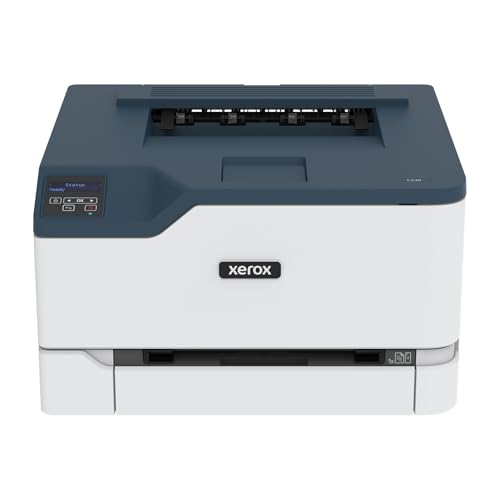
The Xerox C230dni is designed for home offices needing a compact, wireless color printer with easy setup. It features automatic two-sided printing and a user-friendly interface, helping you manage color documents efficiently. Built-in Wi-Fi with support for Apple AirPrint, Mopria, and Chromebook devices ensures broad compatibility. Its small footprint makes it ideal for desks with limited space, while still delivering reliable color output for everyday tasks.
Brother HL-L3280CDW Wireless Compact Color Printer

The HL-L3280CDW from Brother emphasizes compact design with laser-quality color printing and duplex capability. It’s particularly well-suited for small offices or home setups that need reliable, fast color output without taking up much space. The printer supports mobile printing and Ethernet connectivity, and it includes a trial subscription to enhance ongoing value. This model balances performance with affordability, making it a practical choice for everyday color printing tasks.
Canon Color imageCLASS LBP646Cdw
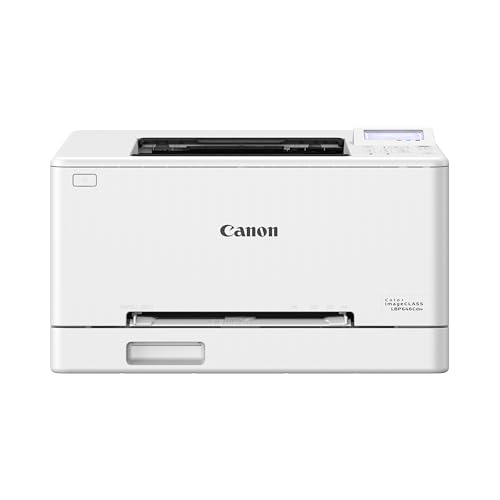
The Canon LBP646Cdw delivers color printing with duplex support and wireless setup in a stylish white chassis. It can print up to 26 pages per minute in color and monochrome, with a fast first-print time. The wireless setup process is straightforward, making it easy to share among multiple devices in a home office. This model targets users who want robust color performance for marketing materials, reports, and school projects, coupled with reliable Canon ecosystem support.
Brother DCP-L2640DW Wireless Duplex Printer

Designed for small businesses, the Brother DCP-L2640DW combines monochrome laser printing with scanning and copying in a compact form. It prints up to 36 pages per minute and offers fast scanning with a 50-page ADF. Wireless and Ethernet connectivity options expand compatibility across devices and networks, and Alexa compatibility adds hands-free control. While primarily a monochrome device, it remains a staple for cost-effective, fast document production within a home office setting.
Buying Guide: Color Laser Printer Considerations for Home Use
- Color accuracy and print quality: For professional-looking reports, charts, and design work, look for printers with vibrant color rendering, good grayscale balance, and reliable toner chemistry.
- Print speed and duty cycle: Consider pages per minute (ppm) for color and duplex functionality. A higher duty cycle helps prevent frequent maintenance on busier weeks.
- Duplex and media handling: Automatic two-sided printing saves paper and time. Check supported media types and tray capacity to match your workload.
- Connectivity and mobile printing: Wireless options (Wi-Fi, Ethernet, AirPrint, Mopria) enable flexible workflows. Ensure compatibility with your devices and apps.
- All-in-one vs. single-function: If scanning, copying, or faxing is essential, choose an all-in-one model. For simple color printing, a focused printer may be more cost-efficient.
- Toner availability and cost per page: Look at pages-per-toner data and the availability of high-yield cartridges to reduce long-term costs.
- Security and management: Built-in security protocols and user authentication help protect sensitive documents in small offices.
- Footprint and placement: Measure desk or cabinet space to ensure the printer fits without obstructing airflow or access to trays and controls.
- Warranty and support: A dependable warranty and accessible customer support are valuable for home users who rely on consistent performance.
Choosing the right color laser printer for home use depends on your balance of speed, color fidelity, and multifunction needs. If you prioritize all-in-one capabilities, consider models with strong scanning and copying features. For simple color printing and compact spaces, a dependable single-function printer may be the most economical choice. Review the options above to identify the best fit for your home office workflow, device ecosystem, and long-term printing demands.