If you’re upgrading an older PC or building a compact system, a cheap PCI Express x16 video card can boost graphics without draining your wallet. This guide highlights several affordable options that pair solid basic performance with compact form factors. Each pick supports common displays and basic gaming or multimedia tasks, while fitting in small cases or SFF builds. Below, you’ll find concise specs and practical notes to help you compare easily.
| Product | Brand | Memory | Bus / Interface | ||
|---|---|---|---|---|---|
| GeForce GT 610 2G DDR3 | Glorto | 2048MB DDR3 | PCIe 1.1 x16 | HDMI, VGA | Entry-level multimedia, HTPC |
| GeForce GT 210 | QTHREE | 1024MB DDR3 | PCIe 2.0 x16 | HDMI, VGA | Basic tasks, light editing |
| GeForce GT 210 (Glorto) | Glorto | 1024MB DDR3 | PCIe 1.0 x16 | HDMI, VGA | Small form factor PC, HTPC |
| Radeon HD 5450 | Glorto | 1024MB DDR3 | PCIe 2.0 x16 | HDMI, VGA, DVI | General purpose, multiple displays |
| NVIDIA NVS 310 | PNY | 512MB DDR3 | PCI Express Gen 2 x16 | DisplayPort 1.2, DVI-D | Multi-display setups, professional use |
Note: All specified products are designed for budget builds and basic tasks. Compatibility depends on your motherboard, power supply, and case size. Review each card’s outputs to ensure your monitor connections align with your needs.
GeForce GT 610 2G DDR3 Low Profile

Powered by NVIDIA GeForce GT 610, this card uses a 40nm process with a 523MHz core frequency and 2048MB DDR3 memory. It’s compatible with Windows 11 and supports HDMI and VGA outputs. The HDMI max resolution is 2560×1600, while VGA tops at 2048×1536. This low-profile card is suitable for compact or SFF builds and HTPC setups where basic acceleration is desired without demanding gaming performance.
GeForce GT 210 Graphics Card (QTHREE)

The GeForce GT 210 features 1024MB of DDR3 memory with a 589MHz core clock and up to 1066Mbps effective memory speed. It offers HDMI and VGA outputs and supports up to two monitors, making it suitable for simple multi-display setups. Its PCI Express 2.0 x16 interface enhances compatibility with a range of systems, and its compact size makes it practical for slim or ITX chassis builds.
GeForce GT 210 1024 MB (Glorto)

This GT 210 variant from Glorto uses a 40nm process with a 589MHz core frequency and 1024MB DDR3 memory. It provides HDMI and VGA outputs, enabling dual-display setups. The 64-bit bus width supports modest bandwidth needs, and the low-profile design is ideal for compact builds and SFF cases where space is at a premium.
Radeon HD 5450 1GB DDR3 (Glorto)

Equipped with AMD Radeon HD 5450, this 40nm card runs at a 625MHz core frequency and includes 1024MB DDR3 memory with a 64-bit bus. It offers HDMI, VGA, and DVI outputs, making it a flexible option for multi-monitor setups. With PCI Express 2.0 x16, it delivers reliable entry-level performance for everyday computing, multimedia tasks, and light gaming in SFF builds.
NVIDIA NVS 310 (PNY)
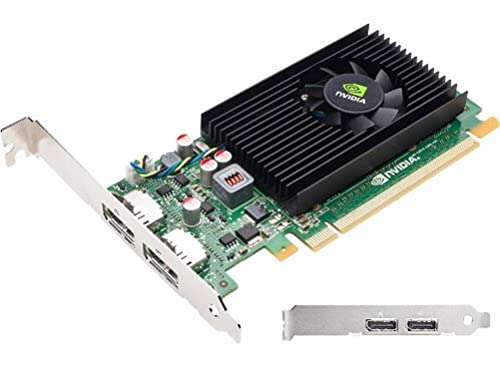
The NVS 310 from PNY features 512MB GDDR3 memory, 48 CUDA cores, and DisplayPort 1.2 with multi-stream capabilities alongside DVI-D. It is designed for professional multi-display setups, offering stable drivers and multi-monitor support. While not a gaming card, it serves as a capable, budget-friendly option for productivity tasks requiring multiple screens in small- to mid-size business or home offices.
Buying Guide
Key considerations when choosing a cheap PCI Express x16 video card:
- Purpose and workload: For basic desktop use, media playback, and light editing, even older GPUs deliver adequate acceleration. For gaming, look for cards with more memory (2GB or more) and a broader memory bus, but expect limited frame rates at higher resolutions.
- Form factor and compatibility: Low-profile/compact cards fit small cases and SFF builds but may have fewer power and connector options. Ensure your motherboard has a PCIe x16 slot and verify available space around the GPU and PSU connectors.
- Video outputs: Confirm your monitor connections (HDMI, VGA, DVI, DisplayPort) and whether you need multi-monitor support. Some cards offer multiple outputs and can drive two displays simultaneously.
- Power and cooling: Budget GPUs typically require minimal power; however, verify your power supply’s available wattage and available PCIe power connectors if needed. Passive cooling or single-fan models are common in this tier.
- Driver support and OS compatibility: Many older cards remain compatible with modern Windows versions, but driver availability varies. Some cards advertise “no driver download needed” but confirm with the vendor’s site for latest compatibility.
- Future-proofing: For simple upgrades, prioritize memory and core clock speed within your budget. Expect these cards to handle standard 1080p video and light gaming at lower settings rather than modern, demanding titles.
In practice, a budget PCIe x16 card can extend the life of an older desktop by enabling hardware acceleration for video tasks, smoother window composition, and improved multimedia performance. For buyers focused on multiple monitor setups, professional-grade options like NVS 310 provide robust display capabilities, though at a higher cost and with a different optimization focus than consumer gaming cards.