The market for affordable drawing tablets with displays has grown, offering artists a range of capable, budget-friendly options. This guide highlights five reliable picks that balance price, performance, and features. Each product below is a display-enabled tablet suitable for digital art, photo editing, and design work, with specifications that appeal to students, hobbyists, and entry-level professionals alike.
| Product | Brand | Key Benefit |
|---|---|---|
| Artist12 11.6″ FHD | XP-Pen | Compact, battery-free pen |
| Artist13.3 Pro | XP-Pen | Wide color gamut, tilt support |
| Upgraded Artist13.3 Pro V2 | XP-Pen | 16K pressure, enhanced control |
| Kamvas 13 Gen 3 | HUION | All-metal feel, Canvas Glass 2.0 |
| PD1161 | GAOMON | 11.6″ on-screen drawing |
XP-Pen Artist12 11.6″ Display Drawing Monitor

The XP-Pen Artist12 offers a compact, 11.6-inch HD display with 1920×1080 resolution and a wide color gamut (72% NTSC, 100% sRGB). It ships with a battery-free P06 pen, a hexagonal grip, and eight nibs for substitutes. The device supports major creative software on Windows, Mac, and Linux, making it a solid starter option for digital drawing, sketching, and light photo editing. A slim touch bar and customizable shortcut keys help streamline workflows, while the pre-installed anti-reflective screen protector reduces glare during long sessions. This model is designed for users who want an affordable, portable drawing tablet connected to a computer.
XPPen Artist 13.3 Pro Drawing Tablet With Screen
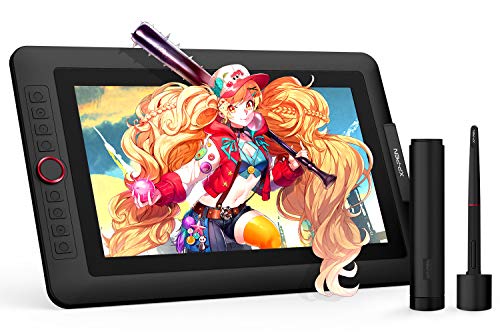
XP-Pen Artist 13.3 Pro features a 13.3-inch full-laminated display with a broad color gamut (88% NTSC, Adobe RGB ≈ 91%, sRGB ≈ 123%). It supports up to 60-degree tilt for natural shading and includes an adjustable stand and 8 shortcut keys. The 1.5x faster pen input and 16,384 levels of pressure sensitivity provide precise control for illustration and design work. Note that this device is intended to be connected to a computer, with a 3-in-1 cable included for easy setup. It is a compelling choice for artists seeking a larger on-screen experience without stepping into high-end price ranges.
XPPen Upgraded Artist13.3 Pro V2 With Screen

This upgraded model introduces a X3 Pro smart chip stylus with 16,384 pressure levels and faster response. It includes a red dial for quick control and eight customizable keys to speed up common tasks. The tablet emphasizes precise lines with reduced lag and improved accuracy, making it a strong option for budding digital artists who need a more capable pen input and streamlined workflow. Setup is straightforward, and drivers offer adjustable brightness, contrast, and color temperature on Windows, enabling swift personalization for new users.
HUION Kamvas 13 Gen 3 Drawing Tablet

Kamvas 13 Gen 3 delivers a 13.3-inch full-laminated display with anti-sparkle Canvas Glass 2.0 to reduce glare and improve clarity. It uses PenTech 4.0 with 16,384 levels of pressure and 2g IAF tilt support for a natural drawing feel. Dual dials and 3 side buttons enhance workflow, and the device is designed for connection to a computer or laptop. It provides accurate color representation with a wide viewing angle, making it suitable for digital illustration, graphic design, and concept art in a compact package. This model is well-suited for users who prioritize screen quality and control in a mid-range price segment.
HUION Kamvas 13 Gen 3 (Alternative Vision)
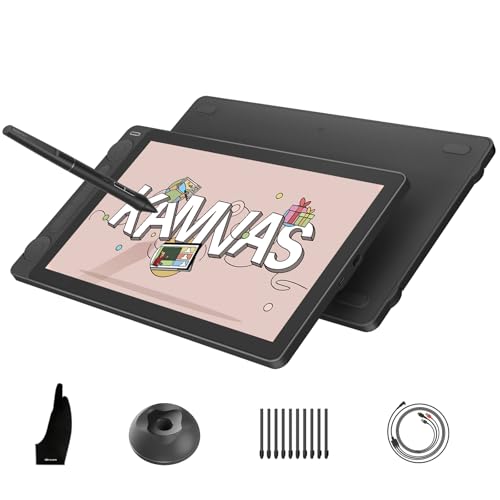
Another Kamvas 13 Gen 3 variant emphasizes the same core features—laminated glass, anti-glare coating, and PenTech 4.0—while presenting a slightly different design. It remains a viable option for artists who want a compact, high-quality display with reliable pen performance and a robust color gamut, suitable for both beginners and more experienced creators exploring digital mediums on a budget.
GAOMON PD1161 Drawing Tablet With Screen
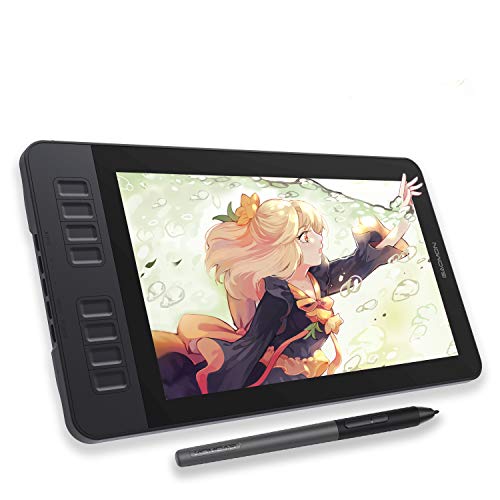
The GAOMON PD1161 provides an 11.6-inch on-screen display with a battery-free stylus and tilt support. It includes 8 shortcut keys, suitable for quick access to tools during illustration, design, or editing tasks. The on-screen canvas and the included matte film reduce glare, helping artists achieve smoother line work and better shading. With a 72% NTSC color gamut, 16.7 million colors, and a strong focus on direct drawing on the screen, this tablet offers a practical entry point for those seeking affordability alongside a full drawing surface.
Buying Guide: Key Purchase Considerations
Display quality and color accuracy: Look for devices with full-lamination displays and wide color gamuts (ideally 72% NTSC or higher, sRGB ≥ 100%). A good anti-glare or anti-sparkle coating reduces eye strain during long sessions.
Pen technology and latency: A battery-free or passive stylus with 16,384 levels of pressure sensitivity and tilt support provides natural brush and shading. Lower latency results in smoother lines; check estimated response times for your preferred model.
Screen size and portability: Smaller screens (11–12 inches) are ultra-portable and budget-friendly, while 13–15 inch models offer more drawing space. Consider whether you need travel-friendly gear or a desktop setup.
Compatibility: Ensure the tablet works with your operating system (Windows, Mac, Linux) and supports your favorite software (Photoshop, Clip Studio, Illustrator, etc.).
Ease of setup and workflow features: Look for driver stability, intuitive interface, and customizable shortcut keys or dials. Built-in stands or easy pen calibration can improve comfort and productivity.
Value and upgrade path: If you’re new to drawing with a display, a budget option that’s easy to learn on is ideal. For future growth, consider models with upgradable drivers, wider color support, and more robust build quality.