CF (CompactFlash) cards have seen renewed interest as compact, rugged storage options and as viable boot drives for older hardware and certain embedded systems. This guide highlights top CF card and CF-to-IDE converter products that help you repurpose CF media as bootable drives or lightweight storage in a variety of environments. Each entry covers key features, compatibility notes, and practical use cases to help you choose the right solution for your setup.
| Product | Brand | Type | Notable Feature |
|---|---|---|---|
| ChenYang CF Card Adapter | chenyang | CF To IDE Converter | Uses external power; best for bootable OS on CF |
| SanDisk Extreme CF 64GB | Sandisk | CompactFlash Memory Card | UDMA 7 up to 120MB/s read; VPG-20 support |
| Ximimark CF To IDE Adapter (2 Pack) | Ximimark | CF To IDE Adapter | True IDE mode; up to 40MB/s transfer |
| WSDMAVIS CF To IDE Adapter | WSDMAVIS | CF To 2.5″ IDE Adapter | Low power, supports Linux/WINCE on embedded systems |
| WQDMKE CF Memory Card 32GB | WQDMKE | CF Card | VPG-65 capable; 120MB/s read, 85MB/s write |
These options cover a range from simple CF-to-IDE adapters to high-capacity CF cards designed for professional video capture. Use this as a starting point to evaluate compatibility with older laptops, embedded devices, and DIY projects that rely on CF storage as a boot or data medium.
ChenYang CF Card Adapter For Toshiba and IDE Conversions

The ChenYang adapter enables a CompactFlash card to function as a DOM-like device, with power supplied externally from a floppy drive connector. It is useful for testing CF memory in a PC or booting legacy systems that require a CF-based boot drive. Important usage notes include formatting CF memory as FAT32 when installing an operating system and understanding that the adapter focuses on simple, low-cost boot solutions rather than high-speed transfers.
Key considerations:
– FAT32 formatting is often required for OS installation.
– External power is typically needed, which can simplify or complicate power management in compact setups.
– The design emphasizes cost-saving testing and recovery scenarios, rather than mainstream modern storage needs.
SanDisk 64GB Extreme CompactFlash Card

SanDisk’s Extreme CF card offers high read speeds up to 120MB/s and write speeds up to 85MB/s, with VPG-20 support to maintain consistent data capture for video workflows. The rugged construction includes testing for shock and vibration, and a protective RTV silicone coating helps preserve data integrity in demanding environments. This card is well-suited for photog/DSLR workflows and scenarios requiring steady, reliable performance in compact storage form factors.
Important notes:
– Ideal for high-bitrate photography and professional video capture.
– VPG-20 ensures sustained recording rates at 20MB/s for longer, uninterrupted streams.
– Durable build supports rough handling and field work.
Ximimark CF To IDE Adapter (2 Pack)

The Ximimark adapters convert CF cards to 2.5″ or 3.5″ IDE interfaces, enabling bootable drives or storage in systems with IDE hardware. Features include low power consumption, quiet operation, and protection against damage. They support standard IDE interfaces, true IDE mode, and can leverage DMA or Ultra DMA modes when the CF card provides those functions. Typical use cases include Linux-based set-top boxes, routers, and industrial PCs seeking compact, energy-efficient storage.
Considerations:
– Maximum transfer rate up to about 40MB/s depending on CF card and host controller.
– Works with various embedded and industrial environments requiring IDE compatibility.
– Useful for creating bootable CF-based IDE drives on legacy hardware.
WSDMAVIS 2 Pcs CF To IDE Adapter

WSDMAVIS provides a CF-to-IDE solution designed for laptops and embedded PCs. This adapter lets you convert a CF card into a standard 2.5″ IDE drive, suitable for storage or boot purposes in devices that rely on traditional IDE interfaces. It also supports direct connection to laptop IDE ports and emphasizes low power consumption and shock resistance, making it a practical choice for rugged or field deployments.
Usage notes:
– Good option for embedded Linux or Windows CE devices needing lightweight storage.
– Enables easy integration with devices that still depend on IDE interfaces.
– The kit typically includes two adapters, addressing bulk needs for testing or deployment.
WQDMKE CF Memory Card 32GB
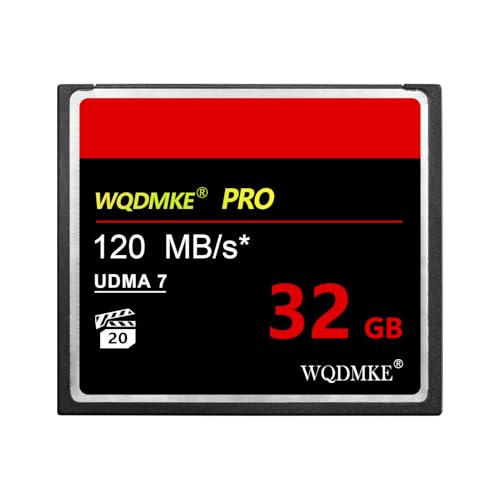
The WQDMKE 32GB CF card offers professional-grade video support with VPG-65 compatibility and fast read/write speeds up to 120MB/s / 85MB/s respectively. This makes it suitable for high-definition video capture and continuous shooting in DSLR setups, camcorders, or other devices that require stable, high-bandwidth CF storage. The card’s performance-focused design aims to reduce frame drops and ensure reliable data integrity during long recording sessions.
Buying Guide: CF Cards And IDE Adapters
- Purpose and compatibility: Decide whether you need a CF card for booting an operating system on legacy hardware or a CF-to-IDE adapter to enable modern storage on IDE-based machines. Ensure the interface (IDE 44-pin or other) matches your device.
- Performance needs: For video and high-bitrate photography, prioritize cards with VPG support and higher read/write speeds. If the goal is simple testing or boot, a standard CF card may suffice.
- Power considerations: Some CF-to-IDE adapters require external power. Plan for suitable power sources to avoid boot or stability issues in field setups.
- Durability and reliability: For field work or rugged environments, look for shock/vibration testing and protective coatings that help safeguard data integrity.
- Capacity versus cost: Higher-capacity CF cards offer more headroom but at a premium. Balance capacity with your budget and needs, especially in embedded or industrial contexts.
- Firmware and compatibility: Some devices rely on DMA/UDMA modes. Verify whether your CF card and adapter support these modes to maximize throughput.
- Bootability: If used as a boot drive, confirm OS compatibility with FAT32 formatting and any device-specific boot requirements.
- Redundancy and maintenance: For critical systems, consider keeping spare CF cards and adapters on hand to minimize downtime during maintenance or replacements.
The combination of CF cards and IDE adapters opens flexible pathways for repurposing compact storage across a range of devices—from retro computers to modern digital capture workflows. By understanding each product’s core strengths and limitations, you can assemble a setup that balances performance, reliability, and cost for your specific needs.