Discover reliable ways to mirror or extend your smartphone screen to a larger display. This guide highlights five top HDMI out adapters that work with iPhone and Android devices, covering USB-C, Micro USB, Lightning, and 3-in-1 options. Each option focuses on performance, compatibility, and ease of use to help you choose the right HDMI out solution for meetings, presentations, gaming, or home entertainment.
Summary of chosen products:
| Product | Brand | Connection Types | Max Resolution | Notes |
|---|---|---|---|---|
| FIGYK Universal 3-in-1 HDMI Mirroring Cable | FIGYK | Lightning, Micro USB, USB-C | 2K 60Hz / 1080p | 3-in-1 adapter for iOS and Android with QR-based setup |
| Apple MFi Lightning to HDMI Adapter (Veetone) | Veetone | Lightning | 1080p | Plug-and-play with charging cable required for some setups |
| Weton 2-in-1 USB-C/Micro USB to HDMI | Weton | USB-C, Micro USB | 1080p (up to 4K@30Hz) | Includes charging capability in one cable |
| KEJOG 3-in-1HDMI Cable to TV | KEJOG | Android data cables (Type-C, Micro USB, etc.) | 2K 60Hz / 1080p | Multi-function, plug-and-play, Android-friendly |
| esbeecables Lightning to HDMI Adapter (MFi) | esbeecables | Lightning | 1080p | Universal Lightning compatibility with no lead charging needed in some cases |
FIGYK Universal 3-in-1 HDMI Mirroring Cable
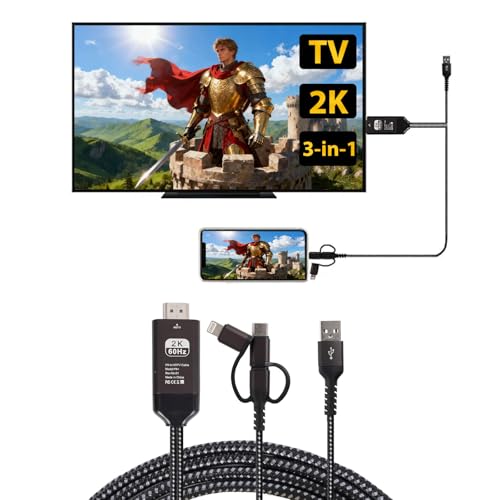
Overview: This 6.6-foot nylon-braided cable supports Lightning, Micro USB, and USB-C connections, enabling screen mirroring from iOS and Android devices to HDMI-equipped TVs, monitors, or projectors. It targets users seeking a single cable solution for multiple devices and HDMI displays. The package emphasizes durability and tangle resistance, with an installation flow that leverages a QR-based connection approach on Android and straightforward mirroring on iPhone devices. Maximum mirroring quality is listed up to 2K at 60 Hz or 1080p depending on the device and display capability.
Compatibility and use: Works with devices such as iPhone, Huawei, and Samsung when connected to HDMI displays. It aims to simplify buying multiple adapters by delivering three interfaces in one cable. The HDMI output supports typical home and classroom setups, and the setup instructions outline enabling USB charging and using the TV input/source selection to start mirroring. The included QR code for Android pairing provides an alternative connection path if needed.
Apple MFi Certified Lightning to HDMI Adapter (Veetone)

Overview: This Lightning-to-HDMI adapter enables iPhone and iPad to mirror content on HDMI-equipped displays with up to 1080p HD. It supports multiple iOS devices and claims universal compatibility across several iPhone and iPad generations and iOS versions. The product is described as plug-and-play, with a charging requirement noted for stable operation. The setup emphasizes automatic mirroring and does not require drivers or apps, though a 5V 1A USB charger may be needed to maintain power during use.
Compatibility and use: It lists broad device support from iPhone 8 through iPhone 14 models and various iPads. The adapter is positioned for easy, tool-free use in presentations, home viewing, and basic screen sharing. The emphasis is on compatibility and straightforward operation, with a reminder to use the power adapter to prevent instability during mirroring.
Weton 2-in-1 USB Type C / Micro USB to HDMI

Overview: The Weton cable provides 1080p mirroring while offering 4K support at 30 Hz in the HDMI path. It features continuous power delivery via a USB charging port, enabling ongoing mirroring during use. The design aims to simplify setups by combining HDMI output with charging in a single cable, making it suitable for home theater, gaming, and presentations. It supports Android devices and tablets with USB-C or Micro USB connections, enabling screen mirroring to HDMI displays.
Usage and compatibility: The product targets Android devices and tablets, plus some notebooks with USB-C or Micro USB ports. It emphasizes stable mirroring with a built-in charging path to prevent power interruptions. Users should be aware of the 1080p baseline and 4K@30 Hz option depending on devices and HDMI displays.
KEJOG 3-in-1HDMI Cable to TV

Overview: This 3-in-1 HDMI solution targets Android devices with multiple interface needs. It covers a range of Android-compatible cables and emphasizes plug-and-play operation. The product highlights screen mirroring from Android devices to big screens, with the flexibility of using HDMI-compatible TVs, projectors, or Blu-ray players as display outputs. The section notes compatibility with Roku TV, PS5, HDTVs, and similar devices that accept HDMI input.
Compatibility and use: It provides guidance for Android users who enable USB debugging to establish a connection and then select HDMI on the TV. The listing suggests broad device coverage and easy setup for educational, business, or home use, with an emphasis on straightforward installation and reliable screen sharing.
esbeecables Lightning to HDMI Adapter (MFi)

Overview: This MFi-certified Lightning-to-HDMI adapter supports mirroring from iPhone, iPad, and iPod devices with Lightning connectors up to 1080p. It targets a broad range of Apple devices and emphasizes a simple plug-and-play experience, with no power supply required in some setups. The adapter is positioned for home entertainment, education, and professional use, enabling content to be displayed on HDMI-equipped screens without extra software or drivers.
Compatibility and use: It lists wide iOS device compatibility and highlights the ease of use—just connect an HDMI cable to the TV and trust the device when prompted. The product also notes limitations around paid apps and DRM scenarios, recommending compatibility checks for streaming apps that may restrict output.
Buying Guide: Key Purchase Considerations
- Device compatibility: Confirm your smartphone’s port (Lightning, USB-C, Micro USB) and the adapter’s compatibility to avoid unused adapters. Some 3-in-1 cables offer broad compatibility, but performance can vary by device.
- Resolution and refresh rate: Look for 1080p support as a baseline, with 4K options where available. Check if 4K is supported at 60 Hz or only 30 Hz, and ensure your display and cable can handle it.
- Power requirements: Many adapters require a separate USB power source for stable mirroring. If the product includes a charging port, plan to supply power during use to prevent interruptions.
- Setup simplicity: Plug-and-play designs minimize driver needs. Android solutions may involve enabling USB debugging or QR-based pairing, while iPhone options often rely on Trust prompts and no apps.
- Portability and length: Longer cables offer flexibility for seating arrangements but may affect signal integrity. Nylon-braided cables provide durability and reduce tangling.
- DRM and streaming restrictions: Some apps (like certain paid streaming services) may restrict HDMI output. If you plan to mirror streaming content, verify app compatibility on the target device.
- Multi-device use: If you need to switch between multiple devices frequently, a 3-in-1 or multi-port solution can save time and reduce clutter, but ensure you don’t sacrifice performance for convenience.