Streaming nostalgia meets modern convenience with cassette-to-MP3 converters that work smoothly on macOS. This guide highlights five reliable options that support Mac users, offering built-in recording, USB or SD card workflows, and straightforward transfer to digital formats. Each selection prioritizes portability, ease of use, and compatibility with common Mac software like Audacity. Read on to compare features and find the right converter to digitize your analog music collection on a Mac.
style=”font-weight:bold;”>Chosen products at a glance
| Product | Type | Key Benefit for Mac | Storage |
|---|---|---|---|
| KLIM K7 Cassette Tape Player + MP3 Converter (16GB) | Portable Cassette Player | Self-contained MP3 conversion without extra software | 16GB SD Card |
| SEMIER Small Cassette Tape Player + USB/SD | Two-way Converter | Convert directly to MP3 on SD or via Audacity on Mac | 16GB SD Card |
| Maypott Portable Cassette Player | Multifunction Cassette Player | Direct MP3 conversion with Audacity workflow on Mac | Includes accessories and SD-ready |
| ClearClick Cassette Tape to USB 2.0 (Second Gen) | USB Flash Drive Output | No computer needed; automatic MP3 & track splitting | 8 GB USB included |
| DigitPro USB 2.0 Audio Capture Card | PC/Mac Capture Device | Direct recording to Mac via USB into MP3/WAV | USB connectivity |
KLIM K7 Cassette Tape Player + MP3 Converter (16GB)

KLIM’s K7 is a compact cassette player with built-in MP3 conversion. It ships with a 16GB SD card and a card reader, enabling straightforward transfer of tapes to MP3 on the SD card. The device also serves as a portable music player with a 3.5mm headphone jack and included earphones. While it records directly to the SD card, it does not support recording onto cassette tapes themselves. This option suits Mac users who want a self-contained solution without external software for basic conversions.
SEMIER Small Cassette Tape Player, USB/SD Converter (16GB)

SEMIER offers a compact solution with dual conversion paths. It can bake MP3s directly onto an included SD card or transfer via USB using Audacity on a Mac. The device features a readable LCD for navigation and accepts Type I tapes (note: it may not support all tape types). The combination of SD-based conversion and USB-assisted workflows provides flexibility for Mac users who want to digitize memories with minimal software steps.
Maypott Portable Cassette Player with MP3 Converter

Maypott’s device combines a portable cassette player with MP3 conversion capabilities. It supports direct conversion to MP3, and can also be connected to a computer via USB for Audacity-based workflows on a Mac. A built-in stereo output and 3.5mm headphone jack enhance listening comfort. This option emphasizes ease of use for Mac users seeking a straightforward conversion path and reliable playback in a compact form factor.
ClearClick Cassette Tape to USB 2.0 (Second Gen)
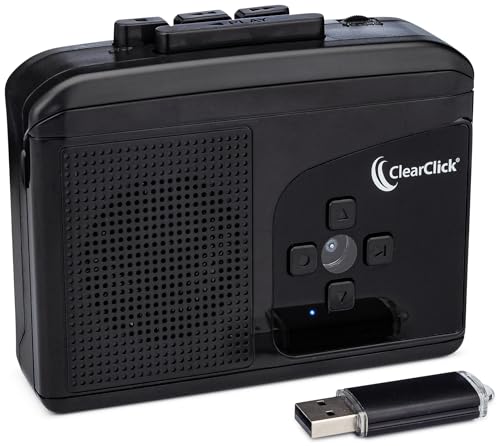
ClearClick’s USB 2.0 converter is designed for simple, no-software MP3 transfers. It automatically outputs MP3s to a USB flash drive, with an 8GB drive included. The instant setup and automatic track-splitting provide a fast path for Mac users who want a hands-off digitization process without desktop software. Ideal for quick archives and easy sharing across devices.
DIGITNOW USB Audio Capture Card

DIGITNOW’s USB capture card is a versatile option for Mac users who want to digitize from vinyl or cassette via analog connections. It supports recording into a computer and converting to MP3 or WAV with compatible software. The device is plug-and-play on Mac systems with Audacity or similar software, and it accepts standard 3.5mm inputs for easy hooking to a cassette player. This approach suits users who plan to archive broader analog audio beyond cassettes.
DigitPro USB 2.0 Audio Capture Card for Mac/PC

DigitPro’s USB 2.0 capture card is designed for cross-platform use on Mac or Windows. It accepts 3.5mm inputs and RCA connections, enabling direct recording into a Mac with MP3 or WAV output. The setup emphasizes a simple, plug-and-play experience with broad compatibility across macOS versions and common recording software, making it a solid option for multi-device digitization projects.
Buying Guide: Key Considerations For Mac Users
- Conversion workflow: Choose between built-in SD/USB-based converters and computer-based methods. SD/USB options tend to be simpler, while USB capture devices offer flexible software workflows on Mac.
- Software compatibility: If you plan to use Audacity or other Mac software, confirm support for USB audio interfaces or direct file export to MP3/WAV formats.
- Storage and expansion: Look for devices that include SD cards or offer easy expansion, especially if you have many tapes to digitize.
- Playback vs. conversion focus: Some devices emphasize portable playback with limited conversion, while others are optimized for high-quality digitization.
- Tape compatibility: Consider tape types supported (Type I vs Type II, metallic or chrome tapes) to avoid performance issues with older media.
- Portability and power: If you intend to digitize on the go, portability, battery life, and lightweight design are important factors for Mac users.
- Recording quality: For best results, examine SNR, noise floor, and the ability to record directly to digital formats without cassette tape recording.
- Future-proofing: A device that supports standard USB audio interfaces or widely used software reduces the risk of obsolescence on macOS updates.