expand your vehicle’s charging and data capabilities with high-speed USB hubs designed for cars. From multiple QC 3.0 ports to USB-C PD and 10Gbps data transfer, these in-vehicle USB hubs let passengers stay connected without crowding the power outlet. The selections below cover a range of port counts, power profiles, and car compatibility to suit daily commutes, road trips, and work-from-the-road needs.
The following quick-reference table highlights five top picks based on compatibility, charging speed, and expansion capability. Use it to compare essentials at a glance before reading deeper into each product’s features.
| Product | Brand | Key Feature |
|---|---|---|
| Multi Ports USB Car Charger, 96W | AI AIKENUO | 6 ports with four QC 3.0 fast charge ports |
| VIENON 4-Port USB 3.0 Hub | vienon | Rotatable, PD-in 5V port for data and power |
| BESTEK Multi Ports USB Car Charger | BESTEK | 125W with PD 30W USB-C and QC 3.0 |
| 5-Port Powred USB 3.0 Hub | vienon | 5 ports with USB-C power/data port |
| TP-Link Powered USB Hub 3.0 | TP-Link | 7 USB 3.0 ports with 2 smart charging ports |
Multi Ports USB Car Charger With Six Ports
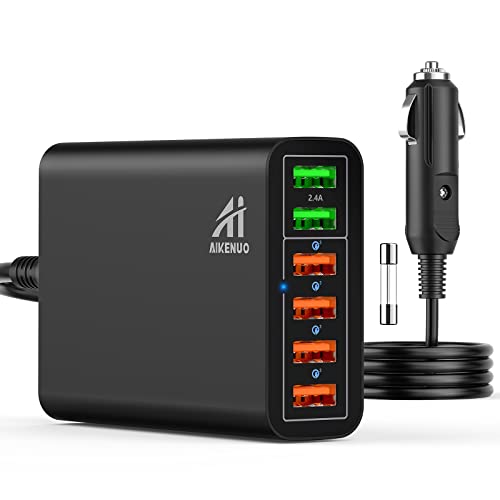
The AI AIKENUO six-port car charger provides a total 96W with four Quick Charge 3.0 ports and two additional 5V/2.4A ports. It supports 12V–24V vehicle power, enabling simultaneous charging for multiple passengers. Each QC3.0 port delivers up to 18W, and the combined output supports rapid charging for smartphones, tablets, and other USB devices. This model emphasizes fast charging without compromising the ability to power several devices at once, suitable for SUVs, trucks, and family cars.
VIENON 4-Port USB 3.0 Hub With PD-In

The VIENON four-port USB 3.0 hub expands a single USB port into three USB A ports and one USB-C port, enabling simultaneous operation of multiple devices. The USB-C port provides 5V power and data transfer; note that it supports power input rather than output for charging. This hub is a practical option for Mac laptops and compatible cars, offering plug-and-play convenience and broad device compatibility for road trips and daily commutes.
BESTEK 6-Port Car Charger With PD And QC

BESTEK’s 125W, 6-port car charger combines three USB-C PD ports with a QC3.0 18W port and two 2.4A ports. Its 12V–24V compatibility covers a wide range of vehicles, including cars, SUVs, vans, and trucks. This model emphasizes rapid charging for multiple devices and smart identification to optimize power delivery to each connected device, making it suitable for families or road warriors with many gadgets.
5-Port Powred USB 3.0 Hub With USB-C Power Port

This 5-port USB 3.0 hub adds four USB-A ports plus one USB-C power/data port, enabling efficient expansion for laptops, cars, and gaming consoles. It supports up to 5 Gbps data transfer and is compatible with USB 2.0/1.1 devices. The USB-C port ensures stable power delivery for charging while maintaining fast data throughput for larger files or media transfers in transit.
USB Hub 3.0 Extender For Laptop, Car

The UKIISM 4-Port USB 3.0 Extender adds four USB-A ports along with a USB-C power/data port, designed for laptops, PCs, and car use. It supports plug-and-play operation and is suitable for travelers who need a compact expansion solution in the cabin or on the go. The included USB-C interface helps connect Type-C devices for data transfer while the hub remains power-stable for continuous use in vehicles.
4-Port USB 3.0 Rotatable Hub With USB-C Power

The TIEDXIOY 4-Port USB hub features a rotatable design with three USB-A ports and a USB-C data/power port. It is designed for cars and laptops, offering plug-and-play convenience and a compact footprint. The rotatable feature facilitates flexible placement in the vehicle, aiding organization and access during travel.
LEINSIS 10-Port Powered USB Hub 3.2

LEINSIS offers a hybrid powered USB hub with 10 ports: seven USB-A 3.0, two USB-C 3.2, and two USB-C 3.2 connections? The product lists 7 USB A 3.0 ports plus multiple USB-C and high-speed capabilities, plus an included 12V power adapter. It’s designed for laptops, desktops, gaming setups, and mobile use, delivering up to 10Gbps on USB-C 3.2 connections and stable charging through an independent power supply. This model targets users needing substantial port availability and robust power in one hub, including vehicle setups where additional outlets are beneficial.
Buying Guide: Key Considerations For In-Vehicle USB Hubs
- Power delivery: Evaluate total wattage, PD support, and QC ports. For many travelers, a mix of USB-C PD and QC 3.0 ports ensures fast charging across smartphones, tablets, and USB-C laptops in a car environment.
- Port variety and count: Decide how many USB-A, USB-C, and data ports you need. More ports help passengers work, play, and charge without swapping cables frequently.
- Vehicle compatibility: Check voltage range (12V–24V), fitment for cars, SUVs, trucks, and whether the device includes a car’s cigarette lighter adapter or requires hardwiring.
- Data transfer speed: USB 3.0/3.2 hubs offer higher data speeds (up to 5 Gbps or more) ideal for transferring media from USB drives or external SSDs while on the road.
- Power management and safety: Look for overcurrent protection, temperature control, and smart charging features that prevent device damage while cruising.
- Port placement and ergonomics: Rotatable or compact designs improve accessibility in cramped dashboards or passenger seats, reducing cable clutter.
- Build quality and heat management: Aluminum or high-grade plastics with ventilation help maintain performance on long drives and high-load scenarios.
- Compatibility with accessories: Ensure the hub works with common peripherals like USB drives, wireless chargers, game controllers, or dash cams to future-proof your setup.
- Upgrade path: Some hubs offer firmware updates or modular designs that adapt to evolving USB standards or new device charging needs.
- Price-to-performance balance: Higher port counts and PD/QC support typically correlate with higher cost. Prioritize the features you’ll actually use to maximize value.