Capacitive touch screen monitors bring laptop-like interactivity to external displays, making tasks like note-taking, drawing, and precise navigation easier when you’re traveling, teaching, or troubleshooting on-site. This guide highlights five top options featuring multi-point touch, vibrant displays, and versatile connectivity. Each product is evaluated for portability, ease of use, and compatibility with a range of devices from laptops to Raspberry Pi setups.
| Product | Screen Size | Key Benefit |
|---|---|---|
| CAPERAVE 15.6″ Portable Monitor | 15.6″ | Full HD touch on a slim, travel-ready panel |
| ANGEL POS 17-Inch Capacitive Touch Monitor | 17″ | Large, seamless touch surface for interactive use |
| InnoView 15.6″ Portable Monitor | 15.6″ | High-contrast FHD with protective sleeve and built-in stand |
| ELECROW 10.1 Inch Portable Monitor | 10.1″ | Compact, versatile for Raspberry Pi and other devices |
| Hosyond 10.1″ IPS Touch Screen | 10.1″ | Built-in dual speakers and broad compatibility |
Note: This overview focuses on capacitive touch functionality, reliable display quality, and broad device compatibility to accommodate Windows, macOS, Raspberry Pi, or portable setups. Each product includes a multi-touch capable panel and is designed to minimize driver requirements for easy setup.
CAPERAVE 15.6″ Portable Touchscreen Monitor

The CAPERAVE portable monitor delivers a 15.6-inch Full HD touchscreen with an IPS panel and a 178-degree viewing angle. It supports a 10-point capacitive touch surface, allowing multiple users or precise gesture control. The connection options include USB-C and HDMI, enabling plug-and-play use with Windows, macOS, and other devices. It is designed for on-the-go use, with thoughtful notes on power delivery via Type-C for compatible ports and an included method to connect using HDMI plus power and USB-C adapters for devices lacking a USB-C DP alt-mode. The display includes blue light reduction and flicker-free technology to minimize eye strain during extended sessions.
ANGEL POS 17-Inch Capacitive Touch Monitor
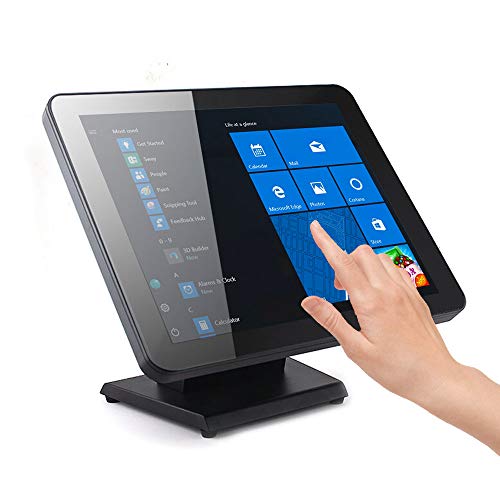
This 17-inch Angel POS touchscreen monitor emphasizes a seamless flat touch surface designed to withstand water and dust ingress, making it suitable for more demanding environments like retail, hospitality, or public kiosks. It offers plug-and-play compatibility with Windows systems and supports up to ten simultaneous touch points for multi-user interactions. The device prioritizes reliability and simplifies setup, with broad OS compatibility and multi-touch gestures such as pinch-to-zoom and swipe for intuitive control in busy workspaces.
InnoView 15.6″ Portable Monitor With Touch

The InnoView 15.6-inch portable monitor offers Full HD resolution and a 178-degree viewing angle with an IPS panel. It includes a built-in protective sleeve and stand, making it well-suited for travel and desk setups alike. The monitor supports a 10-point touch experience when connected via a full-featured USB-C interface, with clear notes about using appropriate cables for devices that lack USB-C DP alt-mode. This model emphasizes low blue light and flicker-free operation to reduce eye fatigue during long sessions.
ELECROW 10.1 Inch Portable Monitor
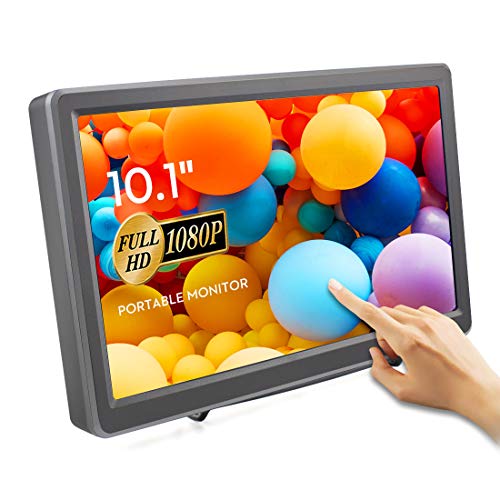
The ELECROW 10.1-inch monitor features a 1920×1080 IPS display with a 178-degree viewing angle and 10-point capacitive touch. It includes dual built-in speakers and a 3.5mm headphone jack for audio versatility, making it a robust option for portable gaming, Raspberry Pi projects, and mobile presentations. The unit is designed for broad compatibility, including Raspberry Pi and Windows devices, and it emphasizes a complete touch experience with a focus on responsive gestures and audio output for a compact screen.
Hosyond 10.1″ IPS Touch Screen For Raspberry Pi

The Hosyond 10.1-inch IPS touchscreen is designed for Raspberry Pi systems with a 10.1-inch display and 1024×600 resolution. It supports capacitive multi-touch and connects via HDMI, with compatibility that suits hobbyists and developers working on Pi projects. The device is described as MIPI-friendly for straightforward driver-free use in Raspberry Pi environments, broadening its appeal for education, DIY projects, and compact computing builds.
Buying Guide
- Screen size and portability: Larger screens offer more workspace but are heavier for travel. For frequent travelers or conference attendees, 10–15.6 inches provide a balance between portability and usability. Larger 17-inch options suit kiosks or collaborative spaces.
- Touch performance: Look for 5- or 10-point capacitive touch to enable multi-user gestures, handwriting, or precise taps. Some models emphasize palm rejection and low-latency touch to support more natural interactions.
- Display quality: IPS panels with Full HD (1920×1080) or higher provide wide viewing angles and accurate colors. Consider blue light reduction and flicker-free technology for long sessions.
- Connectivity and power: USB-C with power delivery allows single-cable use for power, video, and touch on capable devices. HDMI plus a power cable is common for devices without USB-C DP Alt Mode. Ensure cables and adapters are included or readily available for your devices.
- Compatibility: Check OS support (Windows, macOS, Raspberry Pi, Linux) and whether drivers are required. Plug-and-play is preferable for quick setup in classrooms, offices, or remote work sites.
- Audio features: Some models include built-in speakers, which is convenient for presentations and media playback on the go. If audio quality matters, verify speaker specs or plan to use external audio.
- Durability and design: Sealed or flat-seamless designs can offer better resistance to dust and moisture in certain environments. Consider protective sleeves, stands, and mounting options for flexible use.
- Use-case fit: For educational settings, kiosks, or retail environments, choose a display with robust touch responsiveness and easy maintenance. For travel, prioritize lighter weights and compact packaging.
Across these options, the choice depends on the balance between screen real estate, portability, and the intended ecosystem. For frequent Raspberry Pi projects or compact setups, devices like the Hosyond 10.1″ and ELECROW 10.1″ provide strong integration with single-cable USB-C or HDMI configurations. For business environments or teaching spaces, the ANGEL POS 17-Inch or CAPERAVE 15.6″ models offer a larger touch surface with solid multi-touch capabilities and straightforward connectivity. The InnoView 15.6″ adds protective accessories and a professional balance of portability and performance.