Capacitive touch screen LCDs offer precise, responsive input for hobbyist and professional electronics projects. This guide highlights five popular options with capacitive touch panels, SPI or HDMI interfaces, and IPS or TN displays. Each choice pairs compatibility with common microcontrollers and single-board computers, enabling richer interfaces for displays, dashboards, and control panels.
| Product | Brand | Size / Resolution | Touch Type | |
|---|---|---|---|---|
| Hosyond 4.0 Inch Capacitive LCD | Hosyond | 4.0″ 320×480 | Capacitive | 4-wire SPI |
| Hosyond 2.8 Inch Capacitive LCD | Hosyond | 2.8″ 240×320 | Capacitive | 4-wire SPI |
| ELECROW 7 Inch IPS Capacitive LCD | ELECROW | 7″ 1024×600 | Capacitive | HDMI / Wired |
| Hosyond 10.1″ IPS Capacitive LCD | Hosyond | 10.1″ 1024×600 | Capacitive | HDMI |
| waveshare 4.3″ Capacitive LCD | waveshare | 4.3″ 800×480 | Capacitive | HDMI |
Note: The products shown here emphasize capacitive touch panels with broad device compatibility, including Raspberry Pi and Arduino ecosystems. Each entry includes a brief feature summary and a direct link to its Amazon listing.
Hosyond 4.0 Inch Capacitive Display

The 4.0-inch Hosyond display uses a 320×480 TN panel with a capacitive touch layer for improved accuracy. It employs the ST7796S driver and includes an onboard level conversion circuit, enabling operation with both 5V and 3.3V MCUs. The device uses a 4-wire SPI serial bus, saving I/O pins and simplifying wiring for Arduino, ESP32, and related boards. Brightness is rated around 300 cd/m² with vivid color output, suitable for compact project dashboards and handheld devices.
Hosyond 2.8 Inch Capacitive Display

This 2.8-inch Hosyond screen features a 240×320 IPS panel with capacitive touch for improved sensitivity. An IP-wide viewing experience is achieved through the IPS panel, offering broad color accuracy and stability. It uses a 4-wire SPI interface and an onboard level converter compatible with 5V and 3.3V MCUs, making it suitable for compact Raspberry Pi and Arduino projects where space is at a premium and precise touch input is needed.
ELECROW 7 Inch Capacitive IPS Display
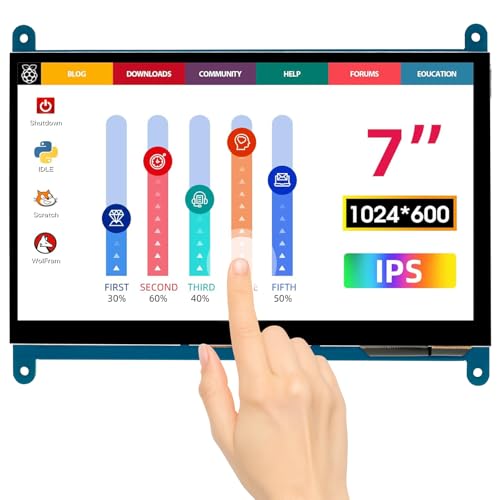
ELECROW’s 7-inch IPS touchscreen combines a 1024×600 resolution with full IPS viewing for vibrant colors from a wide 170-degree angle. It’s designed as a portable monitor compatible with Raspberry Pi 5/4/3 models, BB Black, Banana Pi, and Windows systems. The capacitive touch supports up to five points, and no driver installation is required—simply connect via Micro USB and HDMI to use. The monitor’s wired connection ensures stable operation with diverse setups, ideal for DIY dashboards and embedded interfaces.
Hosyond 10.1″ IPS Capacitive Monitor

The 10.1-inch Hosyond portable monitor uses an IPS LCD panel at 1024×600 with capacitive touch and built-in dual speakers. It’s designed for Raspberry Pi boards (Pi 5/4/3/Zero W) and other systems, offering audio output via a 3.5mm jack and an easy brightness/volume adjustment with a dial. The display is compatible with multiple operating systems, including Raspbian, Kali Linux, and Ubuntu, and ships with a Raspberry Pi HDMI adapter for straightforward setup.
waveshare 4.3 Inch HDMI Capacitive LCD

The waveshare 4.3-inch display provides an 800×480 resolution with HDMI input and five-point capacitive touch. It is designed to integrate with Raspberry Pi models and other devices via HDMI, making it suitable as a secondary monitor or interactive panel. The product emphasizes a clear manual and compatibility with multiple operating systems including Windows and Raspberry Pi OS, supporting flexible use in education, prototyping, and maker projects.
GeeekPi 11.26 Inch HDMI LCD

GeeekPi offers an 11.26-inch HDMI LCD with 1920×440 resolution and a capacitive touch surface. The display supports multi-gesture input and connects through HDMI for straightforward setup with Raspberry Pi 5/4/3 and other HDMI-enabled devices. Its larger size makes it suitable for kiosk interfaces, testing dashboards, and media panels, while retaining responsive touch control for precise navigation.
Hosyond 7 Inch IPS Capacitive HDMI Monitor

This 7-inch Hosyond display features a 1024×600 IPS panel with a capacitive touch surface and HDMI connectivity. It supports 5-point touch and backlight control, offering a balance of portability and utility for Raspberry Pi projects or standalone PC usage. The monitor is suitable as a secondary display for embedded systems, programming kiosks, or portable control panels, with potential for standalone use via HDMI.
Buying Guide: Capacitive Touch Screen LCDs
- Size and resolution: Choose a display size that fits your enclosure and a resolution that provides readable UI elements. IPS panels provide consistent color and wide viewing angles, while TN panels can be sharper at smaller sizes.
- Touch technology: Capacitive touch offers multi-point accuracy and smooth gestures. Confirm the number of touch points supported and the glass durability for your use case.
- Interface and compatibility: SPI interfaces save pins on microcontrollers, but HDMI displays are easier to use with SBCs like Raspberry Pi. Check voltage levels (5V vs 3.3V) and required drivers.
- Power and backlight: Some displays include backlight controls or require separate power. Consider low-power modes for portable projects and brightness ranges suitable for ambient lighting.
- Mounting and enclosure: Verify mounting options, cable lengths, and whether the bezel width fits your project. Some models ship with mounting hardware or adapters for Pi boards.
- Driver and software support: Look for drivers or plug-and-play compatibility on common platforms (Raspberry Pi OS, Windows, Linux). Some displays advertise driver-free operation, while others may require configuration.
- Audio and extra features: Certain larger models include speakers or audio jacks, which can be beneficial for dashboard kiosks or interactive displays.
- Durability and environment: For portable or outdoor use, consider tempered glass, glare reduction, and operating temperature ranges.
Choosing the right capacitive touch screen LCD depends on your project scope, required interactions, and available hardware. The five options above cover a range of sizes, interfaces, and display technologies to support hobbyist builds, educational kits, and prototype systems.