Preserving cherished memories from old camcorders, VHS tapes, and Hi8 formats is easier with modern VHS to DVD and digital converters. This guide highlights reliable devices that convert analog video to digital files or optical discs without a PC. Each product offers built-in screens, USB/SD storage options, or standalone recording capabilities. The selections below cover a range of setups—from simple, plug-and-play converters to more feature-rich capture boxes—so you can choose the best fit for your home library and playback needs.
| Product | Brand |
|---|---|
| Portta VHS to Digital Converter | Portta |
| VHS TO Digital Converter | VIXLW |
| VHS to Digital Converter 2.0 | DigitPro |
| Capture Card, USB Video Capture Card Device | VIXLW |
| VHS to DVD Recorder | Clariviews |
Portta VHS to Digital Converter

The Portta converter offers a straightforward way to digitize VCR, camcorder, and DVD sources without a computer. It records up to 1080P/30Hz and supports AV/RCA, S-Video, and AUX inputs. A built-in 3.0″ preview LCD and speaker enable direct playback and snapshots on the device. Storage via USB drive or TF card is supported, though capacities rely on the power supply used. Files can be saved as MP4 video or MP3 audio, with NTSC and PAL format compatibility for broader playback. A reminder in settings helps ensure proper input muting for clean captures.
VHS TO Digital Converter

Designed for easy digitization of analog sources, this VIXLW model supports VHS, VCR, Hi8, mini DV, camcorder, and other analog inputs. It automatically detects NTSC, PAL, and PAL/60 formats, saving recordings as MP4 or other digital formats for editing or archiving. The device is driverless and compatible with OBS or PotPlayer on Windows as well as QuickTime on Mac, making it suitable for simple editing workflows or quick transfers to a PC or Mac.
VHS to Digital Converter 2.0

DigitPro’s 2.0 model emphasizes one-touch digital conversion from a variety of analog sources, including VHS, VCR, DVD players, Hi8, and camcorders. It records up to 1080P/30Hz and supports MP4, MP3, and WAV formats on USB/TF cards up to 512GB. A 3.5-inch HD preview screen facilitates real-time viewing, while HDMI output allows connecting to a larger display. Smart features such as auto pause/resume on signal loss, time watermark, and scheduled recording enhance versatility for long-form projects.
Capture Card, USB Video Capture Card Device

This USB capture card focuses on converting analog RCA inputs to USB for PC or Mac, enabling direct digitization of VHS, VCR, Hi8, DV tapes, and more. It supports HD 720P output and captures audio without requiring a sound card. The device is plug-and-play with automatic driver installation, and does not demand external power, simplifying the digitization workflow for casual users and hobbyists alike.
VHS to DVD Recorder
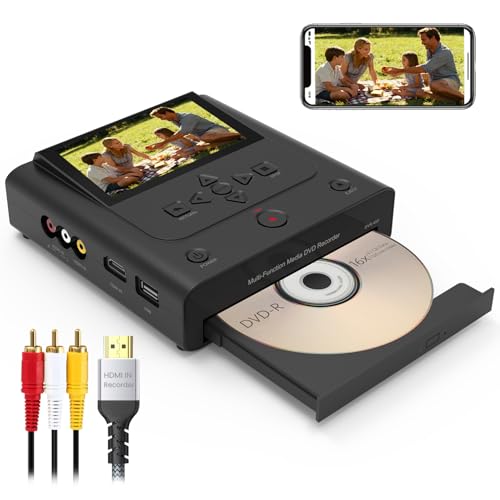
Clariviews offers a standalone recorder that can convert VHS, VCR, Hi8, and camcorder footage directly to DVD or to USB/SD for digital backups. It provides HDMI and AV inputs, enabling compatibility with modern TVs while maintaining traditional sources. The system operates without a PC or software, simplifying the archiving process, and includes a built-in 4.3″ screen for direct preview and easy operation during recording. This option is well-suited for households seeking a turnkey archiving solution.
VHS to Digital Converter
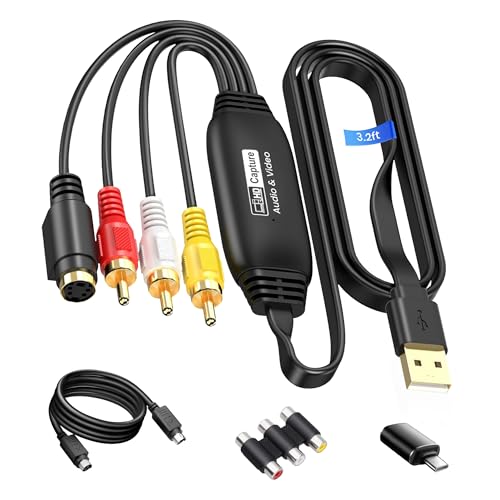
avedio links presents a USB2.0 capture device that converts RCA composite input to HDMI/USB output with up to 1920×1080@30Hz. It supports RCA and S-Video inputs and is compatible with Windows and Mac OS. A 1-meter USB cable helps minimize clutter during setup, making it a practical option for users who want a straightforward bridge from older tapes to modern storage or editing workflows.
Roxio Easy VHS to DVD 3 Plus

Roxio Easy VHS to DVD 3 Plus provides a classic solution for converting VHS, Hi8, or older formats to DVD or digital files. The software suite enables basic editing, color enhancement, transitions, and noise reduction. It supports direct capture from camcorders or VCRs and offers simple trimming and stabilization to improve the final output, making it a reliable choice for straightforward archival projects.
Portta VD22P VHS to Digital Converter

The Portta VD22P focuses on a simple, real-time conversion workflow with a built-in 5″ HD screen for previewing in Full HD 1080p/60fps. It supports VHS, Hi8, Mini DV, DVD, and camcorders. The device emphasizes adjustable image settings such as brightness, contrast, and saturation to ensure each frame looks its best before saving to MP4 or other digital formats. This model suits users who want direct on-device monitoring and easy, high-quality digitization.
Buying Guide
- Source compatibility: Check whether the device supports your exact formats (VHS, VCR, Hi8, Mini DV, camcorders) and input options (RCA, S-Video, HDMI, AUX).
- Output formats: Look for MP4 or other common digital formats, and whether the device can save to USB drives, SD cards, or DVDs without a PC.
- Standalone vs. PC-based: Standalone recorders are easiest for beginners; capture cards are better for editing on a computer.
- Preview and monitoring: Built-in screens help verify quality during capture; larger previews reduce guesswork.
- Storage & power: Ensure compatibility with large USB drives or high-capacity memory cards; verify power requirements for reliable long sessions.
- Editing features: Some models offer color adjustments, time stamps, auto pause/resume, or scheduled recording—assess which features matter for your project.
- Software compatibility: If using a PC/Mac workflow, confirm driverless setup or supported capture software (OBS, QuickTime, PotPlayer, etc.).
- Durability and support: Consider build quality, customer support, and firmware updates to maintain long-term usability.