For laptops, desktops, and network gear lacking built-in Ethernet, USB A to RJ45 cables offer a simple, plug-and-play path to Gigabit networks. These cables combine a USB A interface with an RJ45 Ethernet connector, delivering stable speeds without adapters or dongles. Below are five carefully chosen USB A to RJ45/Copper-based cables that balance performance, durability, and broad OS compatibility. Use this guide to compare build quality, length, and compatibility for work, gaming, and travel.
| Product | Brand | Length | Key Benefit |
|---|---|---|---|
| Thzzhnno USB to Ethernet Cable | Thzzhnno | 6.6 ft | Gold-plated, durable, 1 Gbps |
| OIKWAN USB Console Cable to RJ45 | OIKWAN | 1.8 m | USB-to-console RJ45 for Cisco devices |
| USB to RJ45 Console Cable (2-pack) | OIKWAN | 2 x 1.8 m | Multiple-device console setup, plug-and-play |
| CableCreation USB to Ethernet Cable | CableCreation | 10 ft | Integrated USB to RJ45, gigabit |
| Kxable USB to Ethernet Cable | Kxable | 6 ft | Pure copper, aluminum shell, braided |
| Dutevolns USB to Ethernet Cable | Dutevolns | 10 ft | Plugs directly, gigabit, robust build |
| McBazel USB to Ethernet Cable | Mcbazel | 6.6 ft | Durable, braided, gold-plated |
Thzzhnno USB to Ethernet Cable 6.6FT

The Thzzhnno USB A to Ethernet cable is a 6.6-foot nylon-braided cord with 24K gold-plated connectors and a robust aluminum housing. The reinforced design supports daily use with durable heat dissipation and strong signal integrity. It delivers up to 1 Gbps over Ethernet, while remaining backwards compatible with 100 Mbps networks. It works with ChromeOS, Windows, Mac OS, and Linux, and requires no drivers—just plug and play for laptops, desktops, and many USB-A equipped devices. A reliable choice for business travel, classrooms, and home offices where wired stability matters.
OIKWAN USB Console Cable to RJ45
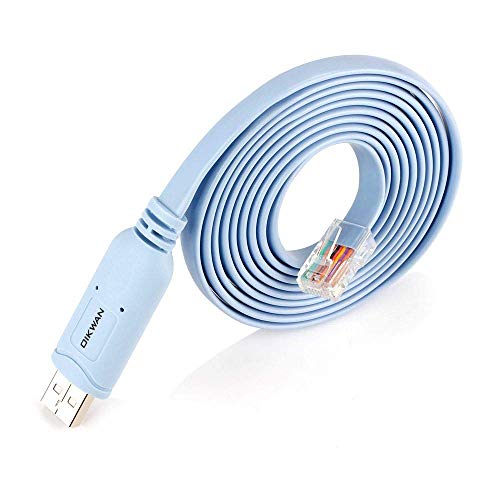
OIKWAN’s USB to RJ45 console cable is designed for configuring network devices like Cisco routers and switches. It plugs directly into a USB port and a console RJ45 port, replacing RS232 adapters. It supports 32- and 64-bit operating systems (excluding Chrome OS) and is positioned as a primary tool for network engineers, IT admins, and technicians who access console ports for device setup, troubleshooting, and initial configuration. Note that this is a USB-to-console cable, not an Ethernet adapter, and requires the appropriate console port on the device.
OIKWAN USB to RJ45 Console Cable (2-Pack)

This two-pack from OIKWAN provides multiple console cables for Cisco, NETGEAR, Ubiquiti, LINKSYS, TP-Link, and other brands. It supports Windows, Mac, and Linux, without requiring driver installation in most cases. It’s ideal for technicians who manage more than one device or who need backup cables in a lab, data center, or classroom setting. Remember, this is a USB-to-RJ45 console connection, not a general Ethernet drag-and-connect setup.
CableCreation USB to Ethernet Cable 10FT

CableCreation’s 10-foot USB A to RJ45 cable provides a true one-piece solution that eliminates the need for separate adapters. It delivers up to 1 Gbps and is backward compatible with 100 Mbps and 10 Mbps networks. It is a straightforward plug-and-play option designed to connect desktops, laptops, or switches to routers or modems. The built-in smart chip and a brushed aluminum connector shell promise durable performance and consistent signal integrity for daily network use.
Kxable USB to Ethernet Cable 6FT

The Kxable USB A to Ethernet cable emphasizes premium materials, including a pure copper core, aluminum shell, and a braided jacket. The 6-foot length provides flexible placement while maintaining a stable Gigabit connection. The product highlights include compatibility with USB 3.0 ports, and a design focused on durability with strain relief and corrosion-resistant connectors. This option appeals to users who value build quality and long-term reliability for home offices or small business setups.
Dutevolns USB to Ethernet Cable 10FT

Dutevolns offers a 10-foot USB A to Ethernet cable designed for direct connection to a router or switch without drivers (Windows 10 and newer). It supports up to 1 Gbps and is backward compatible with 100 Mbps/10 Mbps networks. The cable uses pure copper conductors and an aluminum shell for durability, with nylon braiding for added strength. It’s positioned as a versatile option for gamers, remote workers, and travelers who need reliable wired connectivity away from the router.
Buying Guide: Key Purchase Considerations
- Device compatibility: Ensure the cable works with your operating system (Windows, macOS, Linux) and supports USB 3.0 or higher for Gigabit speeds.
- Length vs. portability: Shorter cables minimize clutter; longer cables offer placement flexibility but may introduce minor signal loss if quality is low. Look for braided or reinforced builds when moving around.
- Intended use: If you need console access to network gear, select a USB-to-RJ45 console cable, not a general Ethernet adapter. For direct desktop or laptop connections to a router, choose a standard USB-to-Ethernet cable.
- Build quality: Materials like copper conductors, aluminum shells, and braided nylon jackets improve durability and signal stability. Gold-plated connectors can reduce contact resistance over time.
- Driver and plug-and-play: Most USB A to RJ45 cables are plug-and-play on recent systems, but console cables may require specific drivers or software on some devices. Check device compatibility notes.
- Brand and warranty: Reputable brands with clear warranty policies offer better support for troubleshooting and replacements.
- Use-case clarity: Distinguish between console cables (RJ45 used for management ports) and standard Ethernet cables (RJ45 for network access). Mixing them up can cause confusion in setups.
In environments ranging from home offices to IT labs, USB A to RJ45 cables provide a pragmatic path to reliable wired networking. When selecting, prioritize compatibility, build quality, and the intended role in your network workflow. The five options above cover a spectrum of lengths, designs, and use-cases to help you pick the best match for your setup.