Choosing the right DisplayPort to DisplayPort cable can impact gaming smoothness, resolution, and overall display stability. This guide reviews top-rated DP cables that support up to 8K, 16K, and beyond, highlighting certified options for modern GPUs and monitors. Read on to compare bandwidth, shielding, and compatibility to pick the best cable for your setup.
| Product | Brand | Key Benefit |
|---|---|---|
| IVANKY 8K DisplayPort Cable 1.4 | IVANKY | 8K@60Hz, 32.4Gbps, HDR, G-Sync/FreeSync |
| Amazon Basics DisplayPort 1.4 Cable | Amazon Basics | 8K@60Hz, 4K@120Hz, Dynamic HDR |
| IVANKY VESA DP Cable 1.2 | IVANKY | 4K@60Hz, 165Hz at 2K, durable nylon braid |
| Highwings DP 2.1 Cable | Highwings | 16K/8K/4K support, 80Gbps, DSC, HDR, G-Sync/FreeSync |
| UGREEN DP 2.1 Cable | UGREEN | 40Gbps, 16K@30Hz, 8K@240Hz, VRR ready |
IVANKY 8K DisplayPort Cable 1.4

This VESA-certified DisplayPort 1.4 cable delivers high bandwidth for demanding monitors and graphics cards. It supports 8K at 60Hz, 5K at 60Hz, 4K at 144Hz, and 2K at 240Hz, along with Dynamic HDR and HDCP 2.2. It is backward compatible with DP 1.3/1.2 and works with FreeSync and G-Sync. The cable uses 30AWG tinned copper, a nylon braided jacket, and 24K gold-plated connectors to enhance durability and signal integrity. A latch-free design minimizes wear during disconnects. This makes it a strong choice for gaming rigs and professional workstations needing peak performance from a DisplayPort connection.
Amazon Basics DisplayPort 1.4 Cable

This 6-foot DP to DP cable supports 8K at 60Hz and 4K at 120Hz with Dynamic HDR and 3D, making it a versatile option for high-resolution setups. It is designed to connect modern laptops or desktops to DP-enabled monitors, enabling expanded desk space and multi-monitor configurations. The construction focuses on reliable signal transmission and ease of use in everyday environments, with compatibility across devices that support DisplayPort 1.4 technology.
IVANKY VESA Certified DisplayPort Cable 1.2
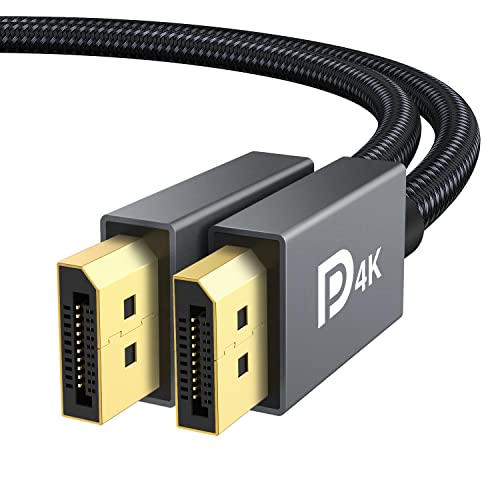
This VESA-certified DisplayPort 1.2 cable focuses on strong durability with a nylon braided jacket and 24K gold-plated connectors. It supports UHD 4K at 60Hz and up to 165Hz at 2K resolutions, reducing flicker and motion blur for smooth gaming and video playback. The cable is compatible with DP, DP++, and DisplayPort++, and its shielding helps minimize interference for stable, long-lasting performance in demanding multi-monitor or gaming setups.
Highwings 80Gbps DisplayPort Cable 2.1

Designed for cutting-edge gaming and professional use, this DP 2.1 cable claims up to 16K at 60Hz (DSC), with 80Gbps bandwidth. It supports 8K at 120Hz and 4K at 240Hz, and includes triple-layer shielding and 28AWG conductors for strong EMI resistance. Features like a slip-resistant grip simplify plugging in, while 24K gold-plated connectors support reliable signal transmission. It also supports HDR, FreeSync, G-Sync, and MST for multi-monitor setups, making it suitable for immersive gaming and high-performance workstations.
UGREEN 16K DisplayPort Cable 2.1

UGREEN 2.1 DP cable leans into next-gen bandwidth with 40Gbps maximum, supporting 16K at 30Hz and 8K at 240Hz. It remains backward compatible with DP 1.4 and 1.3. The cable is built with a braided jacket and 24K gold-plated connectors to minimize interference and improve durability. It supports HDR, DSC 1.2a, and FreeSync/G-Sync, making it a strong option for future-proofing a gaming rig or high-end workstation with multiple displays.
Buying Guide: Key Purchase Considerations
- Bandwidth and resolution: Choose cables that match your monitor’s maximum refresh rate and resolution (e.g., 8K@60Hz, 4K@120Hz, 16K@30Hz). Higher-spec cables (DP 2.1) offer more bandwidth for future upgrades.
- Version compatibility: Verify compatibility with your devices—DP 1.4 cables work with DP 1.3/1.2 ports but won’t carry HDMI signals. For multi-monitor gaming setups, consider cables that support MST and VRR (FreeSync/G-Sync).
- Certification and build quality: VESA or other certification signals adherence to standards. Look for features like nylon braiding, 24K gold-plated connectors, and robust shielding to reduce interference and wear.
- Length and flexibility: For desktop setups, 6–8 feet is common. Longer cables may introduce signal loss unless they are built to DP 2.1 specifications with higher bandwidth.
- Use case alignment: Gaming and professional tasks benefit from Dynamic HDR, low latency, and stable frame timing. If you’re building a multi-monitor array, ensure the cable supports MST and VRR across all displays.
- Compatibility caveats: Do not expect HDMI features on DisplayPort cables; they are not interchangeable with HDMI or Mini DisplayPort.