Expanding USB connectivity without adding a power brick can be a smart move for many setups. This guide highlights five bus-powered USB 3.0 hubs that offer reliable data transfer speeds (up to 5Gbps), compact designs, and easy plug-and-play setup. All options below work with Windows, macOS, and common Chromebooks, making them versatile for home offices, classrooms, and on-the-go use. Use the table to compare quick specs, then read deeper into each product’s features to find the best fit for your workflow.
| Product | Brand | Ports | Power | Key Benefit |
|---|---|---|---|---|
| StarTech 4-Port USB-A Hub | StarTech.com | 4 | Bus-powered | Compact travel-friendly design |
| Anker 4-Port USB Hub | Anker | 4 | Bus-powered | Strong data speed and reliability |
| TP-Link UH720 | TP-Link | 7 (5 data + 2 charging) | Bus-powered | Smart charging with power on/off |
| Atolla 4-Port USB 3.0 Hub | atolla | 4 | Bus-powered | Individual on/off switches |
| DFsucces 3-Port USB 3.0 Hub | DFsucces | 3 | Bus-powered | Compact and affordable |
StarTech.com 4-Port USB-A Hub — USB 3.0, Bus-Powered

The StarTech 4-Port USB-A Hub provides a compact, bus-powered expansion with USB 3.0 speeds up to 5Gbps. It connects four USB devices to a single USB-A port on a computer, supporting wake-on-USB and driverless setup. Its travel-friendly design includes a built-in 5-inch attached cable and a cable management clip, making it suitable for both desks and on-the-go use. The hub draws power from the host PC, eliminating the need for an extra power adapter, and includes overcurrent protection to safeguard connected peripherals.
Anker USB Hub — 4 Ports, USB 3.0 (Charging Not Supported)

Designed for speed and reliability, Anker’s 4-Port USB 3.0 hub transforms a single USB port into four. It supports data transfer up to 5Gbps, enabling quick file moves like transferring a full HD movie in seconds. Note that this model is not intended for charging devices; its focus is on expanding data ports with dependable performance, making it a solid choice for keyboards, mice, printers, and external drives.
TP-Link UH720 Powered USB Hub — 7 Ports

This TP-Link hub adds seven USB 3.0 ports, including two smart charging ports. USB 3.0 data connections support up to 5Gbps transfers, allowing keyboards, mice, printers, and external drives to connect simultaneously. The two charging ports supply 2.4A combined output for fast device charging, while the power-on/off switch helps manage energy use and protects connected devices during idle periods.
Atolla 4-Port USB 3.0 Hub — Individual On/Off Switches
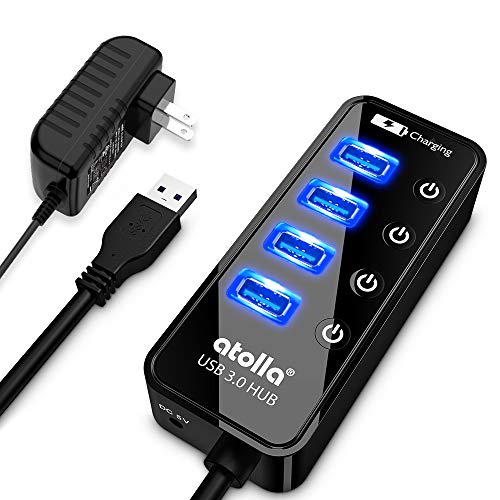
Atolla combines speed and control with four USB 3.0 ports plus a single charging port. Each data port has an individual on/off switch, allowing users to disable ports without unplugging devices. The hub supports up to 5Gbps transfers, ideal for external drives and fast data tasks. Its 5V/3A power profile ensures a stable connection, while the switches help keep desktop cable clutter to a minimum.
DFsucces USB Hub — 3-Port, Plug-and-Play

The DFsucces 3-Port USB 3.0 hub emphasizes compact design with straightforward plug-and-play operation. It provides USB 3.0 high-speed data transfers and backward compatibility with USB 2.0 devices. This model does not require external power, relying on the host computer’s power. It’s a practical option for expanding peripherals like keyboards, mice, and small flash drives on the go or in tight workspace setups.
Buying Guide: Key Purchase Considerations
- Power type: Bus-powered hubs draw power from the host computer, which reduces clutter but may limit power-hungry devices. Self-powered hubs with their own power adapters are better for multiple external drives or devices with higher power needs.
- Port count and data speed: For typical peripherals, USB 3.0 (5Gbps) is standard. If you need to connect many devices, look for hubs with 7 ports or more. Consider whether you need dedicated charging ports and how much current they provide.
- Port management features: Individual on/off switches help manage devices without unplugging, while a compact design and cable management features reduce desk clutter.
- Compatibility and driver support: Most modern hubs are plug-and-play with Windows and macOS. Confirm compatibility with your specific OS version and any devices you plan to connect (external drives, printers, etc.).
- Build quality and portability: A rigid housing, braided or reinforced cables, and a slim footprint improve durability and travel convenience, especially for mobile use.
- Cable length: A longer built-in cable improves reach when ports are in hard-to-reach spots, but a shorter cable keeps the setup neat and reduces tangling.
- Security and safety: Look for hubs with overcurrent protection and good EMI shielding to protect connected devices from surges and interference.