Choosing the right Blu-ray drive for a PC involves balancing speed, compatibility, and portability. This guide highlights five reliable options that cover USB-connected external drives and internal-like setups, aimed at users prioritizing Blu-ray writing, disc compatibility, and data archiving. Each option supports a range of formats and interfaces, making them suitable for modern PCs and laptops. Read on to compare features and find the model that best fits your workflow and storage needs.
Summary of chosen products:
- ASUS BW-16D1X-U — High-speed 16x Blu-ray writing with BDXL support and USB 3.0.
- Wbacon 7 in 1 External Blu Ray Drive — Versatile 7-in-1 with card slots and dual USB-C/USB 3.0.
- Yaeonku External Blu Ray Drive — Dual-interface USB 3.0 and Type-C with portable design.
- aelrsoch External Blu ray Drives (Black) — USB 3.0/Type-C, dual-power option, broad OS compatibility.
- juwuoi External Blu ray Drive — 100GB BD support, USB 3.0/Type-C hub design for convenience.
ASUS Powerful Blu-ray Drive With 16x Writing Speed
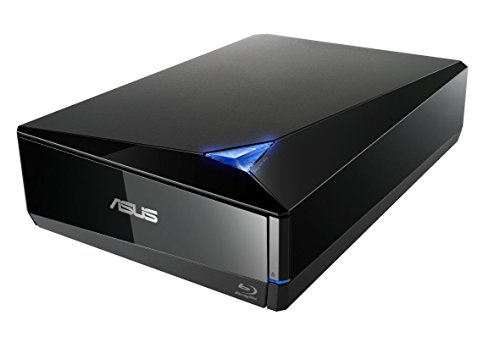
The ASUS BW-16D1X-U is a high-performance external Blu-ray writer designed for Mac and PC use. It delivers 16x Blu-ray writing speed with BDXL support, allowing data storage up to 128 GB on BDXL discs. The drive supports USB 3.0 for fast data transfer and broad OS compatibility, including Windows versions from XP to 10 and Mac OS X. A cloud backup option is noted for Android devices, and the unit operates within a wide temperature range of 5°C to 40°C, making it suitable for varied environments.
Key considerations include ensuring USB 3.0 connectivity with your computer, verifying Mac and PC compatibility, and confirming that BDXL discs are needed for maximum capacity. This model is ideal for users who need rapid Blu-ray authoring and reliable cross-platform operation.
Wbacon 7 in 1 External Blu Ray Drive

The Wbacon 7-in-1 external Blu-ray drive combines multiple functions in a portable package. It can read Blu-ray discs at up to 6x and write BD/DVD/CD discs, with 100 GB disc support for high-capacity storage. The drive includes a 7-in-1 feature set: SD card slot, TF card slot, two Type-C ports, USB 3.0 and USB 2.0 ports, and a dual-cable configuration for data transfer or charging. While SD and TF cards cannot be used simultaneously, both can operate with the USB ports. Its compact design makes it a practical travel companion for data backups, media transfer, and on-the-go disc work.
External Blu Ray Drive By Yaeonku

The Yaeonku external Blu-ray drive emphasizes expanded storage and read/write speed, supporting BD, DVD, and CD formats. It offers USB 3.0 and Type-C interfaces and a dual-interface design that simplifies connections to different host computers. The device is described as portable and user-friendly, with a slip-proof rubber pad and a recessed cable design for desktop stability and space efficiency. It is widely compatible with Windows, Linux, and Mac OS, though playback software may be required for Blu-ray content on some systems.
aelrsoch External Blu ray Drives (Black) – USB 3.0 / Type-C

The aelrsoch external Blu-ray drive focuses on fast USB 3.0 data transfer and Type-C compatibility. It supports Blu-ray, DVD, and CD formats with 100 GB BD discs and emphasizes strong error correction, low noise, and low power consumption. A dual-power design helps maintain stable operation during long sessions and high-speed writing. The device is compatible with Windows, macOS, and Linux, but Blu-ray playback may require specific software, such as PowerDVD, Leawo, or VLC, depending on the user’s system.
aelrsoch External Blu ray Drives (Black) – 6X BD Read/Write

This variant from aelrsoch highlights a dual USB power setup for stable operation, reducing interruptions during read and write tasks. It mirrors the 100 GB BD disc capacity and broad compatibility with USB 3.0 and Type-C interfaces. The device is designed to be portable and easy to connect to typical modern laptops and desktops, with an emphasis on reliable performance for data backup, disc creation, and media playback that requires compatible software for Blu-ray content.
Verbatim Ultra HD 4K CD DVD Blu-ray Writer

The Verbatim Ultra HD 4K Blu-ray writer provides USB 3.2 Gen 1 connectivity with USB-C, aiming at notebook and ultrabook users who need a slim, metal enclosure. It ships with a free 25 GB Verbatim Blu-ray disc and is positioned for high-quality 4K Blu-ray support. Note that Blu-ray playback on Mac requires compatible software, and the device is not universally compatible with all Blu-ray playback configurations. It is designed for portable, slim-line setups rather than desktop internal drives.
External Blu ray Drive For Laptop By Juwuoi

The Juwuoi external Blu-ray drive emphasizes broad support for BD-R/RE/ROM, DVD±R/RW, and CD-R/RW formats with speeds up to 24x for CD, 8x for DVD, and 6x for BD. It also features a 100 GB BD disc capability for large backups and media libraries. The device includes a 7-in-1 USB hub design with multiple ports including USB 3.0, USB 2.0, Type-C, and SD/TF card readers. Additional power and extension cables are included to support stable use in various setups. Some playback may require third-party software.
Buying Guide
Key purchase considerations when selecting a Blu-ray drive for a PC:
- Interface and compatibility: USB 3.0 or Type-C are common. Verify your PC or laptop supports the drive’s interface and that the unit is compatible with Windows, macOS, or Linux as needed.
- Burning speed and BD formats: A 16x or higher write speed with BDXL support enables high-capacity discs. If you need 100 GB discs, confirm BD-R/RE capabilities and disc availability.
- Portability vs. desktop use: External drives are ideal for laptops or space-constrained setups, while robust enclosures and dual-power designs suit extended desktop sessions.
- Software requirements: Some Blu-ray playback requires third-party software (PowerDVD, Leawo, VLC). Plan for licensing if playback is necessary?
- Card slots and hub features: Some models offer SD/TF card readers and USB hubs, which can reduce the need for extra adapters but may have limited simultaneous-use capabilities.
- Power stability: Dual USB power or dedicated power adapters help prevent interruptions during long burns or playback sessions.
- Durability and temperature range: Look for units designed to operate within common ambient conditions and with stable mechanical build for repeated use.