Bluetooth virtual laser keyboards offer compact, touch-free typing by projecting a keyboard layout onto a flat surface. This guide highlights top options that pair with phones, tablets, and computers, helping you compare features, compatibility, and battery life. Below you’ll find five strong picks with concise specs, plus practical buying tips to match your workflow and devices.
| Product | Brand | Key Features |
|---|---|---|
| MOJO Bluetooth Wireless Laser Projection Virtual Keyboard Portable Full-Size Keypad | MOJO-HOME | Projection on any flat surface, wide device compatibility, 1000mAh battery (200 min) |
| AGS Wireless Laser Projection Bluetooth Virtual Keyboard | AGS Design | Bluetooth pairing, supports Windows/iOS/Android/Mac OS, English QWERTY |
| VirtualLaserKeyboard Laser Keyboard | VirtualLaserKeyboard | Upgraded projection, multi-device pairing, English QWERTY |
| AGS Laser Projection Bluetooth Virtual Keyboard & Mouse | AGS | Keyboard plus mouse, broad OS compatibility, Bluetooth |
| GANGXUN Virtual Keyboard, Laser Projection Bluetooth | GANGXUN | Upgraded stability, longer battery life, mini Bluetooth speaker features |
These entries reflect devices designed to project a functional keyboard onto surfaces, with Bluetooth connectivity and cross-platform compatibility. The selections emphasize ease of pairing, battery endurance, and versatility across phones, tablets, and PCs. The following sections provide deeper looks at each option, then a practical Buying Guide to help with your choice.
MOJO Bluetooth Wireless Laser Projection Virtual Keyboard

MOJO-HOME presents a full-size, projection-based keyboard that works with a wide range of Bluetooth-enabled devices. The device projects a virtual keyboard on any flat surface, enabling touch-free typing on tablets, laptops, and desktops. It supports common operating systems and devices such as iPhone, Android phones, iPad, and PCs, making it a versatile travel companion. A built-in 1000mAh Li-polymer battery powers roughly 200 minutes of continuous use, with recharge times designed for everyday use. Pros include easy cross-device compatibility and a portable form factor; consider the need for a flat, non-reflective surface for best results.
AGS Wireless Laser Projection Bluetooth Virtual Keyboard

AGS Design offers a laser projection keyboard that pairs via Bluetooth and supports multiple platforms, including Windows, iOS, Android, and Mac OS. It ships with an English QWERTY layout and is designed for use with iPhones, iPads, smartphones, laptops, and tablets. The device emphasizes straightforward Bluetooth pairing and broad OS compatibility, making it a practical option for users with mixed hardware. Its strength is cross-platform accessibility; users should verify surface conditions to ensure projection clarity in bright rooms or on reflective desks.
VirtualLaserKeyboard Laser Keyboard
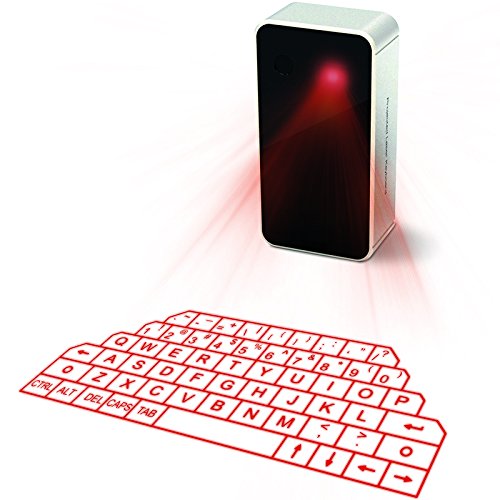
VirtualLaserKeyboard presents an upgraded projection keyboard designed for easy pairing with iPhone, iPad, Android smartphones, laptops, and tablets. The product notes emphasize a stable projection and a user-friendly English QWERTY layout. It highlights environmental factors that influence projection clarity, such as surface texture and lighting conditions. This option is suitable for users seeking an improved laser projection experience in typical home or office settings, particularly where surface quality can be controlled.
AGS Laser Projection Bluetooth Virtual Keyboard & Mouse

AGS combines a projection keyboard with a built-in mouse function, expanding input options across iPhone, iPad, smartphones, and tablets. It supports Windows, iOS, Android, and Mac OS with English QWERTY layout, prioritizing a seamless transition between typing and cursor control. The inclusion of a mouse feature can reduce reliance on touchpads, which is useful for presentations or precise navigation. Pros include versatility and a compact form; ensure you have a suitable projection surface for best results.
GANGXUN Virtual Keyboard, Laser Projection Bluetooth

GANGXUN’s model emphasizes an upgraded virtual laser projection experience with a longer battery life and a compact design. It includes a built-in mini Bluetooth speaker for voice feedback and music playback, which can complement typing tasks by providing audible cues or entertainment. The keyboard supports Bluetooth pairing with smartphones, tablets, and PCs across iOS, Android, Windows, and Mac OS. Pros include extended battery life and multimedia features; consider whether you need the speaker function in your setup and how often you type in bright environments where projection may struggle.
Buying Guide: Key Purchase Considerations
When selecting a Bluetooth virtual laser keyboard, consider the following factors to ensure a good fit for your needs:
- Projection surface and environment: For best results, use a flat, non-reflective, and clean surface. Bright ambient light or reflective surfaces can reduce projection clarity, especially on glossy desks.
- Device compatibility: Check which operating systems and devices you regularly use (iOS, Android, Windows, Mac OS) and confirm cross-compatibility with the keyboard you’re considering.
- Battery life and charging: Look at the battery capacity (mAh) and estimated usage time. Recharge time and the type of charger (USB-C vs micro USB) affect convenience, especially for travel.
- Typing experience vs. accuracy: Laser projection keyboards can feel different from physical keyboards. Some options offer upgraded projection clarity and stable pairing to improve typing accuracy.
- Additional features: Some models include a built-in mouse, speakers, or multiple Bluetooth channels. Decide which extras align with your workflow and portability needs.
- Surface stability vs. portability: Foldable or compact designs enhance portability but may affect comfort during longer typing sessions. Consider your typical use case (travel, presentations, home office).
- Setup and pairing ease: Quick pairing and straightforward software support reduce friction in daily use. Review user guidance for connecting to multiple devices.
- Surface brightness and light conditions: Strong sunlight or overhead lighting can impair projection visibility. If you’ll type outdoors or in bright rooms, test projection under those conditions.
Compared across options, the MOJO and AGS designs emphasize broad compatibility and projection clarity, while models like the VirtualLaserKeyboard and GANGXUN add features such as integrated audio or extended battery life. If you require a mouse function or speaker support, AGS Laser Projection with Mouse or GANGXUN’s speaker feature may be attractive. For frequent multi-device use, ensure the device supports multi-pairing and fast switching between devices.
In deciding, prioritize the environment where you’ll type most often, the devices in your ecosystem, and how central the projection experience is to your workflow. A device with a longer battery life may be preferable for travel or presentations, while surface versatility could matter most for use on the go with tablets and phones.