Bluetooth OBD scan tools connect your vehicle’s onboard computer to a smartphone or laptop for quick diagnostics, live data, and repair guidance. This guide highlights five well-regarded options, covering different features, compatibility, and budget considerations to help American drivers compare effectively and pick the right tool for their needs.
| Product | Brand | Key Benefit |
|---|---|---|
| BlueDriver Bluetooth Pro OBDII Scan Tool | BlueDriver | Comprehensive diagnostics with repair reports |
| OBDLink MX+ OBD2 Bluetooth Scanner | OBDLink | OEM-level support and broad compatibility |
| Panlong OBD2 Scanner Bluetooth | Panlong | ELM327-compliant with many protocols |
| TOPDON TopScan Lite OBD2 Scanner | TOPDON | Bi-directional testing and full-system view |
| Veepeak OBDCheck BLE+ | Veepeak | Easy pairing and live data with mobile apps |
BlueDriver Bluetooth Pro OBDII Scan Tool
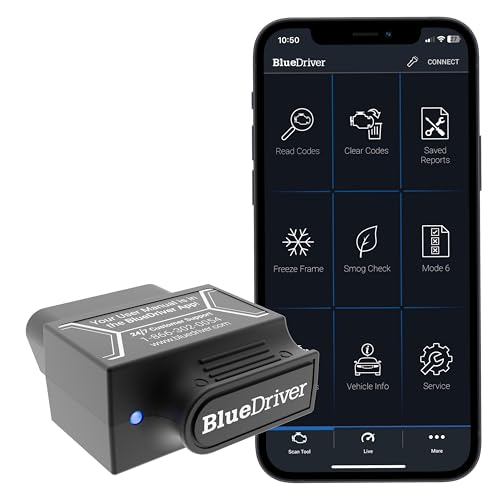
BlueDriver is designed for users who want a professional-level diagnostic experience without ongoing subscription fees. It reads and clears trouble codes and supports diagnostics for the check engine light, ABS, SRS, TPMS, and more. The tool provides unlimited repair reports with possible causes and fixes, and it offers real-time health monitoring while driving. This combination aims to help both casual DIYers and more serious tinkerers understand engine and system status with actionable insights.
Supported capabilities extend beyond basic codes: access enhanced vehicle diagnostics and repair guidance typically found on high-end equipment. The device emphasizes user-friendly interpretation of data, presenting information in a way that reduces guesswork. For those who want ongoing insights across multiple vehicles, BlueDriver can serve as a centralized diagnostic resource in a single app environment.
OBDLink MX+ OBD2 Bluetooth Scanner

OBDLink MX+ emphasizes broad compatibility and robust OEM-level support. It works with iPhone, Android, and Windows devices, making it a flexible option for users who rely on different platforms. The MX+ is commonly recommended for applications like FORScan, Torque, and Carista, and it supports many domestic and import vehicles with enhanced OEM features. Its design targets more demanding users who need reliable data access across multiple vehicle makes and models.
Key strengths include strong data access, stable Bluetooth connections, and solid app compatibility. For enthusiasts and professionals who want a dependable tool for frequent diagnostics across several vehicles, MX+ provides a balance of power, compatibility, and ease of use without compromising on data integrity.
Panlong OBD2 Scanner Bluetooth

Panlong offers a fully ELM327-compliant OBD2 scanner designed to turn an Android or iOS device into a professional-grade diagnostic tool. It supports 9 OBDII protocols and is compatible with 1996 US-based, 2000 EU and Asian-based vehicles, along with newer models. The device enables reading and clearing error codes, displaying sensor data, and showing current vehicle information. Its straightforward feature set makes it an appealing option for everyday DIY diagnostics and basic maintenance checks.
For budget-conscious users who want reliable functionality without complex features, Panlong provides essential OBD-II capabilities with a simple user experience. The device is well-suited for owners who primarily want to check engine codes and monitor basic sensor readings without subscribing to additional services.
Veepeak OBDCheck BLE+ Scanner

Veepeak OBDCheck BLE+ combines Bluetooth connectivity with broad compatibility for iOS and Android devices. It supports generic OBD-II functions such as reading and clearing trouble codes, viewing freeze frame data, I/M readiness, and live sensor data. The device uses Bluetooth LE on iOS and both BLE and Classic Bluetooth on Android, depending on the model. While advanced features can depend on the third-party app used, this scanner is a popular choice for straightforward code reading and basic real-time monitoring of engine parameters.
Users should verify app compatibility and feature support before purchase, as some advanced functions may vary by app. The BLE+ variant is designed for quick setup and efficient operation, making it a solid option for drivers who want a lightweight, cost-effective diagnostic companion.
TOPDON TopScan Lite OBD2 Scanner

TOPDON TopScan Lite is a bidirectional diagnostic tool that extends beyond basic code reading. It enables active testing and command sending to the vehicle’s ECU, which can help identify faults more quickly, such as A/C, windows, or doors, and provides repair guidance to expedite fixes. The device supports eight or more functional areas, including read/clear codes, ECU information, VIN auto-detection, and real-time data. It also offers a set of reset functions like oil, ABS, and airbag resets, potentially helping DIY users address common maintenance tasks without a mechanic.
One notable aspect is the potential for subscription options, though there is a first-year no-subscription period. This makes TopScan Lite appealing for users who want a feature-rich experience with a flexible pricing model, especially for occasional deep-dive diagnostics and repair guidance.
Veepeak OBDCheck BLE+ (Alternative Model)
The Veepeak family emphasizes simple pairing and broad OBD-II coverage. The BLE+ model supports standard diagnostic functions and leverages compatible third-party apps for an intuitive data visualization experience. This option is particularly suitable for users who want a lightweight device with straightforward operation and reliable Bluetooth connectivity across Android and iOS devices.
Buying Guide: Key Purchase Considerations
When choosing a Bluetooth OBD scan tool, consider the following factors to ensure you pick a device that matches your needs:
- Compatibility: Check vehicle coverage (1996+ OBD-II), platform support (iOS, Android, Windows), and whether you need single-vehicle or multi-vehicle use.
- Diagnostics depth: Decide between basic code reading versus full-system diagnostics, real-time data, and bi-directional testing for active ECU commands.
- App ecosystem: Some devices rely on specific apps; others are compatible with multiple apps. Evaluate app usability, data presentation, and whether live repair guidance is included.
- Data presentation: Look for clear, interpretable data such as live sensor readings, graphs, and fault code descriptions. This helps avoid guesswork during maintenance.
- Hardware durability and ease of use: Consider build quality, portability, and ease of setup (e.g., quick pairing, no-wiring requirements).
- Cost and subscriptions: Some models offer free usage but require paid plans for advanced features. Determine total cost of ownership for your planned usage.
- Support and updates: Favor products with ongoing firmware updates and responsive customer support, particularly for expanding vehicle coverage and feature sets.
- Future needs: If you anticipate frequent repairs or multiple vehicles, prioritize tools with broader OEM support and reliable live-data capabilities.
For beginners, a device with straightforward code reading, clear explanations, and robust app guidance can reduce maintenance costs and trips to the shop. For enthusiasts, a model offering bi-directional control and full-system diagnostics provides the most value by enabling proactive maintenance and deeper vehicle insight.