Choosing the right Bluetooth adapter can dramatically improve how your desktop connects to headphones, mice, keyboards, speakers, and other peripherals. This article reviews five high-performing USB Bluetooth adapters, highlighting range, speed, compatibility, and plug-and-play ease. Whether you need a compact nano dongle or a long-range receiver, these options aim to deliver stable connections and broad support for Windows systems.
Summary of chosen products
- TP-Link USB Bluetooth Adapter for PC (UB500) — Bluetooth 5.4, EDR & BLE, Windows compatibility
- Long Range USB Bluetooth 5.3 Adapter for Desktop PC — Class 1 range up to 328 ft
- TP-Link USB Bluetooth Adapter for PC, UB500 Plus — Bluetooth 5.3, extended range, adjustable antenna
- TP-Link USB Bluetooth Adapter for PC, UB400 — Bluetooth 4.0, nano size, plug & play
- Avantree DG45 USB Bluetooth Adapter — Windows-only compatibility, Bluetooth devices only
TP-Link UB500: USB Bluetooth 5.4 Receiver

TP-Link’s UB500 is a compact Bluetooth dongle that adds modern wireless capabilities to desktops and laptops. It supports Bluetooth 5.4 with EDR and BLE, offering faster data transfer and improved range over older standards. The device is designed for easy plug-and-play use on Windows systems and is backward compatible with older Bluetooth versions, enabling quick connections to keyboards, mice, headphones, and other peripherals. Users can expect stable audio streaming and smooth device switching in typical home or office setups. The built-in power efficiency features help prolong battery life for connected devices and reduce interference.
Techkey Long Range Bluetooth 5.3 Adapter

This Techkey adapter emphasizes long-range performance with Bluetooth 5.3 + EDR technology. It supports dual-mode BR/EDR and BLE, allowing low-energy operation while maintaining high speed. Its Class 1 radio design and extended antenna deliver up to 328 feet (open area) of transmission range, though real-world results depend on obstacles. The device is plug-and-play and requires no driver installation, making it suitable for quickly turning a non-Bluetooth PC into a capable hub for peripherals such as keyboards, mice, and audio devices. It is ideal for larger rooms or typical office layouts where distance and interference might otherwise degrade performance.
TP-Link UB500 Plus: Advanced Long Range 5.3 USB Adapter

UB500 Plus brings Bluetooth 5.3 with enhanced data rate and BLE, continuing TP-Link’s trend toward higher speed and broader coverage. The adapter emphasizes faster speeds and greater range versus earlier revisions, making it a strong option for busy workstations with multiple Bluetooth devices. It is backward compatible with legacy Bluetooth versions and designed for quick, driver-free setup on supported Windows editions. The included feature set targets users who want stable connections for peripherals across a wider workspace, especially when using multiple devices simultaneously.
TP-Link UB400: Ultra-Compact Bluetooth 4.0 Dongle
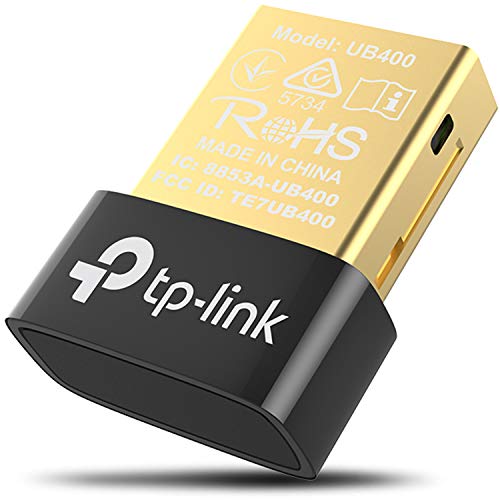
UB400 offers a nano-sized, plug-and-play Bluetooth 4.0 dongle suitable for basic connections. It supports backward compatibility with older Bluetooth versions and is ideal for lightweight setups where space is at a premium. While it does not match the speed or range of the 5.x series, UB400 provides reliable connections for standard peripherals such as mice, keyboards, and audio devices. Its small form factor makes it a discreet option for systems with limited USB room or front-panel access.
Avantree DG45: Windows-Only Bluetooth Adapter

The Avantree DG45 targets Windows-based desktops and laptops, offering compatibility with a wide range of Bluetooth devices like headphones, speakers, keyboards, and mice. It is explicitly designed for Windows environments and is not compatible with macOS, Linux, or other platforms. This adapter is positioned for users who require reliable Bluetooth device support on a Windows-only setup without broader multi-OS considerations. It focuses on straightforward pairing and dependable performance for everyday peripherals.
Buying Guide: Key Considerations and Comparisons
- Bluetooth version and range: Newer versions (5.x) typically deliver higher speeds and longer range, especially with Class 1 or enhanced antennas. If you frequently use wireless audio or need to connect multiple devices across a large room, prioritize 5.3 or 5.4 with extended range.
- Backward compatibility: Most USB adapters support older Bluetooth versions, but verify compatibility with your devices to ensure seamless pairing with keyboards, mice, and audio devices.
- Plug-and-play vs. driver requirements: Some adapters require no drivers on Windows 10/11, while others may need them for older OS versions. Consider your environment and whether driver installations are feasible.
- Antenna design and form factor: Nano dongles save USB space, but larger antennas can improve range and stability in interference-heavy environments. Choose based on your PC setup and available USB ports.
- Multi-device connectivity: If you plan to connect multiple Bluetooth peripherals simultaneously, check the adapter’s support for multiple devices and potential audio sharing limitations.
- Windows compatibility: Some products are Windows-specific. If you use other operating systems (macOS, Linux, ChromeOS), verify cross-OS compatibility or select a model explicitly designed for your platform.
- Interference and environment: Wireless interference from Wi-Fi, microwaves, or other Bluetooth devices can affect performance. A robust 5.x adapter with BLE can mitigate some interference through improved technology.
Overall, for desktop setups needing reliable, fast connections to a variety of devices, Bluetooth 5.x adapters with extended range and BLE support are the most versatile. If simple, compact convenience suffices, a nano 4.0 dongle may be adequate. For Windows-only environments with a focus on device compatibility and ease of use, Avantree’s DG45 provides a straightforward option, while the Techkey and TP-Link lines offer broader range and newer features across multiple models.