Finding a reliable Bluetooth adapter can dramatically improve how you connect keyboards, mice, headphones, and speakers to a Chromebook or other computers. The following picks are among the best-rated USB Bluetooth adapters, combining speed, range, and broad compatibility. Each product is assessed for Windows and broad device support, ensuring you can pair multiple peripherals without dropouts. The list focuses on adapters that work well with Chromebooks or Chrome OS devices when available, while also delivering solid performance on Windows machines.
| Product | Brand | Key Features |
|---|---|---|
| TP-Link UB500 | TP-Link | Bluetooth 5.4, EDR, Broad Compatibility, Plug & Play |
| UGREEN USB Bluetooth 5.3 Adapter | UGREEN | Bluetooth 5.3, 5 devices, Plug & Play (Windows only) |
| UGREEN USB Bluetooth 6.0 Adapter | UGREEN | Bluetooth 6.0, EDR & BLE, 5 devices |
| TP-Link UB500 Plus | TP-Link | Bluetooth 5.3, Long Range, EDR & BLE |
| Techkey Long Range Bluetooth 5.3 |
TP-Link UB500: Fast, Stable Bluetooth 5.4 Dongle

The UB500 is a compact Bluetooth 5.4 dongle designed to boost wireless connectivity for desktops, laptops, and compatible devices. It supports EDR and BLE, offering faster data transfer and extended range, which helps reduce lag in audio streaming and peripheral operations. While primarily marketed for Windows, its backward compatibility with older Bluetooth versions allows broad device pairing. The nano design minimizes desk clutter and supports a wide array of peripherals such as keyboards and mice, making it a solid choice for Chromebooks with USB-A ports and Windows systems alike.
UGREEN USB Bluetooth 5.3 Adapter

This UGREEN adapter updates to Bluetooth 5.3 BR+EDR technology, boosting connection stability and data transfer. It supports up to five devices simultaneously, which is helpful if you switch between a Bluetooth mouse, keyboard, headphones, and other peripherals. It is designed for Windows 11/10/8.1 with a plug-and-play setup that requires no driver installation. Note that it does not support Windows 7, Linux, or macOS, which should be considered for Chromebooks relying on Chrome OS compatibility via USB adapters.
UGREEN USB Bluetooth Adapter 6.0
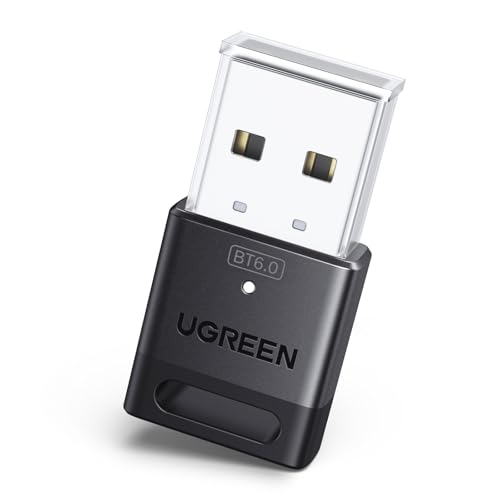
This USB Bluetooth 6.0 dongle uses EDR and BLE to deliver higher speeds and efficient power use. It supports up to five devices at once and maintains backward compatibility with Bluetooth 5.4/5.3 devices. The faster protocol and improved audio/video streaming make it a strong choice for Chromebooks and Windows PCs that demand robust performance for headphones, keyboards, and mice with minimal interference.
TP-Link UB500 Plus: Long-Range Bluetooth 5.3

The UB500 Plus extends the original UB500 with a longer range and more advanced 5.3 capabilities plus EDR. It remains backward compatible with older Bluetooth standards and promises faster speeds alongside broader coverage. The refined design and improved antenna make it suitable for Chromebooks that need reliable, wide-area Bluetooth connections for a variety of peripherals, including wireless keyboards and mice.
Techkey Long Range Bluetooth 5.3

Techkey’s Long Range Bluetooth 5.3 adapter emphasizes extended open-area range with Class 1 radio technology and a high-gain antenna. It supports dual BR/EDR and BLE operation, enabling efficient power use and quick device switching. While advertised for desktops running Windows, its range and compatibility can benefit Chromebooks that support USB peripherals through Chrome OS, especially in larger spaces or classrooms where distance matters.
Buying Guide
- Compatibility: Check whether the adapter explicitly supports Chrome OS or is known to work well with Chromebooks via USB. If not listed, look for broad Windows compatibility as a fallback and ensure Chrome OS users can try via USB ports.
- Bluetooth Version and Range: Higher versions (5.x and above) offer faster speeds, lower latency, and longer range. Consider your real-world environment (dense interference, walls, distance) when selecting between 5.3, 5.4, or 6.0.
- EDR and BLE Support: Enhanced Data Rate (EDR) and Bluetooth Low Energy (BLE) balance performance and power consumption, which is important for battery-powered peripherals.
- Multipoint and Device Count: If you plan to connect multiple devices simultaneously (mouse, keyboard, headphones, speakers), choose a model that supports 4–5 simultaneous connections without conflicts.
- Plug-and-Play vs. Driver Install: For Chromebooks, plug-and-play simplicity is ideal. For Windows PCs, verify whether driver installations are required and whether the device remains functional after updates.
- Antenna and Form Factor: A compact dongle is desk-friendly, but models with adjustable/strong antennas can improve range in larger rooms or classrooms.
- Security and Compatibility Notes: Ensure the adapter is backward compatible with older Bluetooth versions to avoid compatibility issues with legacy peripherals.
- Budget and Availability: Compare features against price and consider future-proofing with a newer Bluetooth standard if you anticipate upgrading peripherals.