Explore accessible quadcopters designed for newcomers who want stable hover, simple controls, and quality 1080P or 4K footage. This guide highlights five entry-level drones with camera features, gesture controls, and beginner-friendly modes to help you start flying with confidence.
| Product | Brand | Camera | Key Features |
|---|---|---|---|
| Drone with 1080P Camera for Beginners (Black) | Hiturbo | 1080P | Altitude Hold, One Key Start, Gesture Selfie, 3D Flips, 2 Batteries |
| Drone with 1080P Camera for Beginners and Adults (Foldable, Screen) | RELIDOL | 1080P | Built-in Controller Screen, 80° Lens, 2 Modes, 360° Flips, GPS-like features |
| Drone with 1080P Camera for Beginners (White) | Hiturbo | 1080P | Gesture Selfie, Altitude Hold, One Key Start, 3D Flips, 2 Batteries |
| PK01 Drone with Camera (Screen on Controller) | RELIDOL | 1080P | Built-in Screen, Gesture Capture, 2 Control Modes (Remote & App) |
| Drone 4K Camera Foldable (Todamu) | TODAMU | 4K | Gesture Control, 360° Obstacle Avoidance, Brushless Motors |
Best Beginner Quad Copter With 1080P Camera (Black)

Hiturbo’s entry-level drone offers a 1080P HD camera suitable for starter aerial photos and videos. It emphasizes beginner-friendly controls, including altitude hold for stable hovering, one-key takeoff/landing, and headless mode to simplify orientation. The unit supports gesture-based selfies and switches between three speed modes to grow with your skills. Flight safety is aided by a responsive control scheme and a basic emergency stop mechanism, making it a practical first drone for casual creators.
Best Beginner Quad Copter With 1080P Camera (Foldable, Screen on Controller)
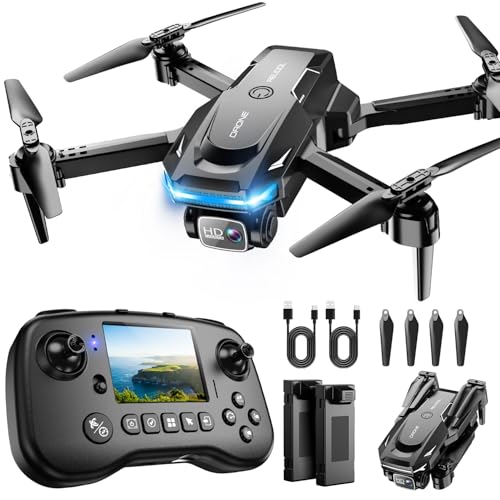
RELIDOL’s PK01 model pairs folding portability with an integrated controller screen for live view and flight status. The 1080P camera, adjustable 80° lens, and gesture-triggered photos/videos provide convenience without requiring a separate device. It supports two control modes—remote and app—and includes 360° flips and one-key takeoff/landing. Beginners benefit from safe practice guidance and wind-free indoor starts, with a note that some features may rely on app connectivity for full control.
Best Beginner 1080P Camera Drone (Foldable, Voice & Gesture)

This Hiturbo model emphasizes flexibility with a foldable design and 1080P shooting ability. It includes two batteries for extended flight sessions and features like gesture-activated photos, altitude hold, and one-key start. The write-up notes that flight times increase when using newer batteries and that more flight actions (like flips) will marginally reduce per-battery duration. A user-friendly hover system helps beginners maintain stable footage as they learn.
Best Beginner 1080P Camera Drone (White)

This white variant from Hiturbo mirrors the 1080P camera setup with gesture selfie capabilities, altitude hold, and one-key start. It emphasizes beginner-friendly flight modes and safety features like an emergency stop, making it suitable for first-time pilots who want reliable stabilization and straightforward operation while capturing aerial imagery.
Best PK01 Drone With 1080P Camera (RELIDOL)

RELIDOL’s PK01 focuses on screen-based live viewing with gesture-triggered captures and 1080P recording, plus 2 control modes—remote control and app. The built-in screen provides live footage and flight stats, helping beginners learn positioning and camera framing without needing a smartphone every stage. It’s well-suited for indoor practice and casual outdoor use, though some advanced features may require app-based control and careful practice with wind conditions.
Best 1080P Beginner Drone With 3D Flips (LEYOUDY)

LEYOUY’s entry provides a 1080P camera with a wide 120° lens and adjustable tilt for varied perspectives. It offers 3D flips, headless mode, and an altitude-hold system for easier flight control. Real-time FPV enables live viewing on a connected device, making it easier for beginners to frame shots and track flight paths as new pilots gain confidence in their maneuvers.
Best 4K Foldable Drone With Gesture Control (RELIDOL)

Todamu’s 4K camera drone introduces higher-resolution video alongside foldable portability. Gesture control simplifies selfies and captures, while 360° obstacle avoidance enhances safety during first flights. Brushless motors deliver smoother throttle changes and cooler operation under moderate use, making it a solid step up for beginners who want sharper video quality without sacrificing ease of use.
Buying Guide: Key Considerations for Beginner Drones With Cameras
- Camera quality and stabilization: Start with 1080P for simple footage; 4K is a step up but requires steadier hands and better processing. Look for altitude hold and electronic image stabilization features for stable shots.
- Flight modes and user-friendliness: Headless mode, one-key takeoff/landing, and gesture controls reduce the learning curve. Two or more speed settings help beginners grow gradually.
- Battery life and endurance: Entry-level drones commonly offer 8–25 minutes per battery. Two-battery kits extend flying sessions and allow practice with rotation charging.
- Control options: Some models include a built-in screen on the controller, while others rely on a connected smartphone or app. Consider your preferred setup and the reliability of the control link.
- Safety features: Look for emergency stop functions, propeller guards, and return-to-home or GPS-based safety (where available) to prevent loss or crashes.
- Portability and storage: Foldable designs save space and ease travel. Lightweight builds are easier to maneuver indoors but may be more susceptible to wind outdoors.
- Expandability and accessories: Consider whether the drone supports extra batteries, microSD storage, or additional flight modes that align with your goals (aerial photography, indoor practice, or outdoor exploration).
- Learning curve vs. price: Entry-level models prioritize ease over advanced features. If you expect to grow quickly, pick a drone with scalable features and good after-sales support.
These considerations help compare drones across brands and models, ensuring you select a beginner-friendly option that aligns with your first-flight objectives and comfort level.