Finding a reliable, backlit Bluetooth keyboard for Mac can enhance typing comfort, productivity, and aesthetics. This guide highlights five compatible options designed for macOS, multi-device pairing, and comfortable illumination in low-light workspaces. Each model emphasizes Mac-specific layouts, quiet keystrokes, and easy device switching, making them appealing for MacBook users, iMac setups, and iPad workflows alike.
Overview of selected products: this table summarizes the five keyboards featured below, including brand, model, and core strengths to help you compare at a glance.
| Brand | Model | Key Strengths |
|---|---|---|
| ProtoArc | KM100-A & K110-A Series | Multi-device, long battery life, macOS-optimized |
| Macally | Backlit Bluetooth Keyboard (Multiple Models) | Mac-specific layout, 3-device pairing, high visibility backlight |
| SABLUTE | Bluetooth Keyboard & Mouse Combo | 7-color backlight, full Mac layout, quiet switches |
| OMOTON | Wireless Keyboard for Mac | Dual connection options, 2.4G and Bluetooth, universal Mac fit |
| ProtoArc | K90-A / K90-8 Series | Compact, multi-device, low profile |
ProtoArc KM100-A Backlit Bluetooth Keyboard for Mac

The ProtoArc KM100-A offers a full-size Mac-inspired layout with a numeric keypad and backlit keys. It supports Bluetooth 5.1 connections to multiple devices, including MacBook Pro/Air, iPad, and iPhone. While primarily designed for macOS, the Keyboard’s Windows compatibility is limited, and older Macs may encounter compatibility issues. The keyboard supports three brightness levels for its soft white LED backlighting, enabling comfortable use in dim environments. Device switching is possible across up to three Bluetooth devices via the mode switch button, though a USB dongle is not included.
Macally Backlit Bluetooth Keyboard for Mac

This Macally keyboard emphasizes a MacOS-specific layout with 107 scissor-switch keys and 14 dedicated shortcuts to streamline Apple workflows. The backlit keys provide three brightness levels and can be turned off when not needed. It supports pairing with three Bluetooth devices and claims up to 30-foot wireless range, offering flexibility in multi-device setups such as MacBook, iMac, and iPad environments. The focus is on native Mac ergonomics and seamless integration with macOS shortcuts for daily use.
SABLUTE Multi-Device Backlit Keyboard & Mouse for Mac

The SABLUTE combo focuses on a complete Mac ecosystem with a 7-color backlit keyboard and a quiet-scissor switch keyboard paired to a matching mouse. It supports three Bluetooth devices and emphasizes macOS compatibility with the Mac layout and shortcuts. The 7-color backlight and adjustable brightness levels offer both aesthetics and practicality for late-night editing or design work. This bundle is designed for creators who want a cohesive set that looks and behaves like native Apple peripherals.
ProtoArc K110-A Aluminum Backlit Keyboard for Mac
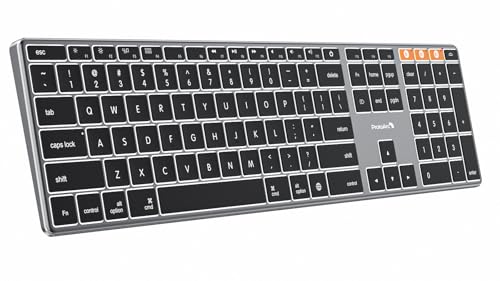
The K110-A model emphasizes an aluminum unibody design with a slim profile, presenting a premium look and feel while preserving Mac compatibility. It supports macOS 10.12 or later and Bluetooth 5.1 or higher, with the caveat that Windows compatibility is limited. The backlighting offers three brightness levels with soft white LEDs to ease eye strain. Its low-profile design aims to balance durability and aesthetics for MacBook-centric desks and iPad workflows.
OMOTON Wireless Keyboard for Mac with Dual Bluetooth

The OMOTON keyboard focuses on versatile connectivity, offering dual Bluetooth channels (BT1 and BT2) plus a 2.4G receiver option. This allows easy pairing with two devices simultaneously and a quick switch between them. It adheres to a Mac-friendly layout and supports Mac OS versions from 10.10 onward. The Type-C/USB-A compatibility adds flexibility for newer MacBooks and desktops, with a note about the USB-A and Type-C port usage order for pairing. It’s a practical choice for mixed Mac setups.
Macally Compact Backlit Keyboard for Mac

This compact Macally option specializes in space-saving design without sacrificing backlit visibility. It supports three-device pairing, enabling quick switching between MacBook, iMac, or iPad, and maintains a 30-foot wireless range. The keyboard is positioned for users who want a smaller footprint on a crowded desk while preserving Mac-focused shortcuts and compatibility. It’s a practical fit for students and professionals who travel or work in compact spaces.
Buying Guide: Key Considerations For Picking The Right Mac Backlit Keyboard
- MacOS compatibility: Ensure the keyboard is designed for macOS and supports the version you use. Some models note limited Windows compatibility or professional-grade macOS shortcuts that are unavailable on other systems.
- Backlighting quality: Compare brightness levels (low, medium, high) and color warmth. Three levels are common; seven-color options exist on some models for users who want color customization or mood lighting.
- Connection options: Decide between Bluetooth, USB dongle, or dual connectivity (Bluetooth plus 2.4G). Multi-device pairing (up to three devices) is valuable for users switching between Mac, iPad, and iPhone.
- Layout and key feel: If you prefer a Mac-native layout, check for macOS shortcuts and scissor-switch or mechanical keys. A full-size layout with a numeric keypad suits data entry, while compact designs save desk space.
- Build quality: Aluminum bodies tend to be sturdier and more premium, while plastic bodies can be lighter and more affordable. Consider thickness and weight for portability.
- Power and battery life: Rechargeable keyboards vary in battery life. Look for models with easy charging options and indicators to avoid frequent recharging.
- Compatibility caveats: Some keyboards omit Windows compatibility or label certain keys differently when used outside macOS. This is important for mixed environments or cross-platform users.
- Ergonomics and eye comfort: Ergonomic key spacing, reduced keystroke noise, and glare-free backlighting reduce fatigue during long typing sessions.
In summary, the best backlit Bluetooth keyboard for Mac depends on your device ecosystem, workspace lighting, and whether you value a premium aluminum build, compact footprint, or multi-device convenience. The options above provide a range from full-size Mac-centric layouts to compact, travel-friendly designs, all with backlighting and macOS-friendly keys.