People looking to access over-the-air television without cable often choose ATSC digital TV receivers. These tuners convert broadcast signals into 1080p or near‑HD picture quality, support recording to USB drives, and many include built‑in media players. This guide highlights five popular ATSC digital TV receivers, detailing what they do, how they connect, and what to consider before buying. The selections focus on reliability, ease of use, and compatibility with modern HDTVs, projectors, and monitors in American homes.
| Product | Brand | Key Feature |
|---|---|---|
| Digital TV Converter Box, ATSC Tv Tuner | ZJBOX | 1080p output with USB recording and playback |
| Digital Converter Box for TV, OWERSLYN 1080P | owerslyn | 3 output options, compact behind-TV design |
| ATSC Digital Converter Box with TV Tuner, Mediasonic | Mediasonic | Front display, supports USB drive up to 4TB |
| ZJBOX Digital Converter Box for TV, 1080P | ZJBOX | Two-in-one remote, HDMI and USB media playback |
| ATSC Digital TV Converter Box, Mediasonic HW135STB | Mediasonic | 1080P HDMI output with Clear QAM |
ZJBOX ATSC Digital TV Converter Box (1080P, USB Recording)
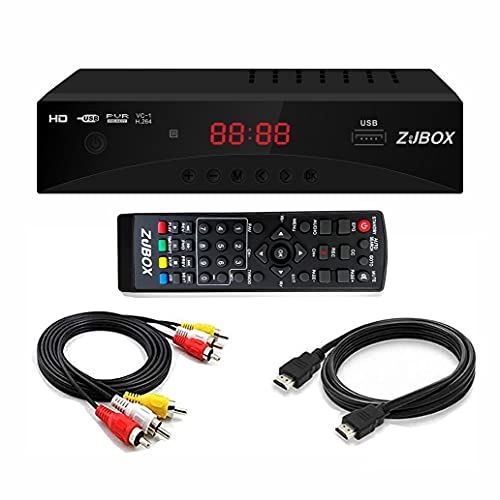
The ZJBOX ATSC digital TV converter box receives over-the-air ATSC broadcasts and outputs to analog or digital displays, including HDTVs, projectors, and computer monitors. It supports recording and playback from USB storage, allowing users to capture favorite programs for later viewing. The device includes a full HD 1080p output, with features such as auto tuning, timing start up/shut down, and a parental control option. A built‑in photo viewer and music playback expand the device’s utility beyond live TV viewing.
Key considerations: compatibility with USB drives (format and capacity may vary), the reliability of the included remote, and the ease of navigating channel lists and recording menus. For households prioritizing high‑definition playback and simple scheduling, this model provides a balanced combination of video quality and recording capability.
OWERSLYN 1080P Mini ATSC Tuner Box (2-in-1 Remote)

The OWERSLYN mini ATSC tuner box is designed for a compact setup behind a TV, offering HDMI output with 1080p resolution and multiple video outputs (HDMI, 3RCA, component). It ships with HDMI and 3RCA cables to simplify setup and includes a 2‑in‑1 remote with learning functionality, reducing the need for multiple remotes. While it is small, it provides versatile connectivity for different display types and supports convenient plug‑and‑play use. Note that CH3/CH4 channel switching is not supported on all configurations.
Key considerations: the device’s size and placement behind the TV, the availability of the learning remote, and whether your TV’s inputs align with the provided cables. For viewers who want a low‑profile, clean installation with flexible output options, this box is a strong candidate.
ZJBOX 1080P ATSC TV Tuner Box With USB Media Playback

This ZJBOX model emphasizes a hidden‑behind‑the‑TV footprint with a 5V USB power option. It offers HDMI output with 1080p support and three output interfaces (HDMI, 3RCA, and component). The included two‑in‑one remote features a learning function, enabling control over both the converter stick and the TV. The package focuses on user convenience, minimizing the number of remotes required for operation. Four programmable buttons on the remote add quick access to common actions.
Key considerations: ensure your TV or display accepts HDMI 1080p and verify that your remote system works with your TV’s IR compatibility. For audiences seeking a streamlined installation with broad output options, this unit delivers on simplicity and compatibility.
Mediasonic HW135STB ATSC Digital TV Converter Box

The Mediasonic HW135STB is part of a well‑established line for over‑the‑air digital TV. It supports 1080p HDMI output, Clear QAM for certain unencrypted cable channels, and built‑in time‑based recording features. Like other Mediasonic models, it accommodates recording to USB storage, with the potential to schedule or manually record programs. A front display helps users identify channel status while in standby mode, and the device is designed to pair with standard USB drives for media storage and playback.
Key considerations: confirm compatibility with your antenna setup and USB drive format (MBR/partitioning). The HW135STB is suitable for viewers who want reliable ATSC reception with straightforward recording and TV playback capabilities in a single box.
Buying Guide: Key Purchase Considerations And Comparisons
When choosing an ATSC digital TV receiver, consider signal compatibility, output options, and recording features. Most devices support 1080p HDMI output, but some households may need 3RCA or component connections to match older displays. Look for:
- Recording capabilities: Determine whether the device requires an external USB drive, and check for supported drive sizes and formatting (MBR vs GPT, drive capacity limits).
- Remote and user interface: A learning remote and clear OSD (on‑screen display) help simplify navigation and channel management.
- Connectivity: Ensure HDMI is supported, and verify additional outputs (3RCA, component, or RF) for compatibility with projectors or older TVs.
- Storage and performance: Some models advertise large USB storage support or even front‑panel displays for quick channel reference; these features improve usability for time‑shifting and program recording.
- Compatibility with Clear QAM: If your home setup includes unscrambled cable channels, a device with Clear QAM support can expand channel availability.
- Size and placement: Compact tuners that hide behind a TV reduce clutter, but make sure cables reach ports without strain.
- Power and remote control: Check whether the included remote works with your TV’s IR protocol, and whether the device powers via USB or an external adapter.
In step‑by‑step terms, plan to connect the antenna, attach the HDMI or alternative video outputs, insert a USB drive if you want recording, and then configure channel auto‑tuning. If you want to watch live TV and save programs for later, prioritize models that explicitly advertise recording and playback capabilities with USB storage. For ultra‑compact setups in small spaces, consider the mini OWERSLYN or ZJBOX options that are designed to tuck behind a TV and still offer robust HDMI output.