When upgrading or recovering data from older systems, pairing ATA (IDE/PATA) drives with modern SATA interfaces can save time and money. This guide highlights top converters that bridge IDE/PATA drives to SATA and USB adapters, enabling quick access, cloning, or backups. The selections emphasize compatibility, ease of use, and reliable power delivery to support multiple drives. Each product includes a brief overview of features to help you compare capabilities at a glance.
| Product | Brand | Key Benefit | Link |
|---|---|---|---|
| Unitek USB 3.0 to IDE and SATA Converter Kit | Unitek | Supports 2.5″/3.5″ SATA and IDE drives; includes power adapter | Amazon |
| IDE to SATA Hard Drive Adapter | StarTech | Driver-free setup for legacy systems; supports optical drives | Amazon |
| Unitek USB C to SATA IDE Adapter | Unitek | USB-C interface with dual-drive capability and power | Amazon |
| Cablecc IDE/PATA 40Pin Disk to SATA Adapter | cablecc | Plug-and-play, supports 40-pin IDE drives up to 1000GB | Amazon |
| YINNCEEN USB 3.0 to SATA IDE Adapter | YINNCEEN | Universal USB 3.0 to connect IDE/SATA drives with power support | Amazon |
Below you’ll find five carefully chosen products, each designed to simplify access to older drives while delivering solid performance and broad compatibility. Whether you’re cloning a drive, performing backups, or trying to salvage data, these tools offer practical solutions without requiring complex setup or driver installations.
Unitek USB 3.0 To IDE And SATA Converter Kit

The Unitek kit provides a versatile solution for connecting 2.5″ and 3.5″ SATA as well as IDE drives to a computer through USB. It features a dual-head IDE connector (40-pin and 44-pin) alongside a SATA II connector, enabling operation of up to three drives simultaneously in some configurations. Data transfer rates reach up to 5 Gbps, and the setup remains backward compatible with USB 2.0 and USB 1.1. A 12V/2A power adapter is included to ensure stable operation, particularly when multiple drives are in use. This kit is well-suited for backups, cloning tasks, and quick access to legacy drives without internal installation changes.
Key points to consider: broad drive support (SATA and IDE, 2.5″/3.5″ formats, optical drives), the need for an external power supply for stability, and USB compatibility that covers most modern systems. The included power supply helps prevent underpowered operations when reading multiple disks.
StarTech IDE To SATA Adapter Converter

This StarTech adapter focuses on adding SATA connectivity to older IDE motherboards. It is a complete hardware solution that does not require additional drivers or software, simplifying usage across various operating systems. The device supports 2.5″/3.5″/5.25″ SATA drives and accommodates optical drives (BLU-RAY/DVD/CD). It conforms to SATA I/II/III standards and is compatible with IDE/ATA interfaces across common speeds (33/66/100/133). Internal power cables are included to ensure reliable power delivery. The setup is ideal for revitalizing legacy machines or building a simple external drive access point for legacy media libraries.
Considerations include its driver-free operation, broad SATA compatibility, and optical drive support. If your workflow involves legacy PCs without modern controllers, this is a dependable, straightforward choice.
Unitek USB C To SATA 6Gbps IDE Adapter

This USB-C oriented adapter from Unitek delivers high-speed data transfer with SATA 6Gbps capabilities and backward compatibility with USB 3.0/2.0/1.1. It supports 2.5″/3.5″ SATA drives and IDE drives via a dual-head IDE connector and a SATA II port. A dedicated 12V/2A power supply is included to ensure stable operation, especially when powering multiple drives or larger 3.5″ IDE devices. The adapter supports two-drive operations simultaneously, a practical feature for cloning or copying data between drives. The package is particularly appealing for users with USB-C capable devices seeking reliable cross-compatibility with legacy storage media.
Important notes include its USB-C interface, the dual-drive capability, and the necessity of the included power adapter to maintain stability under load. This is a strong option for newer laptops or desktops that rely on USB-C connectivity.
Cablecc IDE/PATA 40Pin To SATA Converter
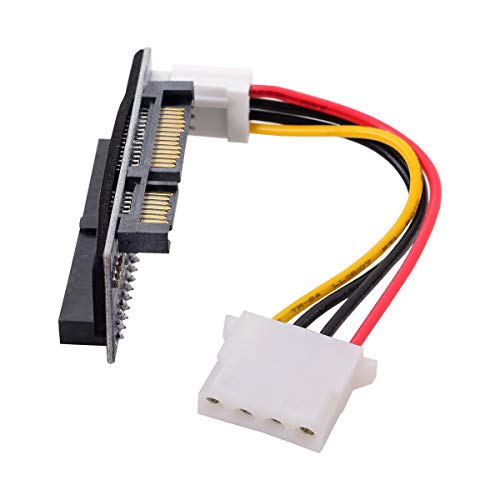
The Cablecc 40Pin Disk to SATA converter is designed for desktop IDE drives and supports 40-pin IDE drives up to 1000GB. It is a plug-and-play solution that requires no driver installation, making it suitable for straightforward data transfer tasks or quick drive testing. The board is not hot-swappable, so users should power down systems before changing drives. This option is especially valuable for users with older IDE disks that need to be accessed via a modern SATA interface without a full enclosure or external enclosure assembly.
Consider the drive sizes and the single-disk operation. For those needing minimal setup and direct drive access, this is a compact, no-fruss solution, though it lacks multi-drive simultaneous operation and driver features.
YINNCEEN USB 3.0 To SATA IDE Adapter Kit

The YINNCEEN kit offers universal hard drive access by connecting SATA or IDE drives to a computer via USB 3.0, supporting 2.5″/3.5″ drives as well as optical media like DVD-ROM and CD-ROM. It enables data duplication, backup, or transfer between drives at speeds up to 5Gbps with USB 3.0. It is compatible with Windows, macOS, and Linux, and includes power via a 12V/2A adapter. The design emphasizes plug-and-play operation and hot-swapping, alongside a read/write capable setup suitable for data recovery and large transfers. Its broad OS compatibility makes it a versatile choice for mixed environments.
When choosing this option, consider the balance of drive compatibility, power requirements, and the practical need for hot-swapping capability. For mixed OS environments, the universal compatibility can simplify workflows.
Buying Guide: ATA To SATA Converter Considerations
When selecting an ATA to SATA converter or adapter, several factors determine long-term usefulness and reliability. The following considerations cover different use cases and user needs to help you decide which product best fits your setup.
- Drive compatibility: Verify that the adapter supports your drive types (2.5″ and 3.5″ SATA, IDE/PATA, and optical drives if needed). Some models enable two drives simultaneously; others support only one at a time. Consider future needs for multiple drives or legacy media.
- Interface and speed: SATA versions (I/II/III) and USB interfaces (USB 2.0/3.0/USB-C) influence data transfer rates. For fastest transfers, look for USB 3.0 or USB-C with SATA III support and UASP where available.
- Power delivery: Many IDE/legacy drives require external power, especially 3.5″ models. Confirm that the adapter includes a reliable power supply and the correct connectors for your drives to prevent underpowering during operation.
- Plug-and-play vs. drivers: Some adapters are driver-free and work across Windows, macOS, and Linux, while others may require software. If you need broad OS compatibility, favor driver-free options.
- Portability and enclosure: Decide whether you need a compact, portable unit for field use or a larger kit designed for a desktop setup. Consider cable lengths and the ease of swapping drives.
- Drive performance expectations: While adapters enable access to drives, actual transfer speeds depend on drive health, USB controller capabilities, and system bottlenecks. Plan for realistic expectations in data transfer tasks.
- Cloning and backup features: Some devices support direct drive cloning or backup operations. If this is a priority, ensure the chosen model explicitly supports these features and check for any limitations (e.g., number of drives supported simultaneously).
- Build quality and vendor support: Look for reputable brands with positive reviews and clear warranty terms. A robust power adapter and solid connectors reduce failure risk over time.
Choosing the right ATA to SATA converter requires aligning drive types, desired transfer speeds, and how you intend to use the device. For frequent backups and drive testing across multiple machines, prioritize models with universal drive support, strong power delivery, and USB-C or USB 3.0 interfaces. If you primarily service legacy systems, a driver-free adapter with IDE to SATA conversion and optical drive support can streamline workflows without added software requirements. Always verify the product’s specifications against your actual hardware to ensure smooth operation.