Choosing the right USB-powered or USB-C docking station can simplify data backups, cloning tasks, and quick access to spare drives. This guide highlights five popular SATA and NVMe docking options, covering 2.5/3.5″ HDDs and SSDs, plus M.2 NVMe support where applicable. Each product section below links to Amazon for easy reference and features a quick visual and key specs to help you compare at a glance.
Summary of Selected Products
| Product | Drive Types | Key Feature | Notes |
|---|---|---|---|
| SABRENT EC-DFLT | 2.5″/3.5″ SATA, HDD & SSD | UASP support, fast USB 3.0 performance | Lay-flat design |
| SABRENT EC-HD2B | 2.5″/3.5″ SATA, HDD & SSD | Dual bay with duplicator | Up to 10TB drives supported |
| xiaobi M.2/NVMe & SATA Dock | M.2 NVMe + SATA 2.5″/3.5″ | Three-bay versatility, offline cloning | Fan cooling included |
| StarTech SDOCK2U33 | 2.5″/3.5″ SATA HDD/SSD | Independent bays with hot-swap | USB 3.0/5 Gbps |
| RSHTECH RSH-DS01 | 2.5″/3.5″ SATA HDD/SSD | Offline clone, UASP support | Supports up to 16TB per drive |
Each option balances cloning capabilities, drive compatibility, and ease of use. The following sections present detailed profiles to help you pick the right docking station for your workflow.
SABRENT EC-DFLT USB 3.0 Lay-Flat Docking Station

The SABRENT EC-DFLT supports both 2.5-inch and 3.5-inch SATA drives, including HDDs and SSDs. It uses USB 3.0 with SuperSpeed data transfer and offers UASP support for enhanced performance on capable host systems. Firmware updates are available from SABRENT’s site to ensure compatibility with larger capacities. This dock is designed for straightforward plug-and-play use, with a lay-flat footprint suitable for desktops with limited vertical space.
SABRENT EC-HD2B Dual Bay Docking Station

The SABRENT EC-HD2B offers two bays for 2.5″ or 3.5″ SATA drives and supports drives up to 10TB each. Its dual-bay design enables simple data transfer or cloning tasks with no driver installation required. The unit is plug-and-play, making it a practical choice for users who need quick backups or drive duplication without software dependencies.
xiaobi M.2 NVMe & SATA Docking Station
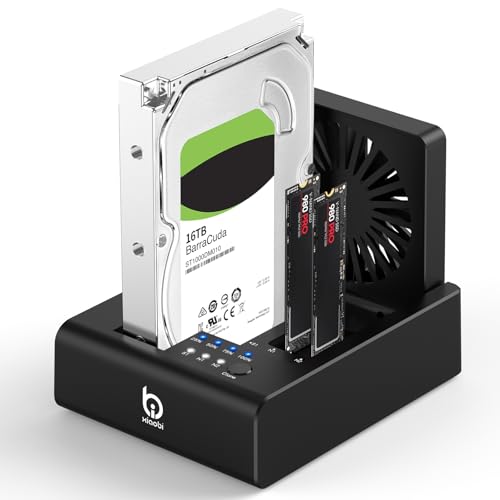
This versatile dock combines M.2 NVMe and SATA 2.5″/3.5″ support in a single chassis. It features USB-C 3.2 Gen 2, independent power and offline cloning controls, and an 80mm cooling fan for heat management during heavy workloads. The built-in One-Touch Offline Cloning streamlines data duplication without software, while the design accommodates multiple drive configurations for flexibly handling backups and migrations.
StarTech SDock2U33 Dual-Bay USB 3.0 Docking Station

The StarTech SDOCK2U33 provides a robust dual-bay experience with independent power controls per drive and USB 3.0 connectivity. It supports 2.5″ and 3.5″ SATA HDDs and SSDs, with OS-independent operation and a top-loading, tool-less design for quick drive swaps. Its 15,000-cycle insertion rating contributes to long-term durability for frequent use in backups or imaging workflows.
RSHTECH RSH-DS01 Aluminum Dock With Offline Clone

The RSHTECH RSHTECH RSH-DS01 supports 2.5″/3.5″ SATA HDDs and SSDs, with USB 3.0 and UASP-enabled transfer speeds. It offers offline cloning and a 16TB per-drive capacity, making it suitable for large backups or data migrations. The unit emphasizes a straightforward, tool-free assembly and plug-and-play use for quick setup.
GODO SAS/SATA Docking Station Adapter

The GODO adapter focuses on high-speed USB 3.0 with SAS/SATA compatibility, supporting up to 20TB capacity with a dedicated 12V/2.5A power supply. It’s a tool-free, plug-and-play solution with LED indicators to monitor drive activity. The device is designed for handling large files and archival tasks with reliable transfer performance.
StarTech Single Bay USB 3.0 Docking Station

The StarTech SDOCKU33BV provides a single-bay docking solution for 2.5″/3.5″ SATA drives, offering USB 3.0 5 Gbps performance with a top-loading design for quick drive changes. It is OS independent and supports a broad range of drive types, including M.2 SATA adapters sold separately. The unit is ideal for fast, on-demand access to a single drive for backups or imaging tasks.
Buying Guide: Key Purchase Considerations
Drive compatibility and capacity
Choose a docking station that supports your drive types (2.5″ and/or 3.5″ SATA, and at least one model with NVMe/M.2 support if needed). If you plan to clone large drives, confirm the maximum per-drive capacity and whether the unit can handle multi-terabyte disks without issues.
Cloning and duplication features
If you frequently clone drives, prefer units with built-in offline cloning and a clear, simple switch or button workflow. Confirm whether cloning is supported across different drive types (SATA to NVMe, NVMe to NVMe) and whether the target capacity must be equal or greater than the source.
Data transfer speed and interface
USB 3.0 or higher (USB 3.1/3.2 Gen 2, or USB-C) delivers the fastest transfers. UASP support can improve throughput on compatible hosts. If you work with large backups or media files, prioritize docking stations with USB-C or USB 3.2 interfaces for future-proofing.
Power and cooling considerations
Some docks include independent power supplies or cooling fans, which help maintain performance during long transfers. Ensure your setup has adequate back-panel clearance and ventilation to prevent thermal throttling in high-demand sessions.
Build, usability, and expansion
Look for tool-free, hot-swappable bays and durable inserts designed to withstand frequent drive changes. A compact, well-ventilated chassis and clearly labeled indicators can reduce operational friction in busy work environments.
Operating system and driver requirements
Most of these docking stations are OS-independent and driver-free, which simplifies deployment across Windows, macOS, and Linux. For cloning devices, ensure no reliance on installed software if you prefer a hardware-based workflow.
When selecting a docking station, align features with your typical workflow: backups, imaging, drive pooling, or rapid cloning. If portability or desktop space is a constraint, consider a compact model with dual bays and a lay-flat design. For intensive cloning or large-capacity needs, prioritizing NVMe compatibility or an additional cooling solution can boost reliability and speed.