Discover reliable stylus options that mimic Apple Pencil performance with palm rejection. This guide highlights five top alternatives, detailing compatibility, precision, charging, and practical workflow features for iPad users in the United States. Whether you’re sketching, taking notes, or annotating documents, these styluses offer responsive input and convenient palm-rejection technology to keep your writing smooth and natural.
| Product | |||
|---|---|---|---|
| Metapen Stylus for iPad | metapen | iPad models 2018–2025, Pro, Air, Mini variants | Programmable side button and low-latency tips |
| Worktisky Stylus Pen (10th Gen) | Worktisky | iPad 2018–2025 series, Pro, Air, Mini | Palm rejection, tilt sensitivity, fast charging |
| Milikilo iPad Pencil | Milikilo | iPad models 2018–2025 (various Pro/Air/Mini generations) | Battery display, tilt sensitivity, long life |
| Metapen Pencil Air8 | metapen | iPad models 2018–2025 (Pro, Air, Mini, etc.) | Fast charging, long standby, palm rejection |
| Hastraith Stylus Pen | Hastraith | iPad 2018–2025 series, Pro, Air, Mini | Tilt sensing, ultra-fast charging |
Note: All models listed are designed as Apple Pencil alternatives with palm-rejection features, compatible with a broad range of iPad generations. Please verify your exact iPad model before purchasing to ensure full compatibility.
Metapen Stylus for iPad
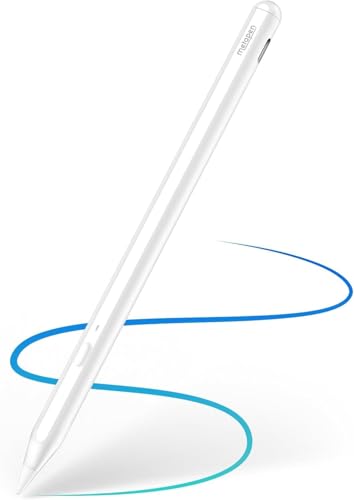
The Metapen A11 Stylus is designed for wide iPad compatibility across 2018–2025 generations, including iPad Pro, Air, and Mini lines. It features a customizable side button via the Wellnote App, enabling single, double, or triple-click actions to streamline creative workflows. The stylus promises precise, 0.1 mm pixel-level accuracy with minimal delay, supporting a variety of tips from soft to metal. While designed to pair with Apple Pencil-friendly apps like Goodnotes, Notability, Procreate, and Paint, it emphasizes an efficient, app-controlled experience. Palm rejection is part of the drawing experience, helping you rest your hand naturally on the screen.
Key compatibility notes emphasize verifying your iPad model before ordering, as earlier iPad generations (pre-2018) are not supported. The A11 chip-based signal adjuster aims to deliver smooth lines across different tips, maintaining responsiveness for both writing and drawing tasks. This makes the Metapen a strong all-around alternative for users who want programmable shortcuts and flexible tip options alongside palm rejection.
Worktisky Stylus Pen for iPad 11th/10th/9th Gen

This Worktisky model emphasizes high precision with a 1.5 mm POM tip and a lightweight design. It is compatible with iPad 2018–2025 generations, including Pro variants (M4 and earlier) and the 11″/12.9″ lines, as well as iPad Air and Mini series. The pen supports palm rejection and tilt sensitivity, enabling dynamic line thickness without requiring gloves. It includes multiple replacement tips to extend the device’s usable life. Note that there is no pressure sensitivity in this particular model, but it delivers smooth, lag-free writing and drawing. The magnetic design helps keep the stylus attached to the iPad for portability and reduced risk of loss.
For users who value a straightforward, fast-charging experience with reliable palm rejection, this option pairs well with creative apps like Procreate, Goodnotes, and Notability. The absence of pressure sensitivity is a trade-off for some users, but tilt support still allows for nuanced shading and line variation during sketching or note-taking.
Milikilo Pencil for iPad

The Milikilo iPad Pencil targets a broad compatibility window across 2018–2025 iPad generations, including Pro, Air, and Mini. It offers battery level display on the iPad and a power-saving mode, helping users track usage and extend charge cycles. Tilt sensitivity and a comfortable ergonomic grip are highlighted features, enabling artists and note-takers to vary line thickness with tilt while maintaining control during extended sessions. The stylus includes multiple notes about compatibility and an emphasis on not supporting iPhone, Android, or other platforms.
Battery management and tilt-aware drawing make this pen attractive for creators who want precise control without the Apple Pencil price tag. The long-term battery life and smart power-saving mode support steady productivity across longer sessions, from classroom notes to professional illustration work.
Metapen Pencil Air8 for iPad

The Metapen Air8 offers a 20-hour standby and up to 20 hours of continuous use on a charge, with a stated 45-minute full charge. It uses USB-C for charging and emphasizes 0.1 mm pixel-level precision, supporting smooth writing without noticeable lag. Although it highlights palm rejection and a lighter form factor than some rivals, it notes that the stylus does not support pressure or tilt sensitivity. Weighing roughly 10 grams, it is designed to minimize hand fatigue, making it suitable for long sessions of note-taking, drawing, or drafting. The magnet-assisted side attachment helps with portability, keeping the pen in reach during mobile use.
For users prioritizing battery life, rapid charging, and a light weight, the Air8 stands out. The lack of pressure sensitivity and tilt may be a limitation for some artists, but the palm rejection and continuous-use capability make it a practical option for everyday tasks on supported iPad models.
Hastraith Stylus Pen for iPad

The Hastraith stylus targets broad compatibility across iPad generations from 2018 onward, including Pro, Air, and Mini models. It features tilt sensitivity for line variation and an ultra-fast charging system via USB-C, promising a quick top-up during busy creative sessions. Tilt sensing helps artists achieve shading effects and nuanced strokes, while palm rejection allows a natural resting of the hand on the screen. The product text emphasizes compatibility and convenience, outlining a design intended to feel similar to using a traditional pencil with reduced fatigue over extended use.
As a candidate for students and professionals who need a reliable secondary pen, the Hastraith model balances a strong feature set with broad device support, enabling easy integration into digital note-taking, drawing, and annotation workflows.
Buying Guide: Key Considerations When Choosing an iPad Stylus With Palm Rejection
- Device compatibility: Confirm exact iPad model generations and iPadOS versions supported by the stylus. Some models exclude older iPad Pro or Mini configurations.
- Palm rejection performance: Look for reliable palm rejection to allow natural handwriting without accidental marks. Verify whether the feature works with the apps you use (Notes, Procreate, Goodnotes, Notability, etc.).
- Tip design and accuracy: Consider tip stiffness, tip material, and reported accuracy (e.g., 0.1 mm precision or similar). Some styluses have multiple tips for different textures and experiences.
- Input dynamics: Tilt sensitivity and pressure support influence shading and line variation. If you rely on pressure-sensitive drawing, ensure the stylus supports it or understand the trade-offs.
- Battery life and charging: Evaluate standby time, continuous-use duration, and charging speed. USB-C charging is common, while some models offer magnetic attachment or wireless charging as options.
- Additional features: Programmable side buttons, app compatibility, and magnetic attachment can improve workflow and portability. Confirm which apps are supported by the stylus for best results.
- Build and weight: Ergonomics matter for long writing or drawing sessions. Lighter styluses can reduce fatigue, while heavier designs may offer sturdier feel for some users.
- Price vs. value: Compare features such as palm rejection, tilt, battery life, and replacement tips. A slightly higher price may reflect better build quality or longer-term tip availability.
- Warranty and support: Check for manufacturer support, replacement tips, and warranty terms to ensure longevity and service if issues arise.