Choosing a single device that combines a DOCSIS 3.1 modem with a high-performance wireless router can simplify setup and reduce rental fees. The following picks represent reliable, widely compatible options aimed at American households seeking fast speeds, strong Wi‑Fi coverage, and straightforward configuration.
Summary of Selected Products
| Product | Brand | Key Feature | Link |
|---|---|---|---|
| Arris G18 Cable Modem Router Combo | ARRIS | DOCSIS 3.1, Wi‑Fi 6 AX1800, multi‑gigabit speeds | Amazon |
| Motorola MG8702 | Motorola | DOCSIS 3.1, AC3200 Wi‑Fi, Intelligent Power Boost | Amazon |
| NETGEAR Nighthawk CM3000 | NETGEAR | Mid/high‑split DOCSIS 3.1, up to 2.5 Gbps down | Amazon |
| Arris SBG8300-RB | ARRIS | DOCSIS 3.1, AC2350, 1 Gbps speeds (renewed) | Amazon |
| Motorola MG8725 | Motorola | DOCSIS 3.1, AX6000 Wi‑Fi, 2.5 Gbps Ethernet | Amazon |
Note: Compatibility varies by provider and plan. Always verify with your service provider before purchase to ensure the device will work on your network and with features like VoIP or Xfinity Voice if applicable.
Arris G18 Cable Modem Router Combo

Arris G18 combines a DOCSIS 3.1 modem with a Wi‑Fi 6 router, delivering fast downloads and robust wireless performance. It is designed to support multiple devices across streaming, gaming, and smart home equipment. The AX1800 dual‑band setup helps balance bandwidth across rooms and floors, reducing dead zones in typical American homes. It’s approved for major providers, including Comcast Xfinity, Cox, and Spectrum, making it a practical all‑in‑one option for many households.
Key features include DOCSIS 3.1 for higher speeds, improved security, and improved gaming performance. The built‑in Wi‑Fi 6 helps with wider coverage and better performance in dense device environments, such as homes with many smart devices. As with all in‑one devices, performance depends on plan speed, home layout, and device density.
Motorola MG8702
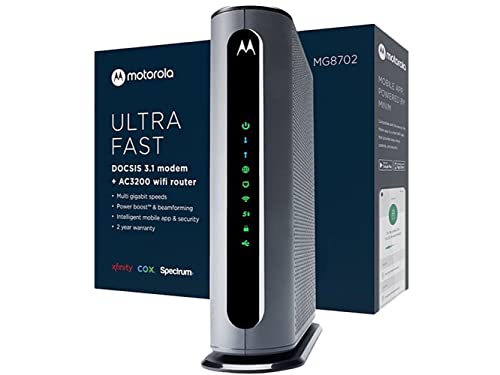
Motorola MG8702 pairs a DOCSIS 3.1 modem with a high‑speed AC3200 router and includes Power Boost and Range Boost features. This all‑in‑one device is designed to support fast plans while delivering broad coverage and strong performance for streaming, gaming, and browsing. It is approved for major providers like Comcast Xfinity, Cox, and Charter Spectrum, which helps with compatibility in many service regions. Owning the modem can reduce rental fees over time and simplify equipment management.
Performance notes emphasize low latency and robust wireless throughput. The integrated design aims to provide simple setup with automated updates to keep firmware current, though actual speeds depend on the service tier and network conditions. The model is positioned as a future‑proof option for households upgrading to DOCSIS 3.1 services.
NETGEAR Nighthawk CM3000

NETGEAR CM3000 is a mid/high‑split DOCSIS 3.1 modem designed for the fastest cable internet plans. This is a standalone modem intended to operate with a separate router. It can reach up to 2.5 Gbps downstream with 1 Gbps upstream capacity, making it suitable for future‑proofing as providers deploy faster tiers. It works with major providers worldwide, including Xfinity, Spectrum, and Cox. If you already own a router, this is a strong choice for a modular upgrade path, or pair it with a separate high‑performance router for a customized network setup.
Performance is optimized for high bandwidth tasks, with emphasis on speed, capacity, and reduced latency. Users should ensure their modem’s compatibility with their service plan and confirm whether any features like voice services are required by their provider before purchase.
Arris SBG8300-RB (Renewed)

ARRIS SBG8300‑RB offers DOCSIS 3.1 alongside AC2350 Wi‑Fi in a renewed packaging option. This combo aims to deliver reliable high‑speed connectivity while providing a budget‑friendly path to a modern home network. The device is approved for major providers such as Cox and Xfinity, among others. Potential buyers should check the renewal status and warranty terms when considering refurbished equipment to balance cost with long‑term reliability.
As a renewed product, it presents an economical route to upgrading from older DOCSIS 3.0 gear. Performance expectations align with DOCSIS 3.1 capabilities, though real‑world results depend on provider compatibility and home network layout. Setup can be straightforward, with management through the SURFboard app in many cases.
Motorola MG8725

Motorola MG8725 combines a DOCSIS 3.1 modem with an AX6000 Wi‑Fi router in a single unit. It supports multi‑gigabit speeds via a 2.5 Gbps Ethernet port and multiple 1 Gbps ports for wired devices. The AX6000 wireless technology enables robust coverage across larger homes, with features like Power Boost, Range Boost, and AnyBeam WiFi beamforming to maximize signal reach. This model is designed for households seeking gaming and streaming performance with lower latency and strong reliability.
As with other all‑in‑one units, actual performance depends on your service plan, home layout, and device density. Compatibility with provider networks should be confirmed prior to purchase, especially for plans nearing 2 Gbps or higher. Firmware updates and feature support can affect long‑term usability and security.
Buying Guide: Key Purchase Considerations
When selecting an all‑in‑one DOCSIS 3.1 modem and wireless router, several factors influence performance and value. This guide covers core considerations from multiple angles:
- Internet plan speeds: Match the device to your plan. DOCSIS 3.1 handles multi‑gigabit speeds, but your actual throughputs depend on your provider’s tier and plan limits.
- Wi‑Fi coverage and standards: Look for Wi‑Fi 6 (802.11ax) for better capacity in busy homes. Consider the number of antennas, beamforming, and mesh capabilities if you have multiple floors or many devices.
- Provider compatibility: Ensure the modem/router is approved for your service provider. Some features (like VoIP) require additional configurations or separate equipment.
- Network topology: Decide between a single integrated unit or modular setup with a separate modem and router. A separate router can be upgraded independently as technology advances.
- Future proofing: Devices with 2.5 Gbps Ethernet or multi‑Gig ports prepare you for upcoming increases in plan speeds and connected devices.
- Security and updates: Seek devices that receive regular firmware updates and support features like automatic security patches and guest networks for visitor devices.
- Warranty and support: Check manufacturer warranties and return policies, especially for refurbished or renewed units.
- Budget and ownership: Owning a modem/router saves rental fees but requires upfront investment and ongoing maintenance, while renting spreads costs but offers service and support through the provider.
Practical considerations include room layout for optimal Wi‑Fi, potential need for a mesh system in large or multi‑story homes, and whether voice services are required by the provider. By evaluating your home’s size, device density, and internet usage patterns, you can choose a unit that balances speed, coverage, and cost effectively.