Expanding your TV’s input options often means converting legacy signals to modern HDMI or routing HDMI to older displays. Below are five reliable adapters that help you add or convert inputs, so you can enjoy older players, consoles, and streaming devices on current screens. Each section highlights how the product works, setup tips, and key considerations.
| Product | Brand | Type |
|---|---|---|
| Tengchi RCA to HDMI Converter | Tengchi | Composite to HDMI |
| GINGIN AV to HDMI Converter | GINGIN | AV to HDMI |
| HDSUNWSTD Multi-Input HDMI Converter | HDSUNWSTD | VGA/AV/YPbPr/HDMI to HDMI |
| GINGIN RCA to HDMI Converter (3.3ft Cables Included) | GINGIN | RCA to HDMI |
| Setuact HDMI to AV Converter | Setuact | HDMI to RCA |
Tengchi RCA to HDMI Converter
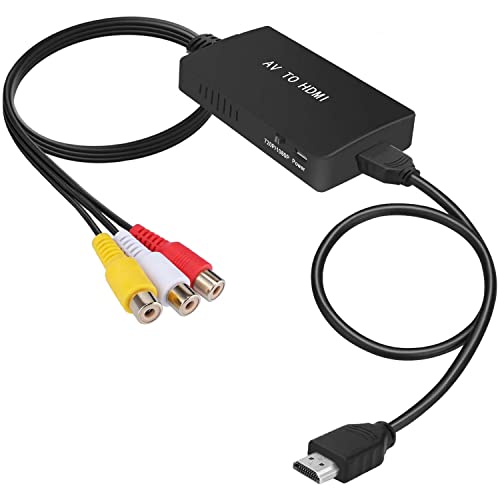
The Tengchi RCA to HDMI Converter translates analog composite input to HDMI 1080p output, enabling older devices to display on a modern HDTV or monitor. It uses a single RCA input (Yellow for video, White and Red for audio) and provides an HDMI 1.3 1080p output. The device is plug-and-play and requires external USB power (included USB cable). It does not support 3D or 4K, and it cannot convert HDMI to AV. For best results, ensure the USB power is connected to a 5V supply during use and use devices with standard composite outputs.
GINGIN AV to HDMI Converter

The GINGIN AV to HDMI Converter converts standard composite AV input (Yellow, White, Red) to HDMI output at 720p or 1080p (60Hz). It’s a plug-and-play device and is powered via a USB 5V cable (included). Note that it transfers AV to HDMI only and cannot convert HDMI to AV. It’s widely compatible with legacy consoles and players like PS1/PS2/PS3, Xbox, N64, Wii, STB, VHS/VCR, and DVD players; ensure your PS2 is set to RGB output for best results.
HDSUNWSTD Multi-Input HDMI Converter

This multi-functional HDMI converter accepts eight inputs including VGA, AV, YPbPr Component, and HDMI, consolidating them to one HDMI output. It also provides COAXIAL and SPDIF outputs. The EDID manipulation feature supports various surround sound formats (2CH, 5.1/6CH, 7.1/8CH) for 1080p displays. It’s a flexible choice when you want to connect multiple legacy sources to a single HDMI-equipped TV or projector, though setup may require selecting the correct input and ensuring compatible power.
GINGIN RCA to HDMI Converter With Cables

GINGIN’s RCA to HDMI Converter converts analog composite (Yellow, White, Red) to HDMI at 720p/1080p. It’s designed for quick use without drivers and includes a 3.3-foot RCA/HDMI cable bundle for convenience. It’s ideal for reviving old devices like PS1/PS2/PS3, N64, Wii, VHS/VCR, DVD players, and other AV sources, transforming them into a modern HDMI display. Use the USB power cable provided to ensure stable operation during use.
Dingsun HDMI to RCA Converter

The Dingsun HDMI to RCA Converter translates HDMI video and L/R audio into an older RCA (AV) format for TVs that lack HDMI inputs. It supports HDMI input resolutions of 480i, 480P, 720P, 1080i, and 1080P, but does not support 4K or 3D. It’s compatible with devices like DVD players, Blu-ray, Roku, Chromecast, and Apple TV. This is useful when you want to connect a modern device to an older TV that only has RCA inputs.
Setuact HDMI To AV Converter

The Setuact HDMI to AV Converter turns HDMI signals into RCA (AV) composite output, suitable for older RCA TVs, monitors, or projectors. It supports HDMI input resolutions up to 1080P and offers NTSC/PAL output formats with a practical N/P switch to match regional standards. It’s designed primarily for modern streaming devices and gaming consoles to display on legacy displays. Note the device only converts HDMI to AV and does not work in the reverse direction.
Buying Guide: Key Considerations For Adding HDMI Inputs To A TV
When choosing adapters to add HDMI inputs or bridge legacy devices to modern displays, consider these factors:
- Input and output formats: Match your source device’s signal (composite, VGA, HDMI) with the adapter’s supported outputs (HDMI, RCA, etc.).
- Resolution support: If you’re using older devices, 720p or 1080p is typically sufficient. Avoid adapters that require 4K upscaling for non-4K sources.
- Power requirements: Many AV-to-HDMI adapters require USB power. Ensure you have a suitable USB power source handy.
- Bi-directionality: Some converters are one-way. Confirm whether you need AV to HDMI or HDMI to AV and choose accordingly.
- Audio handling: Some adapters support embedded audio in HDMI or require a separate audio path for analog inputs. Check if USB audio or stereo outputs meet your setup.
- Device compatibility: Compatibility varies by device type (PS/PS2/PS3, Xbox, DVD/Blu-ray players, Roku, Apple TV, etc.). Verify your exact model and console compatibility.
- Edid and display compatibility: Certain adapters offer EDID or format switching to improve compatibility with different displays. This can matter for color/black-and-white issues.
- Reliability and latency: If you’re gaming, low latency matters. Some adapters introduce slight delay; review user feedback for real-world performance.
In practice, a combination of AV-to-HDMI converters and HDMI-to-AV converters covers most scenarios. If you want to integrate a wider array of legacy devices to a single HDMI TV, a multi-input device that aggregates signals can simplify installation. For those targeting a simple, plug-and-play upgrade, stick to proven models with clear power requirements and documented compatibility. Always test with your specific devices to confirm signal quality and audio synchronization.