The 90 mm (92x92x25 mm) PC fans strike a balance between compact size and solid airflow, making them a common choice for small form factor builds, NAS devices, and compact desktops. This guide highlights five strong 90 mm options, focusing on noise levels, static pressure, PWM control, and durability. Each section explains the standout features and typical use cases to help you pick the right fan for your system.
Product Summary
| Product | Brand | Key Strengths | Typical Use |
|---|---|---|---|
| Noctua NF-A9 PWM | Noctua | Premium quiet operation, Flow Acceleration Channels, advanced acoustics | HTPCs, small form factor builds, NAS replacements |
| ARCTIC P9 Max | ARCTIC | Wide PWM range, high static pressure, excellent efficiency | Heat sinks, radiators, compact builds needing strong cooling |
| 2 Pack 90mm 92mm 12V DC Fan | PANO-MOUNTS | Two-pack value, simple 2-wire/3-pin, adjustable voltage | General case cooling, budget upgrades |
| Thermalright TL-P9W-S | Thermalright | ARGB lighting, PWM control, solid cooling | ARGB-backed builds, chassis cooling with style |
| Thermalright TL-9015 | Thermalright | Slim 15 mm height, high speed, low noise dampening | Slim cases, CPU coolers, compact stacks |
Noctua NF-A9 PWM: Premium Quiet 92mm Fan

The Noctua NF-A9 PWM is designed for quiet, reliable cooling in compact systems. Its 92x92x25 mm form factor fits a wide range of mini-ITX and small form factor cases, and the 4-pin PWM control enables smooth, motherboard-driven speed adjustments. With a maximum speed around 2000 RPM and noise as low as about 22.8 dB(A), it targets whisper-quiet operation while maintaining strong airflow for heat-sensitive components. The A-series frame supports Flow Acceleration Channels and Advanced Acoustic Optimisation, which contribute to improved cooling efficiency at lower noise levels. This makes it a popular choice for 9 cm CPU coolers, HTPC builds, and NAS replacements where quiet operation is a priority.
Key specs to consider include long MTBF ratings (Noctua quotes >150,000 hours for this line) and a compact footprint that minimizes vibration. While it carries a premium price, the performance-to-noise ratio is a core selling point for users prioritizing acoustic comfort without sacrificing thermal headroom.
ARCTIC P9 Max: High-Performance 92 mm PWM Fan

The ARCTIC P9 Max offers a broad PWM range (450-4300 RPM) and is built for high static pressure, making it suitable for radiators and heatsinks where airflow must overcome resistance. Its wide range allows quiet operation at low loads and robust cooling when demand rises. The 4-pin connector supports motherboard PWM control, with a smooth transition from idle to full speed. A fluid dynamic bearing contributes to a long service life and consistent performance, helping preserve reliability in compact builds where space is at a premium. The P9 Max is a strong choice for users looking to maximize cooling efficiency in dense, constrained environments.
Considerations include the balance between static pressure and noise at higher speeds. If your build frequently operates under load, the P9 Max maintains cooling headroom without a dramatic noise increase, especially compared with lower-RPM fans.
2 Pack 90mm 92mm 12V DC Fans by PANO-MOUNTS
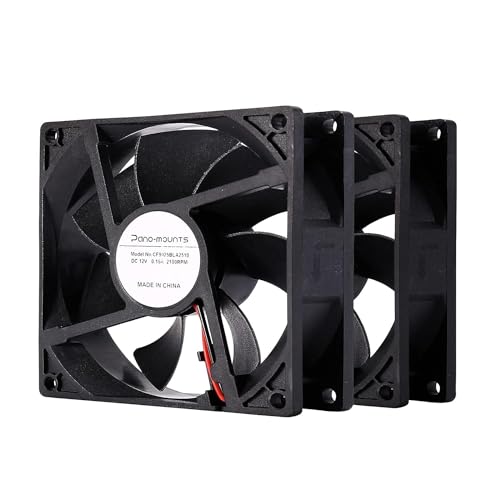
This two-pack option from PANO-MOUNTS provides a budget-friendly avenue for upgrading or replacing 90 mm fans in multiple systems. Each fan runs at 12V with a simple two-wire/three-pin configuration, making installation straightforward even for beginners. The baseline 2000 RPM speed and around 32 CFM airflow offer practical cooling for general PC cases, incubators, or NAS devices where cost efficiency matters. The set includes protective wiring design to prevent misconnection, with a safety feature that prevents damage if wired incorrectly—the fan just won’t start rather than risking a short.
With a flexible approach to voltage (7-12V), you can tune performance to your noise tolerance. This makes the PANO-MOUNTS option appealing to users seeking a two-fan solution for balanced airflow and acoustic behavior across a small system or rack-mounted device.
Thermalright TL-P9W-S CPU Fan: Quiet ARGB 92mm

The Thermalright TL-P9W-S combines quiet operation with ARGB aesthetics and strong cooling potential. This 92x92x25 mm fan uses PWM for automatic speed control based on motherboard sensor data, with a maximum around 2200 RPM. Vibration damping pads reduce fan-induced noise, contributing to a smoother acoustic profile while maintaining adequate air movement. The ARGB feature adds vibrant lighting that can be synchronized with other components via the motherboard’s ARGB header, offering a style-forward option for visually dynamic builds in compact enclosures.
When evaluating this fan, consider the importance of ARGB in your build and whether the aesthetic integration justifies potential trade-offs in acoustics at peak speed. For users who value both performance and visuals, the TL-P9W-S provides a compelling combination.
Thermalright TL-9015: Slim 92mm PWM Fan

The Thermalright TL-9015 is designed for slim desktops and compact setups where height is limited. With a 15 mm profile, it can fit into tighter spaces while still delivering strong performance up to 2700 RPM. It uses PWM control to adjust speed in response to temperature, preserving a balance between cooling and noise. Four vibration-damping pads help minimize noise, and the airflow rating supports efficient cooling of CPUs and other high-heat areas in compact cases. ARGB lighting is also present in this model family, offering visual flair without sacrificing essential cooling capabilities.
When selecting the TL-9015, users should weigh the need for a slim footprint against maximum airflow requirements. For compact builds that demand aggressive cooling without requiring a taller fan, the TL-9015 is a strong option.
Buying Guide: Key Purchase Considerations For 90 Mm Fans
- Noise versus performance: Higher RPM generally increases airflow but also noise. Look for fans with PWM control to automatically adapt to system temperature.
- Static pressure: Fans with higher static pressure perform better on heatsinks and radiators where airflow meets resistance. This is crucial for compact builds with dense component layouts.
- Durability and bearings: Fluid dynamic bearings or high-quality sleeve bearings tend to last longer and operate more quietly at variable speeds.
- Size compatibility: Confirm the exact dimensions (92x92x25 mm vs. 92x92x15 mm) to ensure fitment in your case or heatsink assembly.
- Power allocation: Most 90 mm fans use 12V; some allow voltage adjustments (7-12V) to tailor airflow and noise. Ensure your motherboard or a fan controller can support PWM or voltage control as needed.
- Noise profiles and use case: HTPCs and media centers prioritize low noise, while gaming or workstation builds may tolerate higher noise for better cooling. Consider your environment and tolerance.
- Aesthetics: ARGB-enabled fans add visual appeal; ensure your motherboard has ARGB headers and software support if you want synchronized lighting.
- Reliability and warranty: Reputable brands with long MTBF ratings can reduce maintenance costs in the long run. Check warranty terms when available.
In summary, Noctua’s NF-A9 PWM delivers quiet, refined cooling with premium acoustics, ideal for silent small-form-factor systems. ARCTIC’s P9 Max balances wide speed control and high static pressure for versatile cooling on radiators and heat sinks. The PANO-MOUNTS two-pack provides budget-friendly replacements with straightforward wiring and voltage-tuning options. Thermalright’s TL-P9W-S and TL-9015 lines offer ARGB light options and slim-profile configurations for aesthetically focused or space-constrained builds. Each fan excels in different environments, so align your choice with case size, noise tolerance, and cooling demand.