The demand for 8-pin power connectors in Dell Optiplex and related workstations has led to a variety of 24-pin to 8-pin ATX adapter cables. This article highlights five reliable options, explaining how they connect standard ATX PSUs to Dell motherboards, along with practical considerations for selection and use. Each featured product is selected for compatibility, build quality, and clear documentation to help IT professionals and hobbyists alike.
Summary of chosen products
| Product | Brand | Compatibility Highlights | Approximate Length |
|---|---|---|---|
| IESTAR Main Power 24 pin to 8 pin ATX Power Supply Adapter Cable | IESTAR | Dell Optiplex 3020/7020/9020, Precision T1700, H61/H81/Q77/Q87/B75/A75/Q75/Q65 | Standard 12 inch |
| COMeap 24 Pin to 8 Pin ATX PSU Power Adapter Cable | COMeap | Optiplex 3020/3040/3046/5040/7020/7040/7060/9020, T1700 family, similar Dell systems | 12 inches (30 cm) |
| DKARDU 24 Pin to 8 Pin ATX Adapter Cable | DKARDU | Dell Optiplex 3020/7020/9020, 2014+ Dell motherboards with 8-pin need | 12 inches |
| ALINNA 24 Pin to 8 Pin ATX Power Supply Adapter Cable | ALINNA | Optiplex 3020/7020/9020, Precision T1700; 12VSB booster support | 12 inches |
| JOYJOM Main Power ATX 24 Pin to 8 Pin Adapter | JOYJOM | Dell H61/H81/Q77/Q87/B75/A75/Q75/Q65 family | 12 inches |
Note: All products listed are compatible with standard 24-pin ATX PSUs converted to the Dell 8-pin motherboard connectors, with a focus on Dell Optiplex systems and similar configurations. When selecting a cable, ensure your motherboard’s 8-pin specification matches the product’s intended Dell-compatible pinout and that your PSU can deliver adequate wattage for your setup.
IESTAR 24-Pin To 8-Pin ATX Adapter

The IESTAR adapter converts a standard 24-pin ATX power supply connector to an 8-pin Dell motherboard connector. It is designed for Dell Optiplex models and Precision workstations in the 3000 to 1700 series. Key features include a straightforward 24-pin to 8-pin conversion and compatibility with common Dell motherboard families such as H61, H81, Q77, Q87, B75, A75, Q65, and Q75. The build uses standard 18 AWG wiring suitable for typical mid-range power supplies, and the 12VSB booster support ensures proper standby voltage alignment in compatible systems. This adapter focuses on reliable Dell-specific pinout adaptation without modifying the PSU itself.
COMeap 24 Pin To 8 Pin ATX PSU Adapter Cable

The COMeap adapter is designed to bridge a standard 24-pin ATX PSU with Dell 8-pin motherboards commonly used in Optiplex 3020/3040/3046/5040/7020/7040/7060/9020 lines. It includes a 24P end for the PSU and an 8P end for the Dell motherboard, providing a practical solution for upgrading or repurposing PSUs in Dell systems. The product listing emphasizes broad compatibility, including PowerEdge and Vostro configurations in 2014+ models, making it a versatile option for mixed-use environments. The included 12-inch cable length supports typical desktop layouts.
DKARDU 24 Pin To 8 Pin ATX Adapter Cable

The DKARDU adapter focuses on converting the 24-pin ATX connector to the required 8-pin Dell motherboard interface. It mentions a booster feature via a 12VSB panel to meet the +12VSB requirement when using Dell systems, which can help stabilize standby operation in certain configurations. The product advertises compatibility with Dell Optiplex 3020/7020/9020 and similar models, addressing both mainstream and server-oriented Dell machines. The build emphasizes 18 AWG wire and reliable connector construction for durable daily use.
JOYJOM Main Power ATX 24 Pin To 8 Pin Adapter

The JOYJOM adapter converts a standard 24-pin ATX power supply connector to the 8-pin Dell motherboard connector. It lists compatibility with Dell Optiplex 3020/7020/9020 and related H61/H81/Q77/Q87/B75/A75/Q75/Q65 families. The description highlights the ability to run Dell-specific power connections without modifying the PSU, supporting everyday upgrades or repairs. A 12-inch length provides flexible placement options in typical desktop chassis, while the construction aims for stable electrical contact and reliable long-term use.
AsLiL 24-Pin To 8-Pin 18AWG ATX Adapter Cable

AsLiL offers a 24-pin to 8-pin adapter suitable for Optiplex 3020/7020/9020 and related Dell platforms. The included 12VSB booster feature aligns with the Dell standby voltage requirements, ensuring compatibility with systems that require an elevated +12VSB level from the standard PSU. The adapter uses 18 AWG copper-core wiring and is designed for 12-inch cable runs, enabling straightforward installation in typical desk setups. It targets a broad Dell 8-pin ecosystem and emphasizes easy plug-and-play operation.
Daier 24 Pin To 8 Pin ATX Adapter Cable
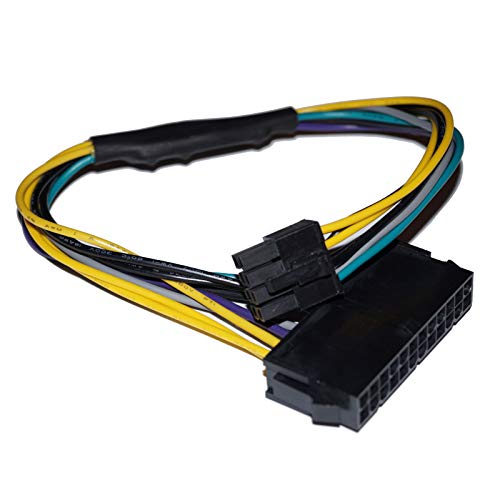
Daier markets a 24-pin to 8-pin adapter aimed at Dell Optiplex 3020/7020/9020 configurations. The cable allows a standard ATX PSU to power Dell motherboards that require an 8-pin interface, including 8-pin compatibility with various Dell families such as H61/H81/Q77/Q87/B75/A75/Q75/Q65. The listing emphasizes a straightforward conversion without PSU modification and offers a practical option for upgrading or repurposing older PSUs in Dell systems. A standard 12-inch length supports common desktop layouts.
Buying Guide: Key Considerations For 8-Pin ATX Adapters
- Compatibility: Confirm the motherboard’s 8-pin connector type and the PSU’s ability to deliver sufficient current on the +12V rail. Look for adapters specifically noting Dell Optiplex and Precision compatibility, as these pinouts vary by model.
- Wiring and gauge: Favor adapters with 18 AWG copper core wires for durability and low resistance. Longer cables may introduce minor voltage drop, so match length to your build needs.
- Voltage boosting features: Some adapters include a 12VSB booster panel to support +12VSB requirements of Dell systems. Verify whether your target motherboard and PSU combination benefits from this feature.
- Cable length: Most listings show about 12 inches. If your case layout demands longer cables, ensure the product length supports safe routing without tension on connectors.
- Build quality and connectors: Inspect connector housings and mating surfaces for a snug fit to prevent loose connections. A robust connector reduces the risk of intermittent power loss.
- Power supply compatibility: These adapters do not increase PSU wattage; ensure your existing PSU can handle the total system load after conversion. Consider upgrading the PSU if required for higher-end components.
- Thermal and safety considerations: Use adapters from reputable brands with proper insulation and strain relief to minimize heat buildup and electrical hazards in dense PC builds.
- Warranty and documentation: Look for clear installation notes and warranty coverage. Thorough documentation helps ensure correct pinout alignment and safe use.
- Non-Dell systems: While primarily designed for Dell boards, some adapters may work with other brands that use an 8-pin Dell-compatible scheme. Verify compatibility before mixing brands.
When choosing an adapter, consider your current hardware goal—whether repurposing a PSU, upgrading an old Dell system, or building a compact workstation. A well-matched 24-to-8-pin adapter maintains reliable power delivery and reduces the risk of boot or stability issues associated with mismatched connectors. Always follow manufacturer guidance and verify pinouts visually before powering on a system for the first time.