Exploring the 7 inch HD LCD landscape reveals compact, feature-rich screens ideal for Raspberry Pi projects, portable monitors, or secondary displays. This guide highlights five strong options, comparing display quality, touch capabilities, compatibility, and power management. Each entry links to Amazon for quick access and purchase, while the buying guide helps you choose based on use case, connectivity, and performance needs.
| Product | Brand | Display | Resolution |
|---|---|---|---|
| Hosyond 7 Inch IPS LCD Touch Screen Display Panel | Hosyond | 7″ IPS, Capacitive | 1024×600 (max software 1920×1080) |
| NLIEOPDA 7 Inches Touchscreen Monitor | NLIEOPDA | 7″ IPS, Dual Speakers | 1024×600 |
| iPistBit 7 Inch LCD Touch Screen | iPistBit | 7″ IPS, Capacitive | 1024×600 (up to 1920×1080 configurable) |
| Hosyond 7 Inch IPS LCD Touch Screen Raspberry Pi Monitor | Hosyond | 7″ IPS, Capacitive | 1024×600 |
| ELECROW 7 Inch 1024×600 Touchscreen for Raspberry Pi | ELECROW | 7″ IPS, Capacitive | 1024×600 (configurable to 1920×1080) |
Hosyond 7 Inch IPS LCD Touch Screen Display Panel

The Hosyond 7 Inch IPS LCD display combines a 7-inch touch-capable screen with 1024×600 hardware resolution. It supports software configuration up to 1920×1080 and includes a capacitive touch panel with up to five-point touch. A notable feature is independent backlight control, enabling power savings by turning off the backlight when not needed. It is designed for Raspberry Pi models (Pi 5/4/3/2/Zero W) and is also suitable as a general HDMI monitor for a PC setup, making it versatile for embedded projects or as a secondary display.
NLIEOPDA 7 Inches Touchscreen Monitor

NLIEOPDA’s 7-inch touchscreen is built around an IPS panel with 1024×600 resolution and a bright 300 cd/m² output, delivering a vivid image and wide viewing angles. The monitor emphasizes broad compatibility, supporting Windows 7/8/10/11, various Raspberry Pi models, and other SBC boards like Banana Pi and Orca Pi. It’s positioned as a DIY-friendly display suitable for 3D printers, smart homes, and central control panels. Dual speakers provide integrated audio, adding convenience for multimedia applications and alert systems in embedded setups.
iPistBit 7 Inch LCD Touch Screen

The iPistBit display emphasizes portability and ease of use, featuring a 7-inch, 1024×600 IPS panel with up to 1920×1080 configurable resolution via software. It offers broad compatibility with Raspberry Pi 5/4/3B+/3B/2B+ and other mini PCs, plus a universal HDMI input for use with PCs and game consoles. The device supports up to five-point touch and includes backlight control to conserve power. No driver installation is required—connect via Micro USB for power and HDMI for video, and it’s ready to go.
Hosyond 7 Inch IPS LCD Touch Screen Raspberry Pi Monitor

This Hosyond model emphasizes a complete Raspberry Pi-friendly package, including a 7-inch capacitive touch screen with a 1024×600 resolution and IPS panel for color accuracy. It’s designed to pair with Raspberry Pi boards (5/4/3) and is compatible with Banana Pi and other mini PCs. A built-in dial adjusts volume and brightness, and the system supports 5-point touch. It also includes audio output via built-in speakers or a 3.5 mm jack, offering a robust multimedia experience in compact form factors.
ELECROW 7 Inch 1024×600 Touchscreen for Raspberry Pi
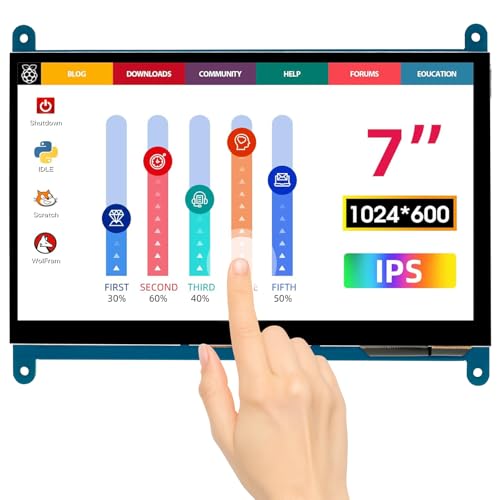
ELECROW’s 7-inch touchscreen is designed for Raspberry Pi and other mini computers, offering a 1024×600 IPS display with broad compatibility that includes Pi 5/4/3B+/3B and Banana Pi. The display supports a wide 170-degree viewing angle and uses a capacitive touchscreen with up to five-point touch. It can be configured to 1920×1080 through software and requires no driver installation—just HDMI for video and USB for touch control. The screen supports Windows 11/10/8/7 and is suitable for portable projects or compact desktop setups.
Buying Guide
Key considerations when choosing a 7 inch HD LCD display for DIY projects include display quality, touch capability, and system compatibility. For Rasberry Pi users, ensuring Pi compatibility (Pi 5/4/3/2/Zero W) is essential, as is support for the correct power setup and backlight control to optimize battery life in portable projects. If you need high color fidelity for media or visual design, look for IPS panels with at least 300 cd/m² brightness and wide viewing angles to avoid color distortion when viewed from off-center angles.
Touch capability matters if you expect interactive projects. Five-point capacitive touch is common and sufficient for most DIY tasks, though some models offer multi-user or more specialized touch features. Driver-free operation is a strong plus, enabling quick plug-and-play use with no additional software. Backlight control is another practical feature; being able to turn off the backlight helps extend usage on battery-powered setups.
Connectivity is crucial. Most 7-inch LCDs in this category use HDMI for video and USB or micro USB for power and touch control. If you plan to run the display as a secondary PC monitor, confirm that the board or computer supports the maximum configurable resolution (often up to 1920×1080 via software). Consider whether built-in speakers are necessary, or if you’ll rely on external audio solutions.
Durability and installation options also influence choice. Tempered glass touch panels, sturdy brackets, and the ability to stand or mount the screen are useful in workshops or living spaces. For portable projects, weight, compactness, and power efficiency become deciding factors. Finally, consider after-sale support and availability of replacement cables or adapters to safeguard long-term usability.
In summary, the five highlighted models offer a balance of portability, touch responsiveness, and Pi-friendly design. If you prioritize brightness and color accuracy, NLIEOPDA and ELECROW provide strong IPS panels with robust viewing angles. For quick, driver-free setup, iPistBit and Hosyond variants emphasize plug-and-play enjoyment. If your setup demands integrated audio, look for models with built-in speakers and audio jacks. The best pick depends on your project’s requirements for portability, display quality, and ease of integration.