Finding a reliable 60 FPS web camera helps ensure crisp, fluid video for streaming, video calls, and online collaboration. This guide highlights five high-performing models ideal for American setups, balancing frame rate, image quality, and smart features. All options support smooth 60 FPS playback where advertised and pair well with common conferencing apps and streaming software. Below you’ll find product sections with quick spec highlights, a concise buying guide, and a comparison to help you choose the best 60 FPS webcam for your needs.
Summary Table of Selected Products
- OBSбот Meet 2-4K (Space Grey) — 60 FPS, AI framing, HDR, dual mics
- Logitech MX Brio Ultra HD 4K — 1080p at 60 FPS, 4K at 30 FPS, AI enhancements
- Razer Kiyo V2 X — 1440p at 60 FPS, auto-framing, wide lens
- NEWORK 4K Webcam — 4K at 30 FPS, 1080p at 60 FPS, PDAF
- OBSBOT Meet 2-4K (Aurora Green) — 60 FPS, AI framing, lightweight design
OBSBOt Meet 2-4K Webcam (Cloud White)

The OBSBOT Meet 2-4K combines a compact form with AI-driven framing and autofocus designed for streaming, meetings, and gaming. Its 1/2″ sensor improves light capture for brighter, clearer images, especially in mixed lighting. The camera supports 60 FPS, HDR, and dual microphones, making it a strong choice for fast-paced content and collaborative sessions.
Key features include AI framing to keep subjects centered during action, lightweight construction for portable setups, and gesture control for hands-free operation. It is positioned as a versatile option for esports, live streams, and remote work environments that benefit from stable framing and crisp video at 60 FPS.
Logitech MX Brio Ultra HD 4K WebCam

Logitech’s MX Brio brings Ultra HD 4K when needed and sharp 1080p at 60 FPS for smooth streaming and video calls. The camera features a sensor with larger individual pixels for better light handling and AI-assisted enhancements, including auto-exposure, white balance, and noise reduction. Compatibility with major video conferencing platforms ensures a reliable experience across Teams, Zoom, and Google Meet. The combination of 4K capture and crisp 60 FPS 1080p makes it suitable for both professional broadcasts and everyday meetings.
Razer Kiyo V2 X Streaming Webcam
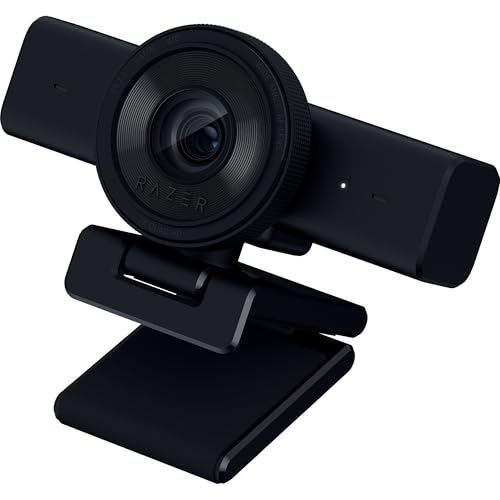
The Razer Kiyo V2 X focuses on fluid 1440p at 60 FPS with fast autofocus and a wide-angle lens suited for gaming, streaming, and calls. The built-in microphone supports basic audio capture, while software customization through Razer Synapse allows easy color and lighting tuning. Its autofocus, video quality, and user-friendly controls make it a practical pick for streamers who want reliable performance without complex setup.
NEWORK 4K Webcam with Sony Sensor

NEWORK’s 4K webcam delivers ultra HD 4K at 30 FPS and 1080p at 60 FPS, providing flexibility for high-resolution streams or smooth 1080p video in fast-moving scenes. It uses dual autofocus (PDAF and CDAF) to maintain sharp focus as participants move. A privacy cover and a 79-degree wide-angle view help protect privacy while offering a broad field of view for group calls or classroom-style gatherings. The camera is plug-and-play for quick setup on PC or Mac.
OBSBOt Meet 2-4K Webcam (Aurora Green)

Another color variant of the OBSBOT Meet 2-4K, the Aurora Green edition shares the same 60 FPS capability, AI framing, and lightweight design. Its 1/2″ sensor and HDR contribute to better low-light performance and richer color. This variant is positioned for users who want to customize their setup with a distinctive color while retaining pro-level imaging and tracking features for streaming or meetings.
Buying Guide: Key Purchase Considerations
- Frame rate and resolution: Prioritize models offering 60 FPS at 1080p or 4K at 30 FPS, depending on your primary use. For live streaming and gaming, 1080p60 often balances performance with bandwidth and processing needs.
- Sensor size and light handling: Larger sensors improve low-light performance and dynamic range. Look for 1/2″ sensors or larger when possible.
- Autofocus and AI features: Auto-framing, AI tracking, and smart exposure help maintain sharp subjects during movement and variable lighting.
- Privacy and security: Privacy covers and physical shutters reduce risk when not in use. Consider software that supports privacy protections and trusted connections.
- Audio quality: Dual mics or high-quality built-in mics can reduce the need for external audio gear in many settings. Check for noise reduction features.
- Compatibility and software: Ensure compatibility with your preferred platforms (Zoom, Teams, OBS, etc.) and that drivers or companion software are regularly updated.
- Mounting and portability: For travel or compact desks, a lightweight, flexible mount or tripod support is advantageous.
- Price and value: Compare features such as AI tracking, HDR, and sensor size against price to determine overall value for your needs.
In summary, the best 60 FPS webcams combine smooth motion, strong autofocus, and practical features like privacy covers and easy software integration. Depending on whether you prioritize streaming, meetings, or versatile work-from-home use, any of these five options can provide reliable, high-quality video at 60 FPS across common communication platforms.