Choosing the right 6-pin to 8-pin or 6-pin to other PCIe power adapters can help you power modern video cards when native connectors are insufficient. This guide reviews practical adapters designed to convert or extend PCIe power connections, offering options for various setups—from standard PCIe GPUs to Mac Pro configurations. Each product below includes key features and compatibility considerations to help you select a reliable solution for stable GPU performance.
Summary of selected products
| Product | Brand | Connector Type | Typical Use |
|---|---|---|---|
| YiKaiEn 6 Pin Female to 8 Pin Male Cable | YiKaiEn | 6-Pin Female to 8-Pin Male | Power GPUs needing 8-pin from a 6-pin source |
| StarTech 6in LP4 to 6 Pin PCI Express Cable | StarTech.com | LP4 to PCIe 6-Pin | Convert LP4 to 6-pin PCIe for PCIe cards |
| Cable Matters 2-Pack 6 Pin to 8 Pin PCIe Cable | Cable Matters | 6-Pin to 8-Pin PCIe | Connect a GPU with 8-pin need from a 6-pin PSU |
| YiKaiEn 4 Pin Molex to 6 Pin GPU Cable | YiKaiEn | Molex 4-Pin to 6-Pin PCIe | Power GPUs from Molex rails |
| J&D 6 Pin PCIe to 2×4 Pin Molex Adapter | J&D | 6-Pin PCIe to 2×4-Pin Molex | Multi-Molex power support for GPUs |
StarTech 6in LP4 to 6 Pin PCI Express Cable

The StarTech adapter converts a standard LP4 (Molex 4-pin) internal power connector to a 6-pin PCIe power connector. It is designed for use with PCI Express video cards and helps eliminate the need to upgrade a power supply solely to obtain a 6-pin PCIe connection. It is a practical choice when your PSU provides LP4 connectors but the GPU requires an additional 6-pin PCIe input. Consider power ratings and whether your existing PSU can safely support the GPU with this adaptation.
Cable Matters 2-Pack 6 Pin to 8 Pin PCIe Cable

These 4-inch cables provide a simple 6-pin to 8-pin PCIe power path, enabling GPUs that demand an 8-pin connector to be powered from a 6-pin source. They come in a two-pack, offering flexibility for multi-GPU builds or common spares. When using these adapters, verify that your PSU has sufficient overall power and amperage on the 6-pin rails to avoid overloading the supply. The cables are compact for tidy cable management inside cases.
YiKaiEn 4 Pin Molex to 6 Pin PCIe Cable

This YiKaiEn adapter uses a Molex 4-pin connection to power a 6-pin PCIe GPU. It enables older power supplies with Molex rails to support modern GPUs requiring extra PCIe power. It is suitable for systems where motherboard-powered PCIe connectors are insufficient. Users should confirm their PSU’s total wattage and rail amperage to maintain stable GPU operation during load.
J&D 6 Pin PCIe to 2×4 Pin Molex Adapter

This J&D two-pack converts a 6-pin PCIe connector to two Molex 4-pin connections, expanding power options for GPUs that can be powered from Molex rails. The 6-inch length aids internal routing in compact builds. The design emphasizes PVC jacket durability and copper shielding for longevity. When employing Molex-based adapters, ensure the PSU can reliably supply the combined current required by the GPU, especially under gaming or benchmarking loads.
zdyCGTime 2 Pack 15-Pin SATA to 8 Pin PCIe Adapter
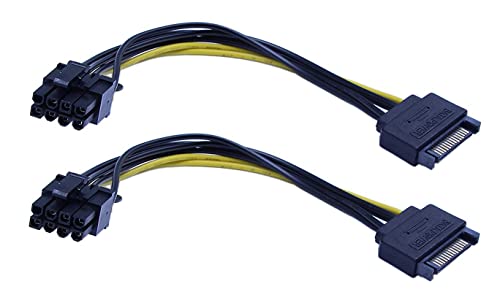
This edition converts a SATA power connector to an 8-pin PCIe (6+2) that can power graphics cards with higher current demands. The 20 cm (8 inch) length provides flexible placement inside the PC case. While SATA-based adapters can be convenient, they rely on the SATA power rail’s capability; verify total system load and avoid overtaxing the PSU to prevent instability or overheating.
E-outstanding 2-Pack 6-Pin to 8-Pin PCIe Cable

These 6-pin to 8-pin PCIe power adapters are designed to expand GPU power supply from a 6-pin source. They are built with 1007-18 AWG tinned copper conductors for reliable current delivery. The adapters help convert 6-pin outputs to 8-pin inputs to meet higher GPU power requirements. Assess your GPU power draw and ensure your PSU provides adequate wattage and rail current to maintain stability during peak loads.
Buying Guide: Key Considerations When Choosing 6-Pin PCIe Adapters
- Compatibility: Confirm whether the adapter matches your PSU connectors and GPU’s required power input. Some GPUs require multiple 6-pin or 8-pin inputs, and mismatches can cause instability or damage.
- Power capability: Check the total wattage and rail amperage available on your PSU. Adapters do not create additional power; they re-route existing capacity. Overloading rails can lead to shutdowns or component damage.
- Cable length and routing: Short cables help with clean builds but may limit placement. Longer options offer flexibility but can introduce minor voltage drop; balance length with case layout.
- Build quality: Look for adapters with durable jackets, quality copper conductors, and proper shielding to reduce resistance and heat. Cheap or flimsy cables may degrade over time.
- Safety and labeling: Prefer products with clear labeling of pin assignments and safety certifications. Avoid unverified components in critical GPU power paths.
- Compatibility with Mac Pro or specialty systems: Some adapters are targeted at Mac Pro power configurations or non-standard motherboard layouts. Verify intended use and supported models.
- Future-proofing: If you anticipate upgrading GPUs, consider adapters that support higher power demands or multiple GPU setups, ensuring you have adequate PSU headroom.
- Installation caution: When connecting adapters, power down the system and unplug the PSU. Improper connections can cause short circuits or motherboard damage.
In summary, 6-pin adapters and related PCIe power cables provide adaptable solutions for powering GPUs in a range of builds. Evaluate each option based on your PSU’s capabilities, GPU power requirements, and case layout to select a safe, effective solution for steady graphics performance.