For users needing large, expandable external storage, a 5-bay enclosure with eSATA can deliver impressive throughput and flexible configurations. This guide reviews top 5-bay options that support eSATA and USB connections, offering RAID, JBOD, and hot-swappable trays where available. Each choice focuses on multi-drive expansion, cooling, and reliable performance for desktop workstations and home labs.
| Product | Bay Capacity | Interface | RAID | Approx. Drive Count |
|---|---|---|---|---|
| Yottamaster VN500C3 | 5 bays | USB-C, USB 3.1 Gen2, eSATA | JBOD, RAID 0/1/5 | 5 |
| Syba SY-ENC50122 | 5 bays | USB 3.0, eSATA | RAID 0/1/3/5/10, JBOD | 5 |
| Syba SY-ENC50118 | 5 bays | USB 3.0, eSATA | RAID 0/1/3/5/10, JBOD | 5 |
| IO CREST 8-Bay Enclosure | 8 bays | USB 3.0, eSATA | JBOD, RAID | 8 |
| Oyen Digital Mobius 5-Bay | 5 bays | USB 3.0, eSATA, FW800 | JBOD, RAID 0/1/3/5/10 | 5 |
Note: Specifications vary by model. Always verify current compatibility and drive limits on the manufacturer’s site or product listing before purchase.
Yottamaster VN500C3 5-Bay USB-C DAS Enclosure

The Yottamaster VN500C3 is a 5-bay USB-C DAS enclosure designed for high-capacity storage with 10Gbps potential through USB 3.1 Gen2. It supports up to 110TB across five drives when using 22TB disks, and up to 330TB in a daisy-chained setup. It supports 2.5″ and 3.5″ SATA drives and offers plug-and-play compatibility for Mac and Windows. The unit emphasizes fast data transfer and enterprise-scale capacity, making it suitable for multimedia editing, backups, and archival storage.
Syba SY-ENC50122 5 Bay RAID External Enclosure
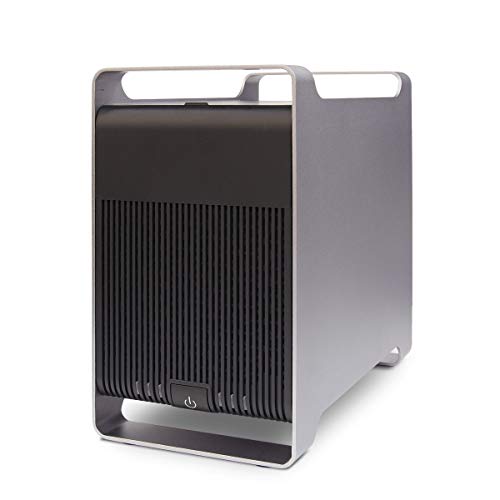
Syba SY-ENC50122 provides five-bay RAID-capable external storage with USB 3.0 and eSATA interfaces. It supports a wide range of RAID modes including RAID 0, 1, 3, 5, 10, and JBOD, plus SPAN. The eSATA interface uses a port multiplier for accessing multiple drives, enabling higher storage density in a single enclosure. It’s designed for users needing scalable performance for video editing, large backups, and scientific data storage.
Syba SY-ENC50118 5 Bay Tool-Less Tray Enclosure

Syba SY-ENC50118 adds tool-less tray functionality for five drives, facilitating quick drive swaps and maintenance. It supports both 2.5″ and 3.5″ SATA drives up to 24TB per drive and provides RAID levels including 0, 1, 3, 5, 10, SPAN, and JBOD. The enclosure relies on a port multiplier for simultaneous access to multiple disks via eSATA, and connects via USB 3.0 for broad compatibility with modern PCs and laptops.
Oyen Digital Mobius 5-Bay FW800/eSATA/USB 3.0 RAID Enclosure

The Oyen Digital Mobius 5-Bay enclosure combines multiple interface options, including USB 3.0, FireWire 800, and eSATA. It supports up to five 3.5″ SATA drives with JBOD and RAID 0/1/3/5/10 configurations. This model appeals to users needing legacy FireWire support alongside modern USB and eSATA connectivity, suitable for legacy media libraries, backups, and archival storage with flexible RAID options.
Buying Guide: Key Considerations For 5-Bay eSATA Enclosures
- Drive compatibility and bays: Confirm drive sizes (2.5″ vs 3.5″), the maximum per-drive capacity, and total bay count. Some enclosures officially support up to 24TB per drive, while others target up to 22TB per drive. If you plan to mix SSDs and HDDs, ensure the enclosure handles mixed media.
- Interface options: USB 3.0/3.1 Gen 2, USB-C, and eSATA are common. Consider whether you need daisy-chaining via USB-C or 10Gbps performance from USB 3.x Gen2. Check compatibility with your host system (Windows, macOS, or Linux).
- RAID and data protection: Decide whether you need RAID for redundancy (RAID 1, 5, 10) or JBOD for independent disks. Verify if the enclosure supports JBOD, Span, or custom configurations, and whether it has a hardware RAID controller or relies on software RAID on host.
- Cooling and thermal management: Multi-drive enclosures generate heat. Look for built-in fans or forced convection designs, especially in 5-bay models, to extend drive life and maintain stable performance under load.
- Power and cabling: Check whether the unit requires an external power supply or can be powered via DC connection from the enclosure. Ensure you have adequate cables for eSATA or USB connections and any daisy-chaining needs.
- Build quality and expandability: Aluminum or metal enclosures typically dissipate heat better. Tool-less trays simplify drive swapping in mixed environments, but ensure the trays securely hold drives during vibration and transport.
- Software and compatibility notes: Some enclosures offer bundled software or rely on host OS for RAID management. Research user reviews for reliability, noise levels, and drive compatibility, especially with 4K video editing or large backups.
- Daisy chaining and expansion planning: If you anticipate growing storage, review the supported daisy-chain topology and whether the host controller can handle multiple high-speed links without bottlenecks.
- Price-to-performance: Compare the total storage capacity, drive compatibility, features, and cooling against the price. For critical workflows, prioritize reliability and cooling over marginal gains in theoretical throughput.