Front-panel 5.25-inch USB hubs and card readers expand a desktop PC’s connectivity, enabling fast USB-C and USB-A access, plus convenient storage and media slots. This guide highlights top 5 options, compares what they offer, and helps you choose the right front-panel upgrade for your build. All selections support standard 5.25″ bays and integrate with common headers on modern motherboards.
Summary Of Selected Products
| Product | Ports & Features | Key Benefit |
|---|---|---|
| GRAUGEAR 5.25 Inch Internal USB Hub Front Panel | 1x USB-C 20Gbps, 2x USB-A 5Gbps, 2x 2.5″ bays | |
| GRAUGEAR 5.25” Front Panel USB Hub (SD/microSD) | USB-C Gen2x2 20Gbps, SD/microSD reader, 2x 2.5″ bays | |
| Kingwin KW525-3U3CR Front Bay | USB 3.0, USB-C, SD/micro SD readers, eSATA | |
| ineo 5.25″ Front Panel USB 3.2 Gen 2 Hub (3570II) | 2x USB-C, 2x USB-A, 1x USB 3.0, audio jacks | |
| 5.25 Inch Front Panel USB C Hub by Bewinner | 2x USB-A, 1x USB-C, 19-pin & 20-pin headers |
GRAUGEAR 5.25 Inch Internal USB Hub Front Panel

Case-ready front-panel expansion provides a USB-C 20Gbps port alongside two USB-A ports. It also features dual 2.5″ drive bays for easy SSD/HDD upgrades. The USB-C port’s 20Gbps speed is contingent on motherboard support for USB 3.2 Gen2x2 A-Key connections via 20-pin headers, ensuring compatibility with high-speed devices when supported.
GRAUGEAR 5.25” Front Panel USB Hub (SD/microSD)

This front panel adds a Gen2x2 USB-C port and dual USB-A ports for fast data transfers, plus built-in SD and microSD card readers. It’s designed to fit standard 5.25″ bays and aligns with Windows systems, delivering a compact, integrated solution for cameras, drones, and other media devices that benefit from quick card access.
Kingwin KW525-3U3CR Front Bay
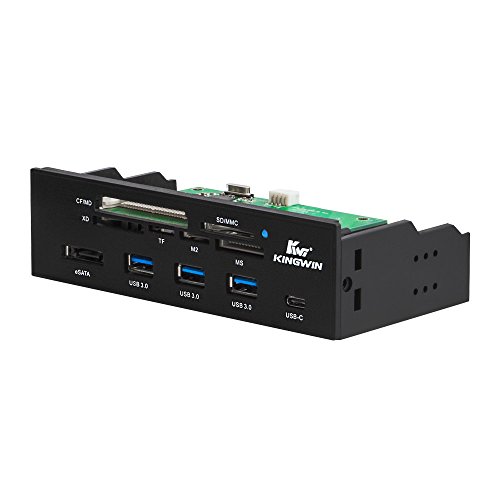
Kingwin offers a complete front-panel hub with USB 3.0, USB-C, and multiple card reader options in a 5.25″ bay. It emphasizes a comprehensive set of front-access ports, including a USB-C slot and SD card readers, making it suitable for users who want varied, quick-access peripherals without opening the PC.
ineo 5.25″ Front Panel USB 3.2 Gen 2 Hub

This model supplies two USB-C ports and two USB-A ports along with two USB 3.0 interfaces and audio connections. It emphasizes high-speed USB 3.2 Gen 2×2 capabilities, broad compatibility with Windows, macOS, and Linux, and a design aimed at simplifying multi-port peripheral connectivity for desktop PCs.
Bewinner 5.25 Inch Front Panel USB C Hub

This 5.25-inch hub focuses on USB-C Gen2x2 and USB-A ports within a single front-panel design. It provides 2x USB-A and 1x USB-C, leveraging 20-pin and 19-pin headers where available. It’s positioned as an accessible option for adding high-speed USB-C connectivity to any standard PC case bay.
Buying Guide: Key Purchase Considerations
- Port speed and standards: Look for USB-C Gen 2×2 (20Gbps) support if you plan to move very large files quickly. Many front panels offer USB-C and USB-A ports with varying Gen speeds; confirm that your motherboard supports the required headers (20-pin USB 3.2 Gen 2×2 Key-A and the 19-pin USB3.0 headers).
- Header compatibility: Ensure the panel uses standard 20-pin USB 3.2 Key-A and 19-pin USB 3.0 headers. Some older motherboards may require adapters. Check your motherboard manual for header availability and color-coding to avoid mismatches.
- Drive bay capacity: If you want to install 2.5″ SSDs/HDDs, verify the product supports dual 2.5″ bays and whether tool-free installation is offered for ease of upgrade.
- Card reader functionality: Several options add SD/microSD readers. If you regularly handle media from cameras or drones, prioritize models with SD/microSD slots and note any special format compatibility (SD/UHS-I, etc.).
- Audio and extra ports: Some panels include audio jacks or microcontroller-supported audio features. If you use the front panel for quick audio checks or mic input, assess these features for compatibility with your setup.
- Form factor and aesthetics: All products fit a standard 5.25″ bay, but front-panel depth, mounting hardware, and cable routing can affect clearance behind the drive bay. Plan cable management for clean builds.
- Software and OS compatibility: While most are plug-and-play, verify compatibility with Windows versions, macOS, or Linux if you use non-Windows environments or need driver-free operation.
- Future-proofing: If you anticipate upgrading to higher-speed drives or new peripherals, pick a panel that supports Gen 2×2 USB-C and provides additional USB-A ports or card readers for expandability.
These front-panel solutions target users who want immediate front-of-case access to fast USB-C and USB-A connections, plus optional storage or card reading capabilities. Each option balances speed, drive support, and ease of installation to fit common 5.25″ bay configurations in American desktop setups.