For PC and Mac setups, external 4K Blu-ray drives offer convenient, plug‑and‑play movie and data playback. This guide highlights five top options and explains what to consider when buying, from 4K playback support to cross‑platform compatibility and power needs. Whether you’re building a home theater PC or upgrading a laptop, these drives deliver reliable optical performance with modern USB interfaces.
| Product | Brand | Key Benefit | USB Type |
|---|---|---|---|
| XRTFORE External 4k Blu Ray Drive | XRTFORE | Slim portable external drive with carry case | USB 3.0 |
| ASUS BW-16D1X-U | ASUS | 16x Blu-ray writing with BDXL support | USB 3.0 |
| archgon Premium Aluminum External USB 3.0 UHD 4K Blu-Ray Writer | SEA TECH | Premium external UHD drive for PC and Mac | USB 3.0 |
| Dainty External Blu-ray Drive | Dainty | USB 3.0 & Type-C with multiple card slots | USB 3.0 / USB-C |
| XRTFORE External 4k Blu Ray Drive (Aluminum) | XRTFORE | Ultra portable with protective carry case | USB 3.0 |
Note: This article focuses on external 4K Blu-ray solutions and compatible PC/Mac use cases. Some models may require third‑party software for UHD Blu-ray playback on macOS or Windows. Always verify system requirements before purchasing.
XRTFORE External 4K Blu Ray Drive With Carry Case

This external drive supports 4K Blu-ray playback and data transfer with USB 3.0 connectivity. It includes a protective carry case for transport and a slim profile suitable for laptops. Compatibility notes indicate it works with Windows and Mac systems, including MacBook Pro/Air and iMac, but may not function with tablets, phones, or Chromebooks. Pre‑use guidance recommends driver and software checks to ensure UHD BD playback is supported.
ASUS BW-16D1X-U Blu-ray Drive
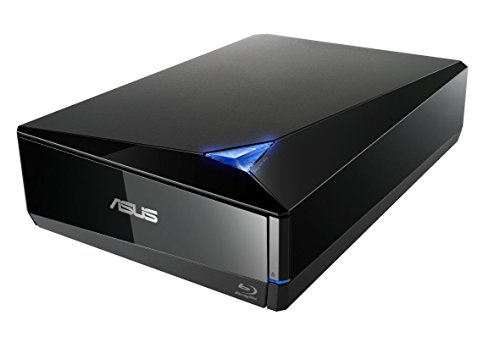
ASUS’s BW-16D1X-U offers 16x Blu-ray writing with BDXL support, enabling large data storage on BD‑XL discs up to 128 GB. It supports both Windows and macOS via USB 3.0 and is designed for high‑volume data tasks and media creation. The device is ideal for users who need fast Blu-ray burning and wide compatibility across common desktop and laptop setups. It is not a dedicated 4K BD playback device on its own; software playback capabilities vary by OS and installed players.
archgon Premium Aluminum 4K Blu-ray Writer

This premium external UHD drive from archgon (SEA TECH brand) emphasizes aluminum construction and full external Blu-ray writer capabilities. It supports playback of Blu-ray, DVD, and CD on Windows with appropriate third‑party software, and Mac systems can read and write standard Blu-ray content. Note that UHD BD playback on Macs may require specific software and may not be supported for UHD 4K Blu-ray discs without compatible tooling.
Dainty External Blu-ray Drive

Dainty’s external Blu-ray drive supports both USB 3.0 and Type-C, with card slots for SD/TF. It is designed to read and write BD/DVD/CD discs and can be powered by the USB data cable, optionally using an extra USB power source for stable playback. The device’s six USB expansion ports can also function as a hub, accommodating data transfer and peripheral connectivity in a compact form factor.
XRTFORE External 4K Blu-ray Drive (Aluminum)

This aluminum variant from XRTFORE emphasizes a rugged, portable build with a carry case for safe transport. It mirrors the standard external 4K Blu-ray drive features, including USB 3.0 connectivity and wide cross‑platform compatibility (Windows and macOS). The pre‑use advice highlights UI tools and preferred software for UHD BD playback on different operating systems.
Buying Guide: Key Purchase Considerations
- Compatibility: Verify that the drive supports your computer OS (Windows or macOS) and that UHD Blu-ray playback requires compatible software. Some Macs necessitate third‑party players for 4K BD content.
- Connection Type: USB 3.0 is common and fast enough for most drives, but USB-C or combo USB 3.0/Type-C options improve compatibility with newer laptops and desktops.
- 4K UHD Playback vs. Burning: Some models emphasize 4K playback, others excel at Blu-ray/DVD writing. If you need both, prioritize drives labeled as UHD 4K compatible and note software requirements.
- Power Delivery: External drives may be bus‑powered via USB or require an additional power source. If you work with power‑hungry discs or long sessions, ensure stable power delivery.
- Build and Portability: Aluminum enclosures and carry cases protect the drive during travel. Slim designs fit into laptop bags, while rugged builds suit mobile workspaces.
- Software Ecosystem: For Mac users, confirm recommended players for UHD BD playback. Windows users often rely on third‑party software to unlock full disc functionality.
- Card and Peripheral Hubs: Some drives include SD/TF slots and multiple USB ports, serving as a small hub. This can simplify data transfer for photographers and videographers.
- Warranty and Support: Check manufacturer warranties and availability of replacement cables or parts, especially for portable drives used on the go.
These considerations help compare models across features such as 4K readiness, write speeds, drive durability, and cross‑platform support. External drives are valuable for adding optical capabilities to laptops that lack built‑in disc drives, but ensure your setup aligns with the software needed for UHD Blu-ray playback and disc authoring tasks.