If you need more USB 3.0 ports without sacrificing speed or reliability, a 4-port USB 3.0 hub is an ideal solution for laptops, desktops, and gaming rigs. These hubs expand a single USB port into multiple connections for mice, keyboards, flash drives, printers, and external hard drives. This guide highlights five top-rated options, detailing features, compatibility, and practical considerations to help you choose a hub that fits your setup and workflow.
| Product | Brand | Key Benefit | Data Speed |
|---|---|---|---|
| Anker USB Hub 4 Ports | Anker | Reliable 4-port expansion | Up to 5 Gbps |
| Acer USB Hub 4 Ports | Acer | Solid build with 4 ports | Up to 5 Gbps |
| ANYPLUS USB 3.0 Hub | ANYPLUS | Portable, versatile | Up to 5 Gbps |
| VIENON 4-Port USB 3.0 Hub | VIENON | High-speed data, simple expandability | Up to 5 Gbps |
| Atolla 4-Port USB 3.0 Hub | Atolla | Smart charging option and switches | Up to 5 Gbps |
Note: Each entry below references product-specific connections and feature highlights. All listed hubs support USB 3.0 data transfer rates (5 Gbps) and are suitable for data-heavy peripherals. Some models include charging capabilities or power management options. Always verify power requirements for connected devices to ensure stable performance.
Anker 4-Port USB Hub—Reliable USB 3.0 Expansion

The Anker USB Hub 4 Ports delivers a dependable way to add four USB 3.0 ports to a laptop, PC, or desktop. Boasting the Anker Advantage, it leverages widely trusted technology and reliability, with data transfer speeds up to 5Gbps. It’s ideal for laptops or all-in-one computers where a single USB port must support multiple peripherals such as printers, flash drives, and mice. Note that this hub is designed for data transfer and expansion, not device charging, making it a solid choice for performance-focused setups where charging is handled separately.
Designed for straightforward plug-and-play use, this hub requires no drivers. It helps maximize productivity by turning one USB port into a compact four-port hub, enabling quick access to essential devices. The compact form factor makes it suitable for travel or desk setups with limited space. Buyers seeking a simple, fast, and dependable USB 3.0 expansion will find this Anker option compelling for everyday computing tasks.
Acer USB Hub 4 Ports—4 USB 3.0 Ports With Power Port Option

The Acer USB Hub expands your device with four USB 3.0 ports and is designed for easy, driver-free operation. Its GL3510-based architecture supports fast data transfers up to 5Gbps, enabling quick file moves for multimedia, documents, and large backups. A notable feature is the optional 5V USB-C power port, which helps stabilize connections when using power-hungry peripherals or multiple devices simultaneously. This makes it a strong option for users who occasionally need extra power support during heavy workloads.
Plug-and-play convenience, minimal heat generation, and a focus on reliable performance define this hub. It’s well-suited for desktops, laptops, and workstations that require dependable USB expansion without the complexity of driver installations or bursty performance issues. For users needing to balance speed with power supply flexibility, Acer provides a practical, affordable alternative.
ANYPLUS USB 3.0 Hub—Portable 4-Port Expander

The ANYPLUS 4-port USB 3.0 hub offers a compact, portable expansion option designed for laptops, desktops, and other devices. It supports four devices working simultaneously with decent thermal management to prevent overheating during extended use. While it is not suitable for charging devices at full speed, it excels as a reliable data transfer hub for peripherals like flash drives, keyboards, mice, and printers. The hub is compatible with multiple operating systems, including Windows, macOS, Linux, and Chrome OS, making it a versatile choice for mixed environments.
Its plug-and-play setup emphasizes ease of use, with no drivers required. The emphasis on broad compatibility and stable 5Gbps performance makes it a practical pick for students, professionals, and gamers who need quick peripheral access without software overhead or additional power requirements for basic devices.
VIENON 4-Port USB 3.0 Hub—Rotatable, USB-C Power In

VIENON’s 4-Port USB 3.0 hub expands a single USB port into four, with a design that minimizes heat buildup and supports simultaneous operation of all ports. A notable feature is the USB-C power and data port, enabling 5V power delivery to the hub and providing data transfer capabilities through a connected USB-C device. It’s compatible with a wide range of devices, from laptops and desktops to consoles and mobile hard drives, making it a flexible choice for mixed-use environments. This hub is clearly aimed at users who need extra ports without compromising performance.
While not intended for charging through the USB-C port for power output, the hub still delivers fast data transfer rates and broad compatibility. Its ease of use, combined with the convenience of a Type-C power input, makes it attractive for Mac users, gamers, and professionals who juggle multiple peripherals during work or play.
VIENON 4-Port USB 3.0 Hub With PD-in 5W USB-C Port

This VIENON model expands one USB port into four, including a PD-in USB-C port that supports 5V power input for the hub. It provides 4 ports for simultaneous use, with a focus on stable performance and reliable data transfer up to 5Gbps. The added USB-C PD input helps accommodate power-hungry devices during data transfers or when operating multiple peripherals. It’s particularly useful for users with USB-C laptops or desktops that lack sufficient USB-A ports, enabling a clean, compact expansion solution.
The hub emphasizes broad applicability across Mac, PC, and other ecosystems, including in-car or travel use cases. As with other hubs, it does not support charging output via the USB-C port; instead, it augments power delivery to the hub itself to sustain performance, which is sufficient for typical USB 3.0 peripherals.
Atolla 4-Port USB 3.0 Hub With Individual Switches
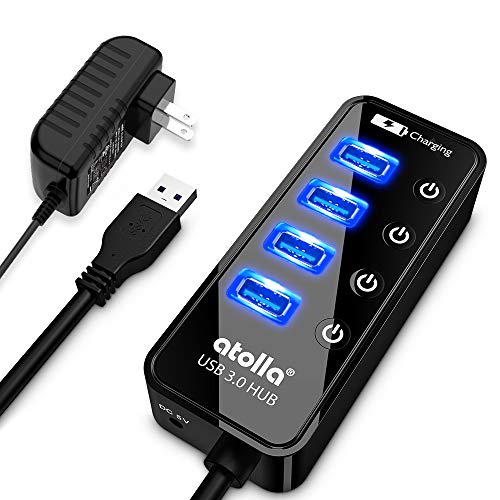
The Atolla 4-Port USB 3.0 Hub combines rapid data transfer with individual on/off switches for each port, giving users precise control over power and device connections. It includes a 5V/3A adapter for reliable powered performance and can expand a single port into four USB 3.0 ports, supporting high-speed transfers for hard drives, flash drives, and other peripherals. The illuminated switches let users easily identify active devices, which can help manage energy use and reduce clutter on crowded desks.
Designed with a sturdy chassis and a glossy finish, this hub is well-suited for home offices, studios, and professional workstations. It offers robust performance for users who need both speed and the ability to control individual port activity, making it a practical option for multi-device setups that require organized power management.
SHMVQ 4-Port USB 3.0 Hub—Compact Data Expander

The SHMVQ 4-Port USB 3.0 Hub is a compact, straightforward option for adding four USB 3.0 ports to a computer or gaming console. It emphasizes plug-and-play ease, with four ports able to operate simultaneously at data transfer speeds up to 5Gbps. The design focuses on simplicity and compatibility with a broad range of devices, including laptops, desktops, consoles, and peripheral drives. It’s a balanced choice for users who want dependable performance without extra features or power management options.
For those prioritizing a minimal, unobtrusive hub that still delivers strong data throughput, this SHMVQ model provides an unobtrusive and reliable solution. It suits environments where space is at a premium or where a clean, uncomplicated USB expansion is preferred.
Buying Guide: Key Purchase Considerations For 4-Port USB 3.0 Hubs
- Data Transfer Speed: All models support USB 3.0 up to 5Gbps. If you frequently move large files or run external drives, prioritize hubs with documented 5Gbps performance and robust driver-free operation.
- Power and Charging: Some hubs include a separate power input or PD-in port, while others are data-only and do not support charging through the port. Assess whether you need power delivery for high-draw peripherals or simply data expansion.
- Port Management: Hubs with individual on/off switches help manage energy usage and reduce phantom power. They are especially useful when multiple devices are frequently connected and disconnected.
- Compatibility: Look for broad OS support (Windows, macOS, Linux, Chrome OS) and compatibility with both laptops and desktops. USB-C power input options can be beneficial for newer machines with Type-C ports.
- Thermal Design: Heat buildup can throttle performance. Consider hubs with good thermal design or aluminum enclosures for better heat dissipation in extended use.
- Form Factor and Build: If you travel or work in constrained spaces, a compact, lightweight hub can be advantageous. For office setups, a sturdier design with a cable length that suits your desk layout is preferable.
- Compatibility with Peripherals: Ensure the hub supports the types of devices you rely on, such as external hard drives, printers, keyboards, or VR accessories. Some hubs emphasize data transfer speed more than charging capabilities, which matters based on your use case.
- Brand Reliability and Support: Reputable brands often provide longer warranty and clearer compatibility notes. Weigh customer reviews and manufacturer support when making a decision.
In summary, a 4-port USB 3.0 hub can significantly improve workflow by enabling simultaneous connections for multiple devices without sacrificing speed. When selecting a hub, consider power delivery needs, device compatibility, and how you will manage connected peripherals. The options listed above balance performance with practical features, helping you choose a model that fits your computing environment.