Finding a reliable 4-pin (4-pole) audio splitter helps you separate mic input from headphone output for gaming, calls, and video conferences on PCs, laptops, and tablets. The following picks cover CTIA/TRRS and TRS standards, compatibility notes, and build quality to help you choose a durable, interference-free splitter. Each option is compatible with common headsets and various devices, making it easier to connect a single headset to devices that require separate mic and headphone jacks or a combined TRRS port.
Summary of chosen products
| Product | Brand | Type | Key Benefit |
|---|---|---|---|
| AAOTOKK 3.5mm Headphone Y Splitter Adapter | AAOTOKK | 4 Pole Male to 2x 3 Pole Female | Gold plated; includes mic input |
| MillSO Headphone Splitter for Computer | MillSO | TRRS to Dual TRS | CTIA compatibility; PC/Tablet use |
| StarTech 4 Position Microphone and Headphone Splitter | StarTech.com | 3.5 mm MUYHSMFFADW | Compact, travel-friendly; legacy gear support |
| SYNCWIRE Headphone Splitter | SYNCWIRE | 3.5mm Male to 2x 3.5mm Female | Gold-plated; durable nylon braided |
| DUKABEL Long Headset Splitter Cable | DUKABEL | 4-Pole TRRS to Dual 3-Pole | Long reach; 24K gold-plated |
AAOTOKK 4 Pin Headphone Y Splitter

The AAOTOKK splitter provides one 3.5mm TRRS male connector and two 3.5mm TRS female connectors, enabling a mono microphone input and stereo headphone output from a single 3.5mm port. It is designed for combo jacks on PCs or laptops, allowing you to connect a headset with a mic and audio to devices that accept a single 3.5mm jack. The compact form factor (about 5.1cm x 2.6cm) makes it portable for travel or desk setups. Compatible with 4-pole jacks, it helps separate mic and audio without needing external power.
MillSO Headphone Splitter for Computer

MillSO’s headset splitter focuses on CTIA-compliant headsets by delivering one TRRS input and two TRS outputs—green for headphones and pink for the microphone. It’s suitable for PCs, tablets, and old laptops with separate mic and audio ports. The adapter supports VOIP apps and common communication tools such as Skype and MSN Messenger. This makes it a solid option for gamers and remote workers who need reliable mic and audio separation, with a note that it may not work with some iOS standard earphones or Beats/Bose headphones.
StarTech 4 Position Microphone and Headphone Splitter

StarTech’s compact 3.5 mm MUYHSMFFADW splitter converts a single mic/audio combo port into separate headphone and microphone ports. It’s designed for travel and provides a stable, durable build to keep legacy gear usable with modern devices. This option is well-suited for users who need a simple, reliable adaptor to connect older peripherals to newer computers or Ultrabooks that still rely on separate audio jacks.
SYNCWIRE Headphone Splitter
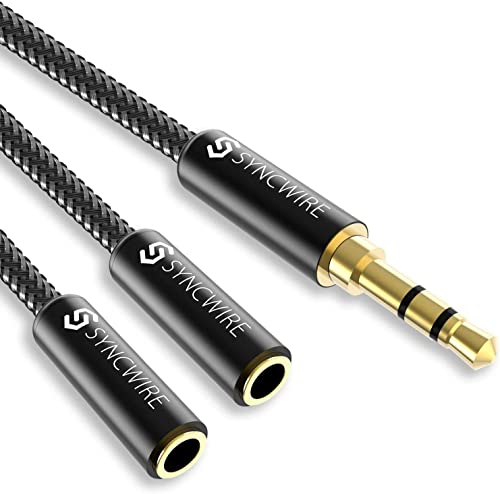
SYNCWIRE offers a nylon-braided, 24K gold-plated 3.5mm splitter that delivers a clear stereo signal across two outputs. Its design emphasizes durability and reliable data transmission with reduced interference. The connector is slim enough to fit most cases, and the cable is compatible with a wide range of devices including phones, tablets, PS4, Switch, and more. Users should note it supports standard 3.5mm CTIA jacks and may not be compatible with certain non-standard headsets.
DUKABEL Long Headset Splitter Cable

DUKABEL’s long 4ft/1.2m headset splitter features one 3.5mm female and two 3.5mm male connectors on a single 4-pole TRRS to dual 3-pole TRRS setup. Its 24K gold-plated contacts, nylon braid, and robust shielding aim to minimize interference while offering a comfortable reach for couch setups or long desks. It is designed for online gaming and VOIP applications, though it notes not to support certain iOS earphones or Beats headsets.
Buying Guide: Key Points To Consider
- Compatibility: Verify whether the splitter supports your device’s standard (CTIA vs OMTP, TRRS vs TRS). Some devices require CTIA 4-pole jacks, while others need separate microphone inputs.
- Connector Configuration: Decide if you need one mic input plus stereo output (1x TRRS to 2x TRS) or other variations. This affects mic usage and headphone control compatibility.
- Build Quality: Look for gold-plated contacts, nylon braiding, and robust shielding to minimize signal loss and interference, especially in mobile or crowded environments.
- Cable Length: Short leads reduce clutter; longer cables offer flexibility for couch setups or desks with distance between devices.
- Device Support: Some splitters are not compatible with iOS earbuds or certain gaming headsets. Check the product notes for compatibility warnings.
- Portability: Travel-friendly designs with compact housings are ideal for laptops and on-the-go use, while heavier, reinforced housings suit desktop setups.
- Use Case: For gaming, ensure the splitter reliably separates mic and audio for VOIP and chat. For media, prioritize audio fidelity and minimal latency.
- Durability vs. Price: Durable materials raise upfront costs but reduce replacement needs. Balance budget with expected usage level.