Finding a reliable four-bay hard drive enclosure can simplify desktop storage, backups, and media libraries. This guide highlights five top options that support 2.5″ and 3.5″ HDDs and SSDs, offer high-speed USB interfaces, and include cooling to keep drives performing well. Each selection emphasizes hot-swappability, space efficiency, and scalable capacity up to 80TB or more, depending on drives chosen. Whether you’re a home user, small business, or IT professional, these enclosures help consolidate multi-drive setups with protection and ease of access.
| Product | Brand | Key Benefit | Max Capacity | Interface |
|---|---|---|---|---|
| CENMATE 4 Bay Enclosure (USB 3.0) | Cenmate | Tool-free design with cooling fan | 80TB (20TB per drive) | USB 3.0 |
| WAVLINK 4-Bay Enclosure | WAVLINK | 10Gbps USB-C, HDMI output option | up to 88TB | USB 3.2 Gen 2 Type-C |
| CENMATE Aluminum 4 Bay (10Gbps) | Cenmte | Very high speeds, aluminum cooling | 80TB | USB 3.2 Gen 2 |
| CENMATE 4 Bay With eSATA Cable | Cenmate | Hot-swappable with USB 3.0 | 80TB | USB 3.0, eSATA |
| MAIWO 4 Bay Docking Station | MAIWO | Offline cloning feature | 96TB | USB 3.0 |
CENMATE 4 Bay Enclosure With Cooling Fan

The CENMATE four-bay enclosure supports 2.5″ and 3.5″ SATA HDDs and SSDs, with a total capacity up to 80TB (20TB per drive). It is designed for both personal and business use, helping save space on desktops while providing scalable storage. A built-in aluminum-alloy chassis and a 2-inch cooling fan reduce heat buildup, promoting data security and drive longevity. Note: fan noise averages 40-50 decibels, which may be noticeable in quiet environments. USB 3.0 delivers transfer speeds up to 5Gbps under UASP control, significantly faster than USB 2.0.
Features at a glance: hot-swappable bays, tool-free HDD installation, and a maximum optimize-for-performance design. Ideal for expanding media libraries, backups, and archiving tasks that require multi-drive configurations without NAS.
WAVLINK 4-Bay Enclosure With 10Gbps USB-C

WAVLINK combines four SATA bays for both 3.5″ and 2.5″ drives, offering up to 88TB of total capacity. The standout feature is the USB 3.2 Gen 2 Type-C port delivering up to 10Gbps, enabling rapid large-file transfers and efficient backups. Optional mounting brackets for 2.5″ drives are required for full compatibility, and the unit includes enhanced cooling as part of its chassis. In addition to storage, WAVLINK provides an HDMI output option (up to 4K@60Hz under certain configurations) and a USB-C port for peripherals, creating a versatile workstation or media server setup.
Considerations include drive compatibility, the need for additional mounting hardware for 2.5″ drives, and ensuring your host supports video output if HDMI is used. This enclosure is well-suited for media editors, game libraries, and professional data projects needing fast access to multiple drives.
CENMATE Aluminum 4 Bay 10Gbps Enclosure

This model emphasizes speed with VL822 and ASM235CM chips and USB 3.2 Gen 2, offering transfer rates up to 10Gbps. Read and write speeds approach several hundred MB/s per drive, depending on the drive version and host system. The enclosure supports 2.5″ and 3.5″ drives, with a total capacity up to 80TB (20TB per drive), making it suitable for intensive data workflows, backups, and large-scale media projects. The integrated 2-inch cooling fan helps manage heat, though noise levels around 40-50 dB should be considered in quiet spaces.
Users should assess motherboard or computer compatibility with USB 3.2 Gen 2 and the actual sustained throughput their drives can deliver. The design remains tool-free for easy substitutions and maintenance, aligning with professional environments that require rapid drive changes and high data throughput.
CENMATE 4 Bay With USB 3.0 And eSATA
This configuration extends external storage options with USB 3.0 and an eSATA interface while maintaining a 4-bay architecture. The enclosure supports 2.5″ and 3.5″ drives with a total capacity up to 80TB (20TB per drive). Aluminum construction plus a 2″ fan aims to balance cooling and noise, with transfer speeds up to 5Gbps via USB 3.0. The unit keeps a compact desktop footprint and offers hot-swapping for convenient drive changes, suitable for backups, media libraries, and light enterprise use where RAID/NAS is not required.
MAIWO 4 Bay Docking Station With Cloning
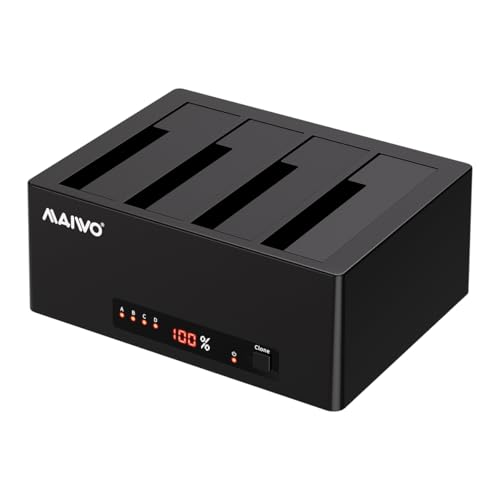
MAIWO’s four-bay docking station accommodates both 2.5″ and 3.5″ SATA drives, with a total capacity up to 96TB. A key feature is offline cloning: you can clone drive data from a source to a target drive without a computer, aided by LED indicators showing clone progress. USB 3.0 provides up to 5Gbps transfer speeds, ensuring efficient backups and data processing. The dock is suitable for batch transfers, backups, and data recovery workflows where speed and offline cloning reduce downtime.
SABRENT 4-Bay USB 3.0 Docking Station

This four-bay docking station from SABRENT supports up to four 2.5″ or 3.5″ SATA drives with a trayless design that simplifies drive insertion and removal. It includes USB 3.0 connectivity delivering up to 5Gbps transfer speeds and supports offline cloning features, though the clone function is often used for quick backups rather than enterprise-grade replication. The trayless design, combined with magnetic drive covers, enables fast drive access and straightforward maintenance for multi-drive management.
SABRENT USB 3.0 4-Bay Docking Station With Cooling
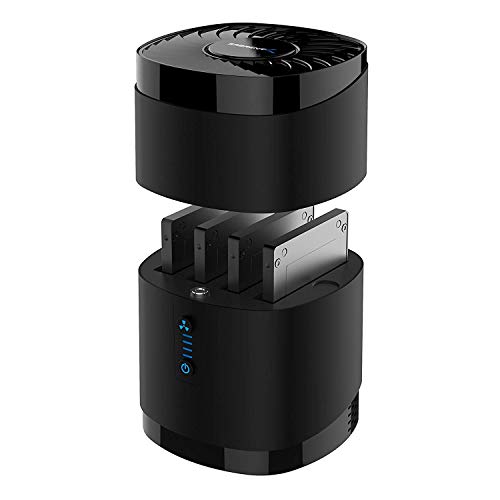
This SABRENT model offers four bays for 2.5″ drives, with a cooling fan to maintain stable operation under load. USB 3.0 delivers up to 5Gbps and the enclosure supports up to 16TB per drive, totaling 64TB across four bays (capability varies by drive and firmware). The design prioritizes quick drive swaps, a clean desktop footprint, and straightforward compatibility with most Windows, Mac, and Linux systems. It is suitable for backups, media libraries, and general multi-drive storage tasks where RAID or NAS features are not required.
Buying Guide: Key Considerations For Four-Bay Enclosures
- Drive compatibility and size: Check that the enclosure supports both 2.5″ and 3.5″ drives, and confirm whether 2.5″ drives require mounting brackets.
- Maximum capacity: Consider total possible capacity (often up to 80TB or 88TB) and how it matches your planned drive sizes and growth expectations.
- Interface and throughput: USB 3.0, USB 3.2 Gen 2, or USB-C with 10Gbps capabilities dramatically affect transfer times for large data sets.
- Cooling and noise: Fans help maintain performance and longevity but may generate audible fan noise; evaluate your noise tolerance and workspace.
- Connectivity options: Some enclosures offer HDMI output or eSATA as alternatives or supplements to USB connectivity; ensure host compatibility with these features.
- Hot-swappability and ease of use: Tool-free designs enable quick drive changes, reducing downtime in backups and maintenance tasks.
- Cloning and data management: Off-line cloning or DAS features can simplify backups, but verify compatibility with your workflow and operating system.
- Build quality and materials: Aluminum or alloy enclosures typically provide better heat dissipation and durability in demanding settings.
- Power considerations: Ensure the power supply meets the enclosure requirements, especially for high-capacity multi-drive setups that draw more current.
- Future-proofing: If you plan to expand, consider models with higher maximum capacities and robust cooling to support more drives over time.
Overall, four-bay enclosures offer flexible, expandable external storage suitable for backups, media libraries, and workflow pipelines. Users should align their choice with drive types, performance needs, and noise tolerance to optimize reliability and efficiency in daily operations.