For users seeking strong multi-monitor performance, a card with multiple HDMI outputs can simplify setup and reduce adapter clutter. This article highlights five capable graphics cards designed for 3 or more HDMI displays, covering office productivity, home theater, and light gaming. Each entry includes key specs, installation notes, and practical considerations to help you choose the right card for a compact PC or an ITX build.
Summary of chosen products
- ARDIYES GT 740 4GB – 4 HDMI ports; low-profile, PCIe 3.0 x16
- Xynsviu Radeon RX560 4GB – 4 HDMI ports; PCIe x16, low power
- VisionTek Radeon RX 550 4GB – 4 HDMI outputs; PCIe 3.0, freesync2
- ZER-LON GeForce GTX 1660 Super 6GB – 3 display outputs (HDMI/DP/DVI); strong gaming
- GPVHOSO RTX 2060 8GB Super – 3 display outputs (HDMI/DP/DVI); ray tracing capable
ARDIYES GT 740 4GB — Quad HDMI Out
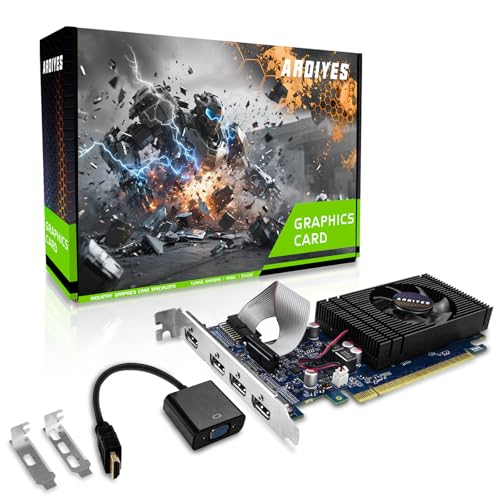
The ARDIYES GT 740 offers four built-in HDMI outputs, enabling a quad-monitor configuration straight from the box. Built on a standard PCI Express interface, it supports modern Windows and Linux drivers for easy setup. Its low-profile design fits into compact cases, making it suitable for office PCs, digital signage, or home theaters that require multiple displays without external adapters.
Key considerations: The GTX 740 is an entry-to-mid level card, best for desktop productivity, video playback, and light multitasking across several screens. Power usage remains modest, and installation is straightforward for ITX or small form factor builds.
Xynsviu RX560 4G — Four HDMI Ports

The Xynsviu RX560 is an entry-level graphics card offering four HDMI outputs, designed for multi-monitor setups typically used in stock monitoring, content creation, or office environments. It uses a Polaris 12 core on a 14nm process and does not require external power connectors for certain configurations, aiding small form factor deployments. The card is aimed at users who want more screen real estate without high power requirements.
Key considerations: RX560 is suitable for productivity and casual gaming at modest settings. Ensure your motherboard and case support the available PCIe slot and that your power supply is adequate for the overall system load when running four displays simultaneously.
VisionTek RX 550 4GB — Four HDMI Outputs

The VisionTek RX 550 4GB card provides four HDMI ports and supports 4K display options, making it a practical choice for multi-monitor office setups or media-centric desktops. PCIe 3.0 compatibility ensures broad motherboard support, and the bus-powered design simplifies installation by avoiding extra power connectors in many configurations.
Key considerations: This card targets productivity and light gaming across multiple displays. Confirm your system’s PSU capacity and GPU-tethered monitor arrangement, especially if you plan to drive four 4K monitors, which can increase power and bandwidth needs.
ZER-LON GTX 1660 Super 6GB — 3 Outputs, 4K Ready

The ZER-LON GeForce GTX 1660 Super offers strong 1080p gaming performance and supports up to three displays via HDMI/DP/DVI connections. It is built on a 12nm process with a 192-bit memory interface and GDDR6 memory, providing a balance of gaming performance and multi-monitor capability. The cooling system supports stable operation under extended workloads.
Key considerations: While it lists three outputs, this card is well-suited for gaming setups that require at least two or three high-resolution monitors. Ensure your chassis has adequate clearance and that your power supply supports the GPU’s thermal and power needs during peak load.
GPVHOSO RTX 2060 8GB — 3 Ports, Ray Tracing Ready

The GPVHOSO RTX 2060 Super provides robust gaming performance with 8GB of GDDR6 memory and real-time ray tracing support. It offers three display outputs (HDMI, DP, and DVI) suitable for multi-monitor gaming or creative workstations that benefit from high-fidelity visuals and expansive screen real estate. The card is PCIe 3.0 x16 compatible and supports up to 8K display output in supported configurations.
Key considerations: RTX 2060 Super delivers strong performance for modern titles at high settings but consumes more power and may require a larger case and a reliable cooling solution. It’s a solid choice when you want gaming-grade capability across three displays without stepping up to the very high-end tiers.
Buying Guide: Key Purchase Considerations For Multi-Display Cards
- Output configurations: Look for GPUs with four HDMI ports if you need four simultaneous displays. A mix of HDMI, DisplayPort, and DVI can also work, but HDMI consistency simplifies cabling.
- Performance needs: Office work and media playback benefit from lower-end cards, while gaming or CAD work demands more powerful GPUs. Balance memory (4GB vs 6GB/8GB) with GPU core performance.
- Power and cooling: High-end multi-monitor setups can increase total system draw. Check PCIe power requirements and ensure adequate cooling, especially in small form factor builds.
- Form factor and compatibility: Low-profile and SFF-friendly cards fit compact cases but may limit cooling or PCIe lane availability. Verify bracket types (half-height/full-height) and motherboard PCIe slots.
- Driver support and OS compatibility: Confirm Windows and Linux compatibility, driver stability, and availability of updated drivers for your workflow.
- Monitor alignment and resolution: If using 4K displays, verify each port’s supported resolution and refresh rate. Some cards handle 4K at 60Hz, others at lower rates depending on the port type.
- Future-proofing: For long-term use, consider GPUs with newer architecture, better power efficiency, and features like FreeSync or RTX capabilities for VR or ray tracing.
When planning a multi-monitor setup, assess how many HDMI ports you truly need and whether you will also use DP or DVI. Each card described here supports multi-display configurations, with varying emphasis on HDMI outputs and gaming features. For office workflows and media-centric desks, a quad-HDMI card can minimize adapters and simplify cable management. For gamers and creators, a card with higher memory, faster GPUs, and ray tracing support may be preferable even if it means fewer HDMI ports on the card itself.