Discover top 32 inch monitors that deliver 1920×1080 Full HD clarity for work, entertainment, and casual gaming. The selections below emphasize large displays with 1080p resolution, reliable panels, and thoughtful features such as fast response times, comfortable viewing options, and versatile connectivity. Each option is well-suited for desks, home offices, or shared spaces where screen real estate matters but 1080p suffices.
This quick overview highlights five 32-inch models with Full HD resolution to help you compare at a glance. Use the table to compare key specs and then read detailed sections for each product.
| Product | Brand | Resolution | Key Benefit |
|---|---|---|---|
| AOC C32G2ZE | AOC | 1920×1080 | Ultra-smooth gaming with 240Hz and 0.5ms response |
| Acer EB321HQ Awi | Acer | 1920×1080 | IPS panel for wide viewing angles |
| LG 32MR50C-B | LG | 1920×1080 | Curved display with 100Hz for smoother motion |
| Packard Bell airFrame 32 | Packard Bell | 1920×1080 | Slim bezel and VESA mount compatibility |
| HP 32″ FHD VA Monitor | HP | 1920×1080 | Anti-glare, Flicker-Free, solid color performance |
AOC C32G2ZE 32″ Curved Gaming Monitor

The AOC C32G2ZE provides a large 32-inch curved VA panel at 1920×1080 with a 1500R curvature designed to immerse players in the action. It ships with a 0.5 ms SmartResponse time and a high 240 Hz refresh rate, enabling responsive gameplay and smooth motion. AMD FreeSync Premium helps eliminate screen tearing for competitive titles, and the monitor supports a wide refresh rate range from 48 to 240 Hz via DisplayPort and HDMI. With multiple inputs and VESA compatibility, this model fits well with desktop setups that favor speed and immersion.
Acer EB321HQ Awi 32″ Full HD IPS Monitor

The Acer EB321HQ Awi offers a 32-inch IPS panel at 1080p for wide viewing angles and consistent color. It lists a 4 ms response time and a pixel pitch of 0.3675 mm, making it suitable for everyday tasks, office use, and general media consumption. The monitor consumes moderate power and provides HDMI and VGA connections for broad compatibility with laptops and desktops alike.
LG 32MR50C-B Curved Monitor
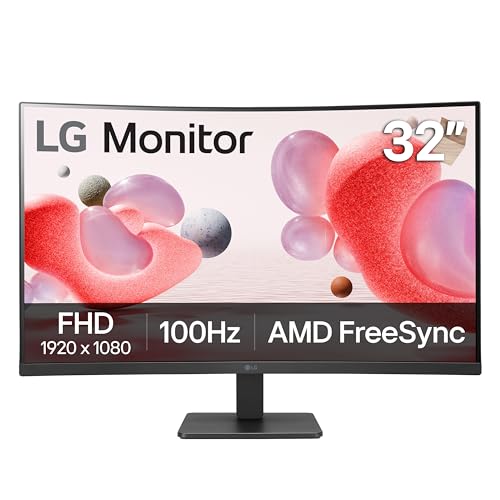
The LG 32MR50C-B is a curved 32-inch FHD monitor that emphasizes accessibility and smooth performance with a 100 Hz refresh rate. The panel delivers vibrant color and clarity at 1920×1080 resolution, and OnScreen Control assists with quick adjustments. The curved design helps reduce eye strain and offers a more immersive viewing experience for media and multitasking. This model is well-suited for home offices where a larger display improves productivity and comfort.
Packard Bell airFrame 32″ FHD Monitor

The Packard Bell airFrame 32-inch monitor features a 1920×1080 resolution with a slim bezel design, making it a practical choice for desks that require wide screen real estate with an unobtrusive profile. It includes a 75 Hz refresh rate and a 5 ms response time, suitable for everyday tasks, streaming, and light gaming. The monitor supports VESA mounting for versatile setups and flexible positioning with compatible arms or wall mounts.
HP 32″ FHD VA Monitor

The HP 32″ FHD VA monitor combines a 1920×1080 VA panel with anti-glare and flicker-free technology to deliver solid contrast and comfortable extended viewing. With a 100 Hz refresh rate, it provides smoother scrolling and video playback for everyday use. Connectivity includes two HDMI 1.4 ports and a VGA input, making it easy to pair with various devices, from desktops to laptops. The tilt-adjustable stand supports ergonomic positioning for long sessions at the desk.
Buying Guide: Key Purchase Considerations
Screen size and resolution: For a true 32-inch, 1080p experience, ensure the monitor’s size matches your desk space and seating distance. 1080p on a 32-inch panel will appear less dense than on smaller screens, so consider viewing distance and personal preference for sharpness.
Panel type and color performance: IPS panels provide wide viewing angles and accurate colors, which are beneficial for office work and media. VA panels, like some 32-inch models, offer strong contrast for darker scenes and rich blacks, which can improve movie watching and gaming immersion.
Refresh rate and response time: If gaming is a concern, models with higher refresh rates (75–240 Hz) and low response times reduce motion blur and improve targeting accuracy. For general productivity, a standard 60–75 Hz panel is typically sufficient.
Connectivity: Look for HDMI and DisplayPort compatibility, plus VGA or USB-C if you plan to connect laptops or external devices. VESA mounting compatibility is a plus for flexible mounting options on a desk arm or wall mount.
Ergonomics: Tilt, height adjustment, and stand design influence comfort during extended use. A slim bezel and curved design can improve immersion and desk aesthetics, while offering a more focused viewing area.
Power and eye comfort features: Anti-glare coatings, flicker-free technology, and blue light filtering help reduce eye strain during prolonged sessions. Assess color accuracy if you work with images or media.
Build and reliability: A reputable brand with standardized warranty coverage can offer ongoing support if issues arise. Consider product reviews and customer feedback to gauge durability and service quality.