Looking for a sturdy 30 inch monitor mount that maximizes desk space and reduces neck strain? This guide highlights top-rated arms designed to support large displays, with gas springs for stable positioning and wide movement ranges. Each option below fits common VESA patterns and shares core features like tilt, swivel, and rotation to help you reach an optimal eye level. Whether you need ultra-wide support, tall poles for standing desks, or heavy-duty strength for gaming rigs, these mounts are built to adapt to your setup. Read on to compare designs, load limits, and ergonomics across five strong choices.
Summary of featured products
| Product | Brand | Max Load | VESA | |
|---|---|---|---|---|
| Heavy Duty Single Monitor Arm | WALI | 33 lbs | 75×75 / 100×100 | Supports 17–49 inch displays; gas spring; clutter-free desk |
| Single Monitor Arm With Tall Pole | HUANUO | 22 lbs | 75×75 / 100×100 | 39″ tall center pole; good for sit-stand desks |
| ErGear Single Monitor Arm | ErGear | 22 lbs | 75×75 / 100×100 | 40% wider VESA head; durable gas-spring |
| HUANUO Single Monitor Arm | HUANUO | 19.8 lbs | 75×75 / 100×100 | Extends up to 39.6 cm; versatile adjustments |
| NB North Bayou F80 | NB North Bayou | 19.8 lbs | 75×75 / 100×100 | Universal fit; easy tilt/rotation |
WALI Heavy Duty Single Monitor Arm
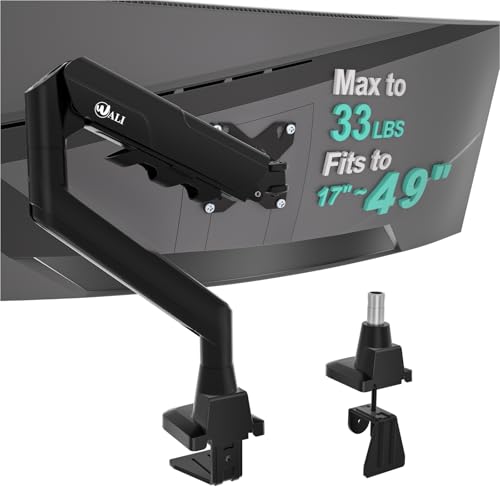
The WALI GSM001XLN is designed to support large, flat, curved, and ultrawide monitors from 17 to 49 inches, with a maximum load of up to 33 pounds. Its gas-spring system provides zero-drift stability, keeping the screen in the chosen position once set. The arm extends up to 20.79 inches and elevates up to about 20.79 inches, freeing desk space and enabling ergonomic alignment for gaming and productivity setups. It uses a dual-base system with integrated cable management for a tidy look. Supports VESA patterns 75x75mm and 100x100mm.
Features include a full range of motion: ±90° tilt, 360° rotation, and substantial reach to accommodate portrait or landscape orientation. The mount is designed to replace heavy bases and maximize desk space, making it suitable for home offices and gaming rigs where a clean, adjustable display is critical.
HUANUO Single Monitor Arm With Tall Pole

This HUANUO model features a 39-inch tall center pole for added clearance, making it ideal for sit-stand desks or workstations that require extra headroom. It fits most 13–32 inch screens and some ultrawide screens up to 38 inches, with a weight capacity up to 22 pounds. The arm supports 180° tilt, 180° swivel, and 360° rotation, enabling flexible viewing angles and portrait or landscape orientation. It’s designed for easy adjustment and can help reduce neck and eye strain by setting a comfortable eye level.
Note: When selecting, verify your desk thickness and VESA compatibility (75x75mm or 100x100mm) to ensure proper fit and stability.
ErGear 13–34 Inch Monitor Arm

The ErGear arm is engineered to support 13″–34″ monitors up to 19.8 lbs, with a high-strength aluminum alloy build for durability. It accommodates VESA patterns 75x75mm and 100x100mm and has a wide VESA head with a tight panel to minimize wobble. The gas-spring mechanism provides smooth adjustments and stable positioning. Full motion includes -35° to 90° tilt, 180° swivel, and 360° rotation, enabling portrait or landscape setups and easy reach to the screen.
NB North Bayou F80 Monitor Mount

The NB North Bayou F80 fits most 17–30 inch monitors up to 19.8 pounds with VESA patterns 75x75mm or 100x100mm. It offers full motion with tilt -30° to +85°, ±90° swivel, and 360° rotation. The design emphasizes stability and ease of positioning, helping you tailor your workspace for comfort and productivity. The mounting system is compatible with a wide range of desk setups and supports portrait or landscape orientations for diverse tasks.
ErGear Single Monitor Arm for 13–36 Inch Screens
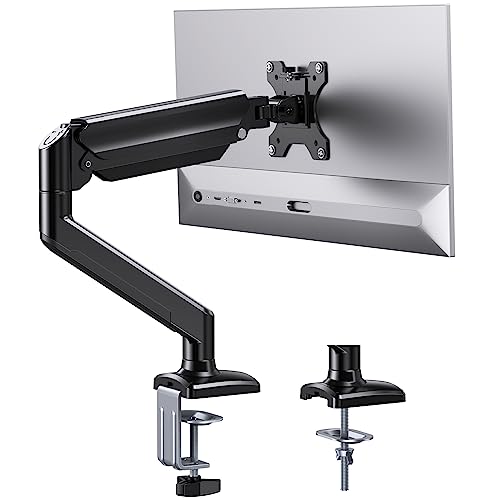
ErGear’s 13–36 inch arm is built for strength, supporting up to 22 lbs. It features aviation-grade aluminum, a rugged gas spring, and supports VESA patterns 75x75mm and 100x100mm. The arm offers -35° to 90° tilt, 180° swivel, and 360° rotation, enabling flexible positioning. The gas spring endures 20,000+ cycles, providing long-term performance. The system allows vertical extension up to 17.5 inches and horizontal reach up to 15.3 inches for optimum eye level and comfort.
Buying Guide: Key Purchase Considerations
- Monitor size and weight compatibility: Confirm the mount’s supported range (e.g., up to 22 lbs, up to 33 lbs) and screen size to ensure safe use with a 30 inch monitor.
- VESA pattern compatibility: Most mounts support 75x75mm and 100x100mm; verify your monitor’s pattern.
- Mounting method: Clamps and grommets offer different desk-fitting options. Consider desk thickness, cable routing, and space under the desk.
- Adjustability: Look for tilt, swivel, rotation, and height adjustment ranges that align with your ergonomic goals to reduce neck and back strain.
- Build quality and durability: Gas-spring arms provide smoother movement and stability, but check for tested cycle counts (e.g., 10,000–20,000+ cycles) for long-term reliability.
- Desk compatibility and footprint: Larger arms may require more clearance; consider whether you prefer wall-free setups or more desk space.
- Portrait vs. landscape: If you frequently switch orientations for tasks like coding or design, ensure the arm supports 360° rotation and stable portrait positioning.
- Cable management: Integrated channels help maintain a clean setup and reduce desk clutter.
In selecting a 30 inch monitor mount, balance load capacity, motion range, and desk geometry. For heavy or ultrawide displays, a high-capacity arm with a robust gas-spring mechanism delivers the best stability. If desk space is at a premium or you use a standing desk, prioritize tall poles and extended reach. For lighter, standard-size displays, a compact arm with strong tilt and rotation may suffice. Always verify mounting patterns and desk compatibility before purchase to ensure a secure, ergonomic setup.