When duplicating a single VGA source across multiple displays, a reliable splitter ensures consistent image quality and dependable performance. This guide highlights five top 3-way to 4-port VGA splitters that support mirror displays, great for presentations, classrooms, or office setups. Each option emphasizes signal integrity, ease of use, and practical range for standard VGA resolutions up to Full HD. The selections below cover budget-friendly to feature-rich solutions, helping you choose the right splitter for your needs.
| Product | Brand | Max Resolution | Port Count |
|---|---|---|---|
| DTECH Powered 4 Port VGA Splitter Box | DTECH | 1920 x 1080 @ 60Hz | 4 |
| EKYLIN VGA Cable 3-Way Splitter | EKYLIN | Supports multiple displays via splitter | 3 |
| Cable Matters 1ft VGA Splitter Cable | Cable Matters | 1920 x 1200 / 1080p | 2 |
| DTECH 2 Way Powered VGA Splitter | DTECH | 1920 x 1080 @ 60Hz | 2 |
| CKLau 2 Port VGA Splitter Amplifier | CKLau | 2048 x 1536 @ 60Hz | 2 |
The products listed below are selected for their reliability, signal integrity, and practical applicability in mirror-display scenarios. Each entry links to Amazon for quick reference and purchase.
DTECH Powered 4 Port VGA Splitter Box
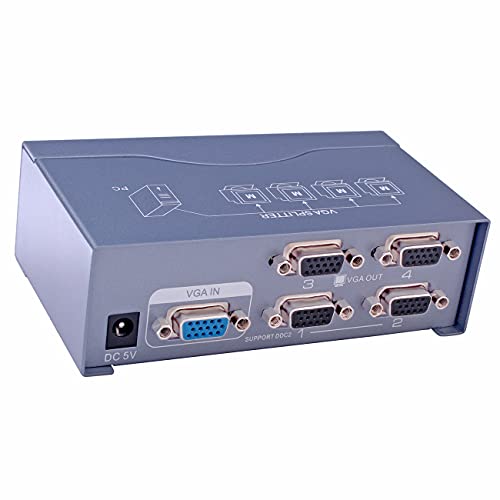
This powered 4-port VGA splitter duplicates a single video source to multiple monitors simultaneously. It supports full HD up to 1920 x 1080 at 60Hz and extends transmission distance up to 130 feet (40 meters) with standard VGA cable. Includes a power adapter to maintain signal strength across longer runs. Ideal for classrooms, conference rooms, or display walls where identical visuals are required on all screens.
Key features include:
– Active 1×4 VGA distribution, mirroring a single source
– 250 MHz bandwidth for stable, high-quality video
– Range extension up to 130 feet with power supplied
EKYLIN 3-Way VGA Splitter Cable

The EKYLIN 3-Way VGA splitter cable offers compact, plug-and-play functionality for connecting one VGA source to up to three displays. It uses molded strain-relief connectors and thumbscrews to secure connections. Shielded construction helps preserve signal integrity by reducing interference, making it suitable for multi-monitor setups where mirroring is required across displays.
Highlights include:
– 3-way distribution for simultaneous display to three monitors
– Professional connectors for a secure fit
– Shielded design to preserve signal quality
Cable Matters 1ft VGA Splitter Cable

This Cable Matters 1ft VGA splitter cable mirrors a single VGA source to two displays. It is designed for display duplication only and does not support extended desktop functionality. It supports high resolutions up to 1920×1200, 1920×1080, and higher, ensuring clear images on compatible LCD or LED monitors. No audio via VGA; audio requires a separate connection.
Key points:
– Mirrored display only for two monitors
– Direct plug-and-play with a male-to-two-female layout
– Supports high-definition resolutions
DTECH 2 Way Powered VGA Splitter

This powered 2-port VGA splitter distributes a single video signal to two displays with mirroring. It features a 250 MHz bandwidth and supports up to 1920 x 1080 at 60Hz. The built-in amplifier helps maintain signal strength and extends transmission distance up to 130 feet with standard VGA cables. It is intended for mirror displays rather than extended desktop configurations.
Notable aspects include:
– Amplified output for two monitors
– Clear Full HD compatibility
– Long cable reach with power support
CKLau 2 Port VGA Splitter Amplifier Box
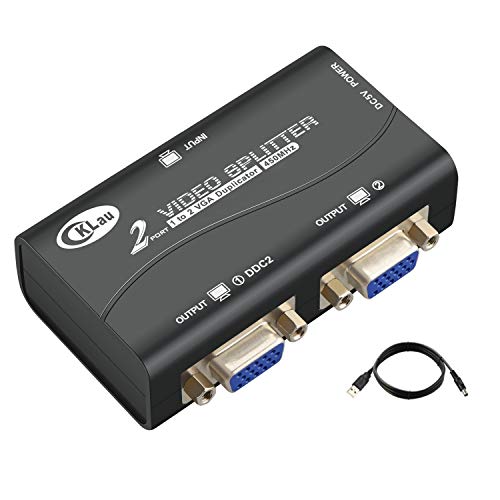
CKLau’s 2-port VGA splitter amplifier supports mirror output to two displays with a bandwidth of 450MHz. It handles resolutions up to 2048 x 1536 at 60Hz, making it suitable for higher-resolution monitors while maintaining consistent image replication. The device supports daisy-chaining for extended setups and offers robust signal amplification to preserve image quality over longer runs.
Xelsluthe VGA Splitter Dual Monitor Cable

This VGA splitter cable provides dual display outputs with identical signals to two monitors. It emphasizes high-quality construction with plated connectors and a durable PVC jacket to reduce interference and crosstalk. The plug-and-play design enables quick setup for presentations or monitoring systems without software requirements.
Buying Guide: Key Considerations For Choosing A VGA Splitter
- Mirror vs. extended desktop: Confirm whether you need identical displays or independent screens. Most basic splitters are mirror-focused, while some powered amps support longer runs and improved signal for two displays.
- Bandwidth and resolution: Look for devices rated around 250 MHz to 450 MHz with support for up to 1080p (Full HD) or higher resolutions. Higher bandwidth helps preserve image clarity on longer cable runs.
- Power requirements: Powered splitters typically deliver stronger signal than passive ones, especially over long distances. Check if the model includes an external power adapter.
- Cable length and distance: Consider the maximum recommended transmission distance (often up to 100–130 feet with powered units). Plan cable routes accordingly to avoid signal loss.
- Connector quality: Durable molded connectors, thumbscrews, and shielding reduce interference and improve reliability in busy or multipack environments.
- Compatibility and daisy-chaining: If you anticipate expanding to more displays, check whether the splitter supports daisy-chaining or higher port counts.
- Installation simplicity: Plug-and-play models with straightforward setups minimize technical overhead and support quick deployments.
These considerations help ensure you select a VGA splitter that matches your display goals, whether for classrooms, conference rooms, or home entertainment setups. All options listed prioritize reliable mirror output, robust connections, and practical support for typical office-grade VGA displays.